

Granola
Meeting notes shaped by what you write
Take brief notes during a conversation and let Granola expand them with meeting context. Search the resulting notes and use them for follow-up work.
Free plan availableAccount required
- Access
- Free and paid plans
- Available on
- Desktop, Mobile
What is Granola?
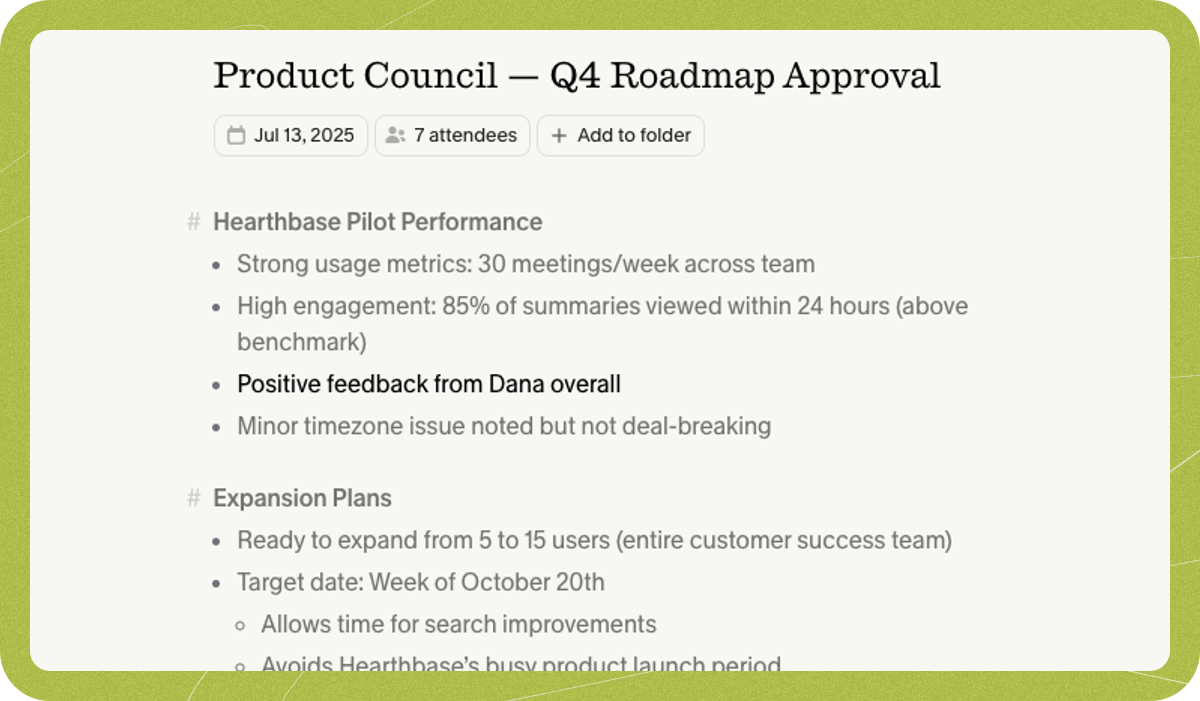
Granola expands the notes you take with context from the meeting conversation. Templates, folders and private or shared spaces help organise the resulting record, while Chat can answer questions and draft follow-ups from selected notes.
On desktop, it captures device audio without inviting a bot. Mac, Windows, iOS and Android apps are listed, but bot-free capture does not mean offline AI processing or automatic participant notification.
Notes and transcripts without an audio archive
Granola uses external transcription and AI providers and stores notes and transcripts. It does not retain replayable meeting audio; the mobile workflow uses temporarily cached audio before transcription. Choose a recording-centred tool if interview playback or sharing the original recording is essential.
Scope Chat to the relevant meetings
Ask about one note for a single call, or select meetings or a folder for a project-wide follow-up. Home-screen questions can draw on a broader history. Check the underlying notes when an answer combines several conversations. Basic shows the last thirty days; Business adds unlimited notes and history and broader integrations, while Enterprise adds organisation controls. History and model access depend on the plan.
Export owned notes and plan team handovers
CSV export includes owned notes with summaries, transcripts and basic details from selected workspaces, including older notes no longer displayed by Basic. It excludes deleted notes and notes without summaries.
Workspace administrators cannot export everyone else’s private notes through a company-wide export. Put material needed by colleagues in shared folders before a handover rather than relying on later admin access.
Best for
- Personal meeting notes enriched by conversation
- Project follow-ups across selected meetings
- A note-first workspace without audio playback
Limitations
Basic meeting history is limited to thirty days. Bot-free capture does not establish offline processing or notify every participant. Sharing, data controls and integrations depend on plan and settings. Granola does not retain replayable audio recordings. Its transcription and note-generation workflow uses external providers.
Granola features
Notes enriched with meeting context
Combine your own short notes with captured discussion to create fuller meeting notes.
Bot-free desktop capture
Capture computer audio without adding a meeting bot.
Cross-meeting chat
Ask about selected notes and earlier meetings to support recall and follow-up drafts.
Folders, templates and integrations
Organise notes with shared folders and templates; broader integrations depend on plan.
Scoped meeting questions
Ask about one note, selected meetings or a folder rather than always using the whole history. The available history and model choices depend on plan.
Owned-note CSV export
Export summaries, transcripts and basic note data for your own notes. Scope, missing-summary exclusions and Enterprise controls affect the resulting file.
Granola pricing
Basic is free with thirty days of visible meeting history. Business advertises USD 14 per user per month and Enterprise USD 35; check the selected billing commitment and final charge. Business adds unlimited history, broader integrations, MCP and API access. Enterprise adds organization-wide controls. Basic history visibility, CSV portability, model choice and integration access are different entitlements rather than one universal storage limit.
Technical specifications
Transcription and meetings
| Feature | Granola |
|---|---|
| File and meeting capture | Bot-free device-audio capture on desktop; mobile conversation capture. Manually start the meeting.Desktop/mobile capture |
| Recording and usage limits | Basic exposes 30 days of meeting history; Business and Enterprise list unlimited history. No replayable audio archive is retained.Plan history versus recording storage |
Granola alternatives
Choose the workflow that matches the material you want to create or capture.
Otter.ai
Otter.ai suits shared transcripts and replayable conversation recordings. Granola retains notes and transcripts without a meeting-audio archive.
Fathom
Fathom suits a recording-led workflow with post-call transcripts and summaries. Compare that with Granola’s notes and cross-meeting questions.
Wispr Flow
Wispr Flow suits everyday app dictation, with Notetaker as a separate desktop feature. Compare the meeting-specific plans for that job.
Granola FAQs
Does Granola invite a bot to the call?
Its desktop workflow captures computer audio without adding a bot. Check the capture controls and participant-notification settings before using it.
How much meeting history is free?
The current Basic plan shows thirty days of meeting history. Business and Enterprise list unlimited history.
Can Granola answer questions across meetings?
Granola Chat works with selected notes and meetings so you can recall details and draft follow-up outputs. Model and integration access depend on plan.
Can teams share notes?
Shared folders are listed on Basic. Business adds broader integrations and central billing; Enterprise adds organisation-wide controls.
Can I replay the meeting recording in Granola?
Granola states that it does not store meeting audio. It retains transcripts and notes; mobile audio is cached temporarily for transcription. Choose a recording-centred tool when replaying the original conversation is essential.
Can I export notes older than Basic’s thirty-day view?
The documented CSV export includes your owned summarized notes from selected workspaces, including older notes outside Basic’s visible history. Deleted notes and notes without a summary are excluded. Export is enabled by default on Basic and Business; on Enterprise it is disabled by default until a workspace admin enables it.
Can an admin export the whole company’s notes?
The export guide says there is no company-wide or admin export of other members’ notes. A person exports their own notes. Shared folders can retain shared material, while private unshared notes remain private to their owner.
Does Granola use meeting content to improve its models?
Granola says it can train on anonymized data and provides a settings opt-out; Enterprise training is off by default. It says third-party AI providers cannot train on the data. These are vendor data-use controls, separate from cloud processing, sharing and retention.
Explore related AI tools
Is this your product? Claim this page to update your listing.