

Fathom
Fathom: AI meeting recordings, summaries and searchable notes
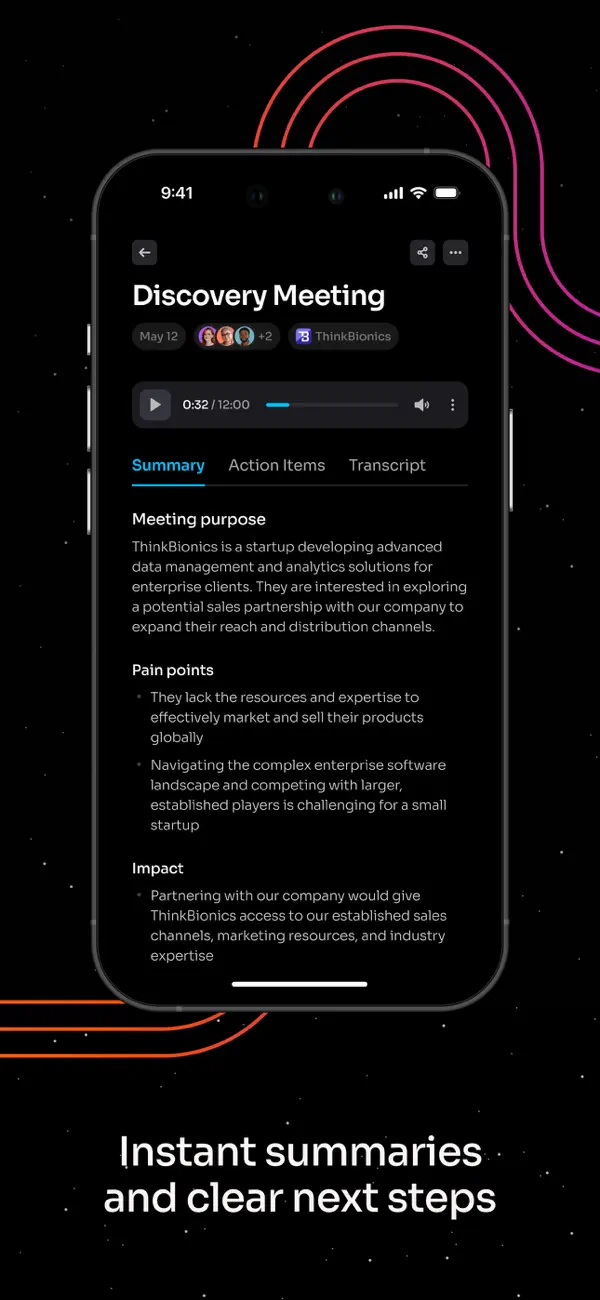
Fathom records meetings, turns conversations into transcripts and creates summaries and action items. Its desktop and web experience supports meeting playback, clips and questions across conversation history. The iPhone app adds in-person capture and mobile review, with a more limited feature set at launch.
Free plan availableAccount required
- Access
- Free and paid plans
- Example plan
- USD 20 / monthPremium — monthly
- Available on
- Web, Desktop, Mobile, API
A meeting library with summaries and follow-up notes
Fathom keeps a recording, transcript and summary together so you can revisit decisions after a call. Highlighted moments can become shareable clips, while action items keep follow-up work attached to the conversation. Team plans add shared history and collaboration; higher tiers offer additional CRM and administrative features.
Account-Wide Ask Fathom draws answers from meetings you can access. Individual accounts use their own calls; team accounts can choose My Calls, Team Calls or All Calls within their permissions. Plan allowances and team-history lookback can differ. For in-person conversations, the iPhone app captures audio and gives you recordings, summaries, transcripts and tasks. It needs internet for recording and processing, and cannot record phone calls.
Fathom is built around captured meetings rather than an archive of imported audio or video. You can copy transcript text, but there is no direct document or subtitle export. MP4 recording downloads depend on your access. Its privacy policy allows de-identified meeting content to improve Fathom’s own AI according to account settings, with an opt-out; third-party AI providers are not authorized to train on personal or meeting content.
The Mac Fathom 3.0 rollout adds bot-free Transcript Only and Audio Only modes. Transcript Only keeps a transcript and summary without saving an audio or video recording. Audio Only captures audio on your device, but Fathom still uses cloud processing. Bot-free Zoom video is available in the Mac beta; Windows and other meeting platforms have different availability.
Premium and team users can add personal instructions to summary templates in the web app, regenerate a summary and save the instructions for future calls. That is useful for consistent client notes or follow-up tasks. In the new bot-free experience, this customization is done on the web rather than in the desktop app.
Automatic sharing can send a summary with its recording, send the summary alone or send nothing. The recipient list comes from the calendar invitation, including people who did not attend. Removing someone’s individual access does not recall an email already sent; if a recording allows anyone with its link, the link remains another way in until you restrict access.
Language support depends on the experience you use. The earlier transcription experience lists 38 languages, with a separate seven-language set for translated summaries. Fathom 3.0 adds native-language summaries and translated action items in English plus 38 other languages, rolling out by account.
Best for
- Professionals keeping meeting recordings and follow-up notes
- Teams sharing conversation history and CRM notes
- iPhone users capturing in-person conversations
Limitations
Fathom cannot import external audio or video, and transcripts are copied rather than downloaded as document or subtitle files. Bot-free capture is limited to the Mac rollout. iPhone recording needs internet and cannot capture phone calls. Automatic sharing can send a recap to invited people who did not attend.
Fathom meeting recording and AI notes features
Recorded meeting history
Keep playback and transcripts for supported calls and iPhone recordings, or use Transcript Only in the Mac beta without saving audio or video.
Summaries and action items
Turn conversations into notes and tasks. Paid users can add personal summary instructions in the web app.
Questions across meetings
Ask questions across accessible meetings, with individual or team context according to your account and permissions.
Shareable meeting clips
Highlight moments and share clips for follow-up without sending a full recording.
iPhone capture and review
Record in-person conversations and review notes, recordings and tasks; internet is required.
Copied transcripts and MP4 downloads
Copy transcript text and download permitted recordings as MP4; direct subtitle/document export is unavailable.
Fathom pricing
Fathom’s Free plan includes unlimited recordings, transcription and storage with standard summaries; advanced AI features have separate limits. Premium costs USD 20 per month, Team USD 19 per user and Business USD 34 per user on monthly billing. Annual commitments have monthly equivalents of USD 16, USD 15 and USD 25 respectively. Team and Business require at least two users. Enterprise is annual-only at USD 35 per user per month equivalent.
Example plans.
Premium — monthly
USD 20 / month
Subscription
Plan details
Individual monthly billing. Annual commitment advertises USD 16/month equivalent, billed annually.
Team — monthly
USD 19 / user / month
Subscription
Plan details
At least two users: minimum USD 38/month before tax. Annual commitment advertises USD 15/user/month equivalent.
Business — monthly
USD 34 / user / month
Subscription
Plan details
At least two users: minimum USD 68/month before tax. Annual commitment advertises USD 25/user/month equivalent.
Technical specifications
Transcription and meetings
| Feature | Fathom |
|---|---|
| File and meeting capture | Zoom, Google Meet and Microsoft Teams capture on supported Mac/Windows apps; iPhone in-person capture and web review. Mac beta adds bot-free Transcript Only, Audio Only and Zoom video; platform availability differs. No external file imports.Capture mode and feature availability differ by device |
| Transcription languages | Earlier experience: 38 transcription languages and a separate seven-language translated-summary set. Mac Fathom 3.0: English plus 38 additional languages for native-language summaries and translated action items, with phased account availability.Transcription and translated-summary language lists differ |
| Speaker-label workflow | Meeting transcripts identify speakers. On iPhone, optional voiceprinting identifies only the opting-in account owner; other in-person speakers may remain unnamed.Voiceprinting is optional and iOS-only |
| Transcript exports | Copy transcript and summary text to the clipboard. Recordings download as MP4 where permitted; direct transcript-file downloads and MP3 audio downloads are not currently supported.Available exports differ from document/subtitle transcription tools |
| Recording and usage limits | Unlimited recordings, transcripts and storage on Free. External recording uploads unsupported. Team and Business require two users; iPhone capture needs internet and cannot record phone calls.Advanced AI features and device support have separate conditions |
Fathom alternatives
Related tools cover imported files, document exports and shared meeting analysis.
Fathom FAQs
Is Fathom free?
Yes. Free includes unlimited recordings, transcription and storage with standard summaries. Advanced AI features have separate allowances; unlimited recording does not mean unlimited access to every AI feature.
Can Fathom transcribe uploaded audio or video?
No. Fathom does not accept external audio or video uploads. It captures supported meetings and in-person conversations through its iPhone app. For existing recording files, consider TurboScribe or Fireflies.ai.
Can Fathom export SRT subtitles or transcript documents?
There is no direct transcript-file download. You can copy transcript text to the clipboard, then save it in another application. Permitted recordings download as MP4; direct SRT, VTT and MP3 exports are unavailable.
Does Fathom have a mobile app?
Yes. Its iPhone app is included on all plans and records in-person conversations. You can review recordings, transcripts, summaries and tasks. Recording requires internet; it cannot capture phone calls, and there is no Android app.
Can Fathom take notes without saving a recording?
Yes. Transcript Only in the Mac Fathom 3.0 beta produces a transcript and summary without saving an audio or video recording. It is bot-free, but does not make Fathom an offline transcription tool. Availability depends on the rollout.
Does Ask Fathom search private team meetings?
Account-Wide Ask follows your meeting permissions. Selecting Team Calls or All Calls does not give you access to conversations you are not permitted to view. Individual accounts use their own meeting history.
Who receives Fathom’s automatic meeting recap?
Automatic sharing uses the calendar invitation list, including invited people who did not attend. You can choose a summary with the recording, a summary alone or no automatic sharing. Recording access is a separate setting.
Can I customize Fathom’s AI summaries?
Premium and team users can add personal instructions to a built-in template in the web app, regenerate the summary and apply those instructions to future summaries. In the new bot-free experience, use the web app for this customization.
Is this your product? Claim this page to update your listing.