

TurboScribe
TurboScribe: long-file transcription and multilingual subtitles
TurboScribe turns recorded audio and video into editable transcripts and subtitles. It supports 98+ transcription languages, speaker labels, audio-linked text and translated exports. Unlimited accepts files up to ten hours / 5 GB, with batches of up to 50 files.
Free plan availableAccount required
- Access
- Free and paid plans
- Example plan
- USD 20 / user / monthUnlimited
- Available on
- Web
Turn interviews and recordings into editable text
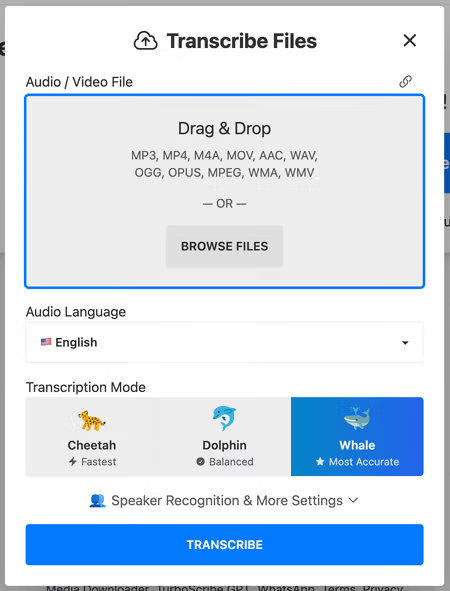
TurboScribe is built for recorded files: interviews, lectures, podcasts and video archives. Upload supported media, choose its language and select a transcription mode. The service uses Whisper-based speech recognition and offers optional speaker labels for conversations. The transcript links back to the audio, making it easier to locate and correct a passage.
Its export options cover readable documents and timed subtitles: TXT, DOCX, PDF, CSV, SRT and VTT. Transcripts and subtitles can be translated into 134+ languages, while a separate option transcribes speech directly into English. Timestamp controls, folders and bulk export help manage longer collections.
Unlimited accepts ten-hour files and batches of 50, which makes it relevant for substantial archives. Extremely high usage can move to slower single-file scheduling and temporary upload deferrals. Processing is cloud-based: the vendor reports encrypted storage, primary US infrastructure and no model training on uploaded media or transcripts. Its privacy policy still allows service subprocessors and limited legal or abuse-related access.
Best for
- Researchers transcribing long recorded interviews
- Creators exporting multilingual subtitles
- Individuals processing large archives of audio and video
Limitations
Unlimited is for one person and still has file, batch and scheduling conditions. Speaker detection and transcription need correction when audio is unclear. Files are processed in the cloud; deleting an account may take up to 90 days to purge backups. Annual billing charges USD 120 upfront.
TurboScribe transcription and subtitle features
Long recordings
Unlimited accepts audio or video up to ten hours and 5 GB per file.
Three transcription modes
Cheetah, Dolphin and Whale offer different speed and accuracy priorities.
Speaker recognition
Differentiate speakers using an automatic or specified speaker count.
Audio-linked transcripts
Navigate a recording through its transcript and correct the text.
Multilingual subtitles
Translate transcripts and subtitle files into 134+ languages.
Document and subtitle exports
Download TXT, DOCX, PDF, CSV, SRT or VTT; organise folders for bulk export.
TurboScribe pricing
Free plan available. Plans priced per user. Visit TurboScribe for full plan details and current offers.
Example plans.
Unlimited
USD 20 / user / month
TurboScribe
Plan details
One person; up to 10 hours or 5 GB/file, with 50 simultaneous uploads.
Technical specifications
Transcription and meetings
| Feature | TurboScribe |
|---|---|
| File and meeting capture | Upload recorded audio/video or import supported media links. Unlimited batches up to 50 files; this is a recorded-file transcription service.Free and Unlimited browser service |
| Transcription languages | 98+ transcription languages; translated transcripts and subtitles in 134+ languages. Direct transcription to English is a separate option.Language-specific transcription and translated exports |
| Speaker-label workflow | Optional speaker recognition, with automatic count detection or a supplied speaker count. Automatic detection can overestimate speakers.Recognition selected before transcription |
| Transcript exports | TXT, DOCX, PDF, CSV, SRT and VTT; timestamp controls and audio-linked transcript navigation. Folder bulk export supports up to 1,000 transcripts.Document/subtitle formats; bulk export scope |
| Recording and usage limits | Free: three files daily, 30 minutes each, one at a time. Unlimited: ten hours / 5 GB per file, batch 50; very high volume may use slower single-file scheduling.Unlimited is for one person; no shared login |
TurboScribe alternatives
Related tools add meeting capture, production editing or dialogue cleanup.
Adobe Podcast
Remote recording, transcript editing and speech enhancement.
Compare with TurboScribeTurboScribe FAQs
Is TurboScribe free?
Yes. Free accounts can transcribe three files daily, with a 30-minute limit per file. Files are processed one at a time with lower queue priority.
How much does TurboScribe cost?
Unlimited costs USD 20/month when billed monthly, or USD 120 billed yearly. The advertised USD 10/month figure is the annual plan’s monthly equivalent.
Does TurboScribe export subtitles?
Yes. SRT and VTT subtitle exports are available alongside TXT, DOCX, PDF and CSV. Transcripts and subtitles can also be translated.
Does TurboScribe train AI on my recordings?
Its security FAQ says it does not train AI models on media files or transcripts. The cloud service uses primary US infrastructure; retention and service access are governed by its privacy policy.
Is this your product? Claim this page to update your listing.