

Adobe Podcast
Adobe Podcast: speech cleanup, remote recording and transcript editing
Adobe Podcast combines speech cleanup with browser recording, transcription and text-based audio and video editing. Enhance Speech removes noise and echo; Studio supports remote interviews and separate participant tracks. Premium adds source separation, video enhancement and larger export allowances.
Free plan availableAccount required
- Access
- Free and paid plans
- Example plan
- USD 19.99 / monthFirefly Pro — individual monthly
- Available on
- Web
Cleaner dialogue and an editor built around spoken words
Adobe Podcast is a good fit for spoken-word production: remote interviews, voiceovers and video dialogue. Enhance Speech cleans up an existing recording; Studio combines recording, transcription and editing in the browser. Studio remains in beta, with desktop Chrome required. Enhance Speech also supports current Chrome, Safari, Edge and Firefox on desktop and mobile.
Studio records participants on separate tracks and can include video. A shareable invitation link lets guests join without signing in; an email invitation requires an Adobe account using that exact address. Guests allow microphone access and, for video, camera access. Recordings are processed in the cloud, so this is a hosted service even though recording starts in the browser.
The transcript is also an editing surface. Follow the highlighted words to find a passage, correct a transcription mistake, or cut and rearrange recorded speech. Deleting words removes the corresponding audio or video. That makes it useful for shortening an interview without hunting through a waveform. Finished transcripts download as TXT, PDF or DOCX.
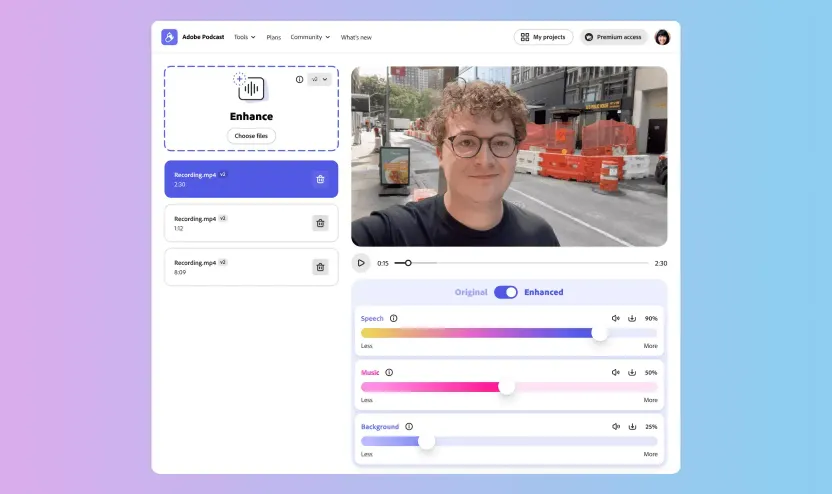
Premium Enhance Speech separates speech, music and ambience, with independent controls and downloadable stems. Studio can import multiple participant recordings into one synchronized project. These features suit dialogue-heavy projects where you want to keep background sound under control or edit speakers separately. Enhancement still depends on how audible the original speech is.
Studio exports MP3 or WAV audio and H.264 MP4 video at 720p or 1080p. Premium adds original speaker-separated recordings and customizable audiograms. Its two-hour Studio project allowance is separate from the four-hour daily Enhance Speech allowance; unlimited Studio downloads do not mean unlimited speech enhancement.
Best for
- Podcasters recording remote interviews
- Video creators cleaning dialogue and background audio
- Editors working from transcripts and separate speaker tracks
Limitations
Studio requires desktop Chrome. Free Enhance Speech processes audio only; video enhancement and separate sound controls need Premium. Speaker detection varies by plan and region and excludes EDU. Cleanup cannot recover every unclear recording.
Adobe Podcast recording and editing features
Noise and echo reduction
Enhance existing voice recordings, with results affected by the clarity of the input.
Independent sound layers
Premium controls speech, music and ambience separately and exports isolated stems.
Remote audio and video
Record separate participant tracks with optional video in desktop Chrome.
Transcript-based editing
Correct transcript text, or cut and rearrange recorded speech through its synchronized words.
Multitrack import
Combine separate participant recordings into one synchronized editing project.
Documents and audiograms
Export transcripts and shareable video; premium adds custom backgrounds and removes Podcast branding.
Adobe Podcast pricing
A free plan covers short recordings: Enhance Speech accepts 30-minute, 500 MB audio files, with one hour per day; Studio allows two 30-minute project downloads daily. New Premium subscriptions come through Firefly Pro, advertised at USD 19.99/month on the US individual monthly plan. It includes two-hour Studio projects with unlimited downloads and four hours of enhancement daily, using files up to two hours and 1 GB. Existing standalone subscribers keep their legacy rate while subscribed; cancelling ends access to that legacy plan. Regional prices and taxes vary.
Example plans.
Firefly Pro — individual monthly
USD 19.99 / month
Consumer subscription
Plan details
Includes Podcast Premium. Enhance up to four hours daily; files up to two hours / 1 GB. Studio projects up to two hours with unlimited downloads. US advertised price; region/taxes differ.
Technical specifications
Transcription and meetings
| Feature | Adobe Podcast |
|---|---|
| File and meeting capture | Record remote audio/video in desktop Chrome or import participant tracks into Studio. Link guests join without signing in; email guests use the invited Adobe account.Browser service; Studio labelled beta |
| Transcription languages | Studio transcription: English, French, German, Hindi, Italian, Portuguese and Spanish. Enhance Speech cleans up speech without translating it.Transcription and enhancement are different functions |
| Speaker-label workflow | Optional detected speaker labels; availability varies by plan and region, and is unavailable for EDU plans. Premium can export original speaker-separated recordings.Speaker detection and separate originals |
| Transcript exports | TXT, PDF and DOCX transcripts; MP3, WAV audio and H.264 MP4 video/audiograms at 720p or 1080p. WAV is 48 kHz, 16-bit. Premium source separation adds downloadable audio stems.Feature-specific and plan-specific exports |
| Recording and usage limits | Free enhancement: 30 minutes, 500 MB per file; one hour daily. Premium: two hours, 1 GB per file; four hours daily. Studio project/export limits are separate.Current Firefly Pro bundle; legacy subscriptions separate |
Adobe Podcast alternatives
Other products focus on production editing, file transcription or meeting notes.
Adobe Podcast FAQs
Is Adobe Podcast free?
Yes. Free Enhance Speech allows one hour daily, with files up to 30 minutes / 500 MB. Free Studio exports two projects daily, each up to 30 minutes.
How much is Adobe Podcast Premium?
New subscribers get Podcast Premium through Firefly Pro, advertised at USD 19.99/month on the US individual monthly plan. Existing standalone subscribers retain their legacy rate while subscribed. After cancelling that legacy plan, they need Firefly Pro to regain Premium access.
Can Adobe Podcast edit video?
Yes. Studio records and imports video and supports transcript-based editing. Premium Enhance Speech also accepts video files and offers separate speech, music and ambience controls.
Does Enhance Speech translate audio?
No. Enhance Speech cleans up audible speech without translating it. Studio transcription is a separate feature.
Do my guests need an Adobe account?
Guests joining through a shareable session link do not need to sign in. Email invitations require them to sign in to an Adobe account with the exact invited email address. Remote recording requires desktop Chrome; guests grant microphone access and camera access if they record video.
Can I use Adobe Podcast Studio on my phone?
Studio requires Google Chrome on desktop. Enhance Speech supports current Chrome, Safari, Edge and Firefox on desktop and mobile. Being able to enhance a file on your phone does not mean you can join a Studio recording there.
Which languages can Adobe Podcast transcribe?
Studio supports English, French, German, Hindi, Italian, Portuguese and Spanish transcription. That list is separate from the languages available for the interface. Enhance Speech cleans up the recording without translating it.
Explore related AI tools
Is this your product? Claim this page to update your listing.