

Fireflies.ai
Fireflies.ai: AI meeting notes, searchable transcripts and team insights
Fireflies.ai records meetings, creates searchable transcripts and produces summaries and action items. Teams can revisit conversations, share clips and send notes to connected apps. It supports uploaded recordings, desktop and mobile capture, and a Chrome extension alongside its meeting bot.
Free plan availableAccount required
- Access
- Free and paid plans
- Example plan
- USD 18 / user / monthPro — monthly
- Available on
- Web, Desktop, Mobile, API
Meeting history that teams can search and share
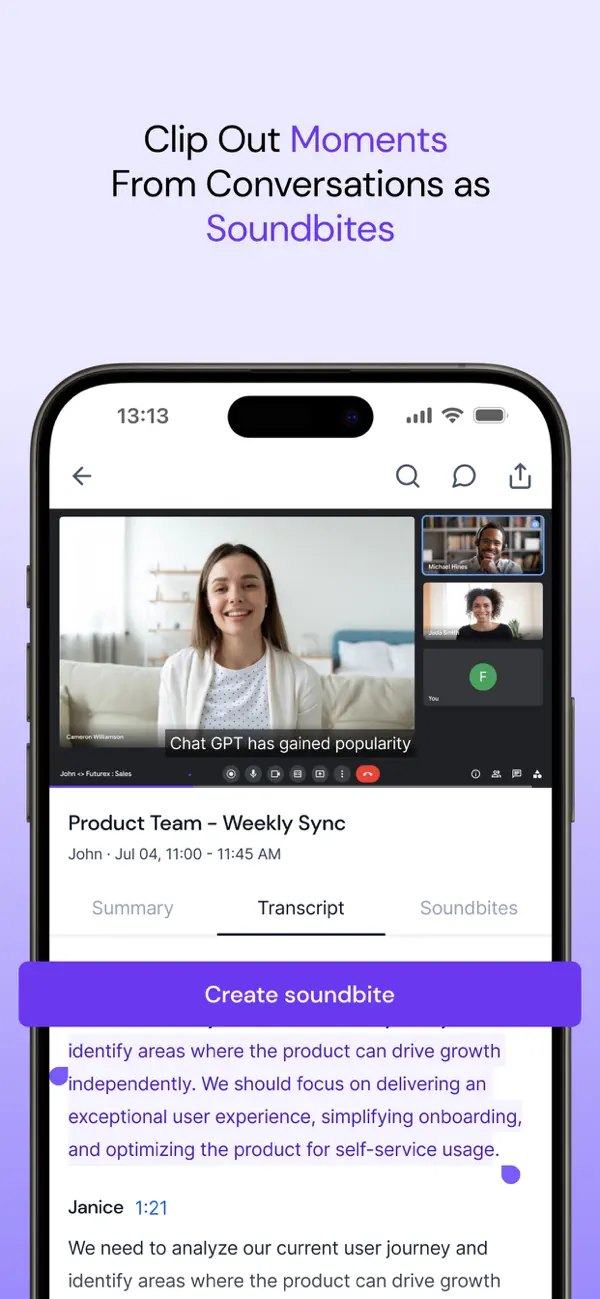
Fireflies.ai brings recordings, transcripts and follow-up notes into a shared meeting library. Search across conversations, jump to timestamped passages and add comments or bookmarks. Soundbites turn selected moments into shorter clips, while integrations connect meeting notes with collaboration tools and CRMs.
The meeting bot can join supported Zoom, Google Meet and Microsoft Teams calls. For recording without a visible bot, the desktop app captures calls on Windows and macOS; recordings still use Fireflies’ cloud service. You can also import existing audio or video. Pro and higher add transcript downloads and video recording, while Business adds conversation intelligence and team analytics.
Fireflies’ September 2026 privacy policy says meeting content is not used to train internal or external AI models, and third-party processors do not retain it after processing. Fireflies still stores your meeting library according to the plan and account settings. Meeting sharing controls determine who can access recordings and recaps; business content is also governed by the applicable service agreements.
Global AskFred answers questions across past meetings and connected apps, or focuses on selected meetings, people and groups. It uses AI credits. AskFred inside an already processed meeting is different: on paid plans, those single-meeting questions do not consume AI credits. This distinction matters when you want to revisit one conversation versus draw conclusions across a team’s meeting history.
Ordinary transcription supports more than 100 languages. Auto Detect identifies the dominant language; it is not the mixed-language setting. Business and Enterprise offer Multi-Language Mode beta for 60+ languages in the same conversation. Enable it before capture or upload; switching the mode later requires reprocessing the transcript.
Sharing a recap email and granting access to its recording are separate controls. The default viewing setting lets teammates and anyone with the link open a meeting, so forwarding that link can extend access. Restrict viewing to the owner, participants or teammates when appropriate. A shared transcript is not automatically editable: only its owner or host can change the transcript text.
Best for
- Teams sharing searchable meeting history
- Sales and customer teams connecting notes with CRMs
- Professionals recording calls and importing audio
Limitations
Unlimited transcription still has per-recording duration, storage and imported-media limits. Paid AI credit packages are separate from the meeting subscription and can automatically move to a higher tier when exhausted; you can disable auto-upgrades in billing settings. Meeting-link permissions also need attention before you share a recording.
Fireflies.ai meeting notes and transcription features
Meeting and recording capture
Use a meeting bot, record bot-free with the desktop app, capture on mobile or import audio and video. Desktop recordings still use cloud processing.
Searchable meeting library
Search timestamps and bookmarks, or ask Global AskFred questions across meeting history using separate AI credits.
Summaries and action items
Generate meeting notes and follow-up tasks; advanced custom AI actions use separate credits.
Clips for team follow-up
Share selected moments as soundbites instead of sending an entire recording.
Documents, captions and recordings
Pro and higher export documents, SRT subtitles, MP3 audio and captured MP4 video.
Mixed-language conversations
Business and Enterprise offer Multi-Language Mode beta for conversations with language switching.
Fireflies.ai pricing
Fireflies.ai has a free plan with limited summaries, uploads and 400 minutes of stored content. Monthly billing costs USD 18 per seat for Pro and USD 29 for Business. With an annual commitment, the advertised monthly equivalents are USD 10 and USD 19; Enterprise is annual-only at USD 39 per seat per month equivalent. Pro stores 8,000 minutes per seat, while Business and Enterprise offer unlimited storage. Imports and advanced AI actions have separate allowances.
Example plans.
Pro — monthly
USD 18 / user / month
Subscription
Plan details
Per-seat monthly billing. Annual commitment advertises USD 10/month equivalent; 8,000 minutes total storage/seat.
Business — monthly
USD 29 / user / month
Subscription
Plan details
Per-seat monthly billing. Annual commitment advertises USD 19/month equivalent; unlimited storage with recording and import limits.
Technical specifications
Transcription and meetings
| Feature | Fireflies.ai |
|---|---|
| File and meeting capture | Meeting bot for Zoom, Google Meet, Microsoft Teams and other supported calls; desktop/mobile recordings, Chrome extension and uploaded audio/video.Capture options differ by platform |
| Transcription languages | 100+ transcription languages overall. Business and Enterprise Multi-Language Mode beta covers 60+ languages within a conversation.Single-language and mixed-language modes differ |
| Speaker-label workflow | Speaker-labelled transcripts, talk-time insights, comments and bookmarks. Transcript edits are restricted to meetings you own or hosted.Shared access does not automatically grant transcript editing |
| Transcript exports | Pro+ transcript PDF, DOCX, SRT, CSV, JSON and MD; summary DOCX, PDF, JSON and MD; audio MP3 and captured video MP4.Downloads require paid access and recorded content |
| Recording and usage limits | Free/Pro meetings: two hours; Business: three; Enterprise: four. Storage is total retained content. External media has a separate monthly per-source rate limit.Meeting duration, storage and imports are different limits |
| Maximum recording duration (minutes) | 150Free uploaded file; 100 MB maximum, not live meeting duration |
| Included monthly transcription (audio minutes) | 3000Individual external imports, per source; live bot/extension/mobile exempt |
Fireflies.ai alternatives
These alternatives emphasize meeting capture, multilingual transcripts or long recorded files.
Fireflies.ai FAQs
Is Fireflies.ai free?
Yes. Free has restricted summaries and uploads, plus 400 minutes of stored content. Enabling auto-join allows unlimited eligible live meeting transcription. Downloading transcripts or recordings requires Pro or higher.
What does Fireflies.ai’s unlimited transcription include?
It does not mean every allowance is unlimited. Recording duration and retained storage depend on plan; external imports have a separate monthly per-source rate limit and paid overage.
Can Fireflies.ai export subtitles?
Yes. Pro and higher export SRT subtitles, plus PDF, DOCX, CSV, JSON and Markdown transcripts. Recorded audio downloads as MP3 and captured video as MP4.
Does Fireflies.ai use meeting recordings to train AI?
Its September 2026 policy says meeting content is not used to train internal or external AI models. Third-party zero retention applies after processing; it does not mean Fireflies keeps no meeting library.
Can Fireflies.ai record meetings without a bot?
Yes. Its desktop app records calls without a meeting bot on Windows and macOS. Bot-free capture does not mean offline processing: recordings still use Fireflies’ cloud service.
Does AskFred cost extra?
Questions inside an already processed meeting are included without AI credit charges on paid plans. Global AskFred, Live AskFred and other advanced AI actions use separate credits. Paid credit packages can auto-upgrade when exhausted unless you turn that option off in billing settings.
Who can open a shared Fireflies meeting?
The default viewing setting allows teammates and anyone with the link. You can choose more restricted access, including the owner or meeting participants. The recap email recipient list does not override viewing permissions, so check the meeting’s access setting before forwarding its link.
Can I edit a Fireflies transcript shared with me?
Only the meeting owner or host can edit its transcript text. Being able to view a recording, receive its recap or add comments does not grant transcript editing access.
Is this your product? Claim this page to update your listing.