

Notta
Notta: multilingual transcription, meeting notes and local recording
Notta transcribes recorded files and meetings, identifies speakers and provides translated transcripts and AI notes. Its web, mobile and desktop apps cover different recording needs. Desktop Privacy Mode offers a separate local transcription option with narrower language support than the cloud service.
Free plan availableAccount required
- Access
- Free and paid plans
- Example plan
- EUR 11.69 / monthPro — monthly (Europe)
- Available on
- Web, Desktop, Mobile
Transcripts for interviews, meetings and multilingual teams
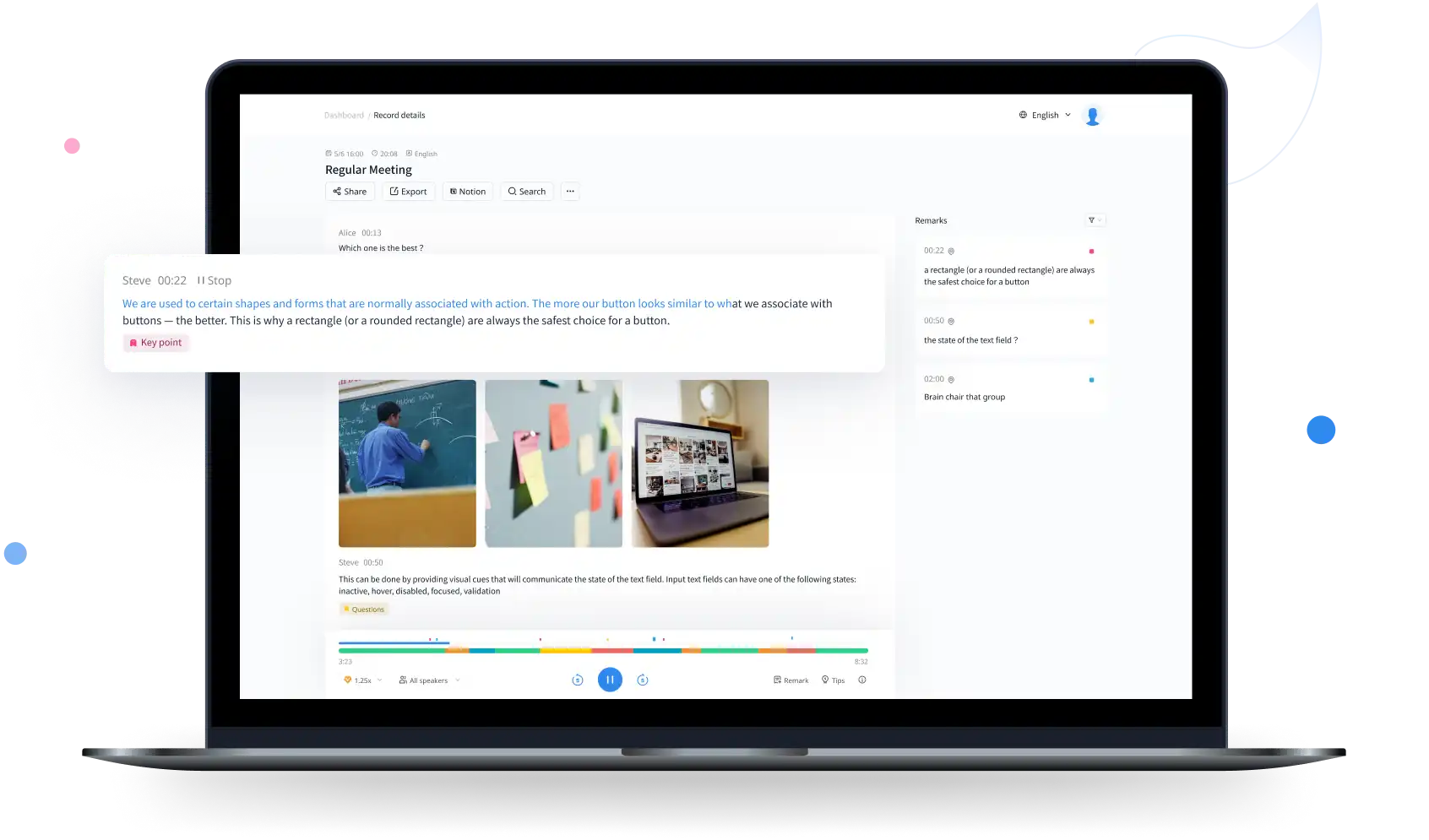
Notta turns uploaded audio and video or live speech into editable text. Its cloud transcription supports 58 languages, with translated transcripts in 41. Speaker labels, timestamps, search and adjustable playback help you review interviews. Paid exports include document, spreadsheet and subtitle formats.
The web app connects recordings with editable speaker names, bookmarks and notes. Calendar integration lets Notta Bot join live meetings, while desktop recording offers a bot-free option. AI notes provide another way to revisit a conversation, and team plans add collaboration and CRM connections.
Desktop Privacy Mode processes transcription and stores recordings locally. It can work offline after account sign-in and model setup, although login and updates still need internet. The default model covers English, Simplified Chinese, Japanese, Korean and Cantonese; Apple Speech Analyzer on macOS 26+ supports additional languages. Pro local transcription does not consume cloud minutes, but long sessions still depend on device resources. This mode is separate from ordinary cloud recording.
Best for
- People transcribing multilingual interviews
- Teams combining meeting notes and translated transcripts
- Desktop users seeking an on-device transcription option
Limitations
The free tier stops at three minutes per conversation. Translation add-ons, AI credits, uploads and summaries have separate allowances. Cloud language coverage differs from local models. Cancelling paid access preserves data but Free can show only the first three minutes of longer recordings; export important transcripts before downgrading.
Notta transcription and meeting features
Multilingual cloud transcripts
Transcribe 58 languages and translate transcript text into 41 languages.
Speaker editing and playback
Rename speakers, search timestamps and review passages against the recording.
Meeting recording options
Use calendar-linked meeting capture or desktop recording without a bot joining.
Local Privacy Mode
Process and store recordings on the desktop, with model-dependent language support.
AI meeting notes
Generate notes and summaries, with monthly allowances separate from transcription minutes.
Documents and subtitles
Paid exports include PDF, DOCX, TXT, XLSX and SRT alongside recording downloads.
Notta pricing
Free plan available. Plans priced per user. Visit Notta for full plan details and current offers.
Example plans.
Pro — monthly (Europe)
EUR 11.69 / month
Subscription
Plan details
European advertised monthly price; regional billing and taxes may differ. Cloud usage has separate minute, upload and summary allowances.
Business — monthly (Europe)
EUR 25.99 / user / month
Subscription
Plan details
European advertised per-seat price with one seat selected. Unlimited transcription retains recording, upload and summary conditions.
Technical specifications
Transcription and meetings
| Feature | Notta |
|---|---|
| File and meeting capture | Upload recordings, import supported links or capture live meetings. Web, mobile, Chrome extension and desktop options are available; recording without a bot and local Privacy Mode are distinct options.Cloud and desktop modes have different processing paths |
| Transcription languages | Cloud transcription supports 58 languages; translated transcripts support 41. Local Privacy Mode supports a smaller set that depends on the selected model and operating system.Cloud language count does not apply to every local model |
| Speaker-label workflow | Identify speakers and edit their names in transcripts. Custom vocabulary is available for English and Japanese with tier-specific allowances.Speaker editing and language-specific vocabulary |
| Transcript exports | Paid plans export transcripts or recordings. Listed formats include MP3, TXT, SRT, PDF, DOCX and XLSX; translated transcript exports require paid access.Formats and translation access depend on subscription |
| Recording and usage limits | Free: 120 minutes/month, three minutes/conversation. Pro: 1,800 minutes/month, five hours/recording, 100 uploads and summaries. Business: unlimited transcription with five-hour recordings, separate upload and summary allowances.Cloud quotas do not carry over; local Pro minutes separate |
| Maximum recording duration (minutes) | 300Pro cloud transcription |
| Included monthly transcription (audio minutes) | 1800Pro cloud transcription |
Notta alternatives
Related products focus on collaborative meeting history, long-file transcription or production editing.
Otter.ai
Live meeting transcripts, shared notes and collaborative follow-up.
Compare with NottaNotta FAQs
Is Notta free?
Yes. Free includes 120 transcription minutes per month, but only three minutes per conversation. It also has separate monthly upload and summary allowances.
Does Notta work offline?
Desktop Privacy Mode can transcribe locally after initial sign-in and model setup. The web service and standard cloud transcription still require an internet connection.
Is Notta’s bot-free recording always local?
No. Recording without a bot joining and processing locally are different options. Desktop Privacy Mode is the explicit on-device transcription and storage mode.
Can Notta export subtitles?
Yes. Paid plans support SRT exports, plus document formats such as TXT, PDF and DOCX. Transcript translation and higher-volume translation add-ons have separate subscription conditions.
Is this your product? Claim this page to update your listing.