

ChatGPT
An AI assistant for writing, research, images and file-based work
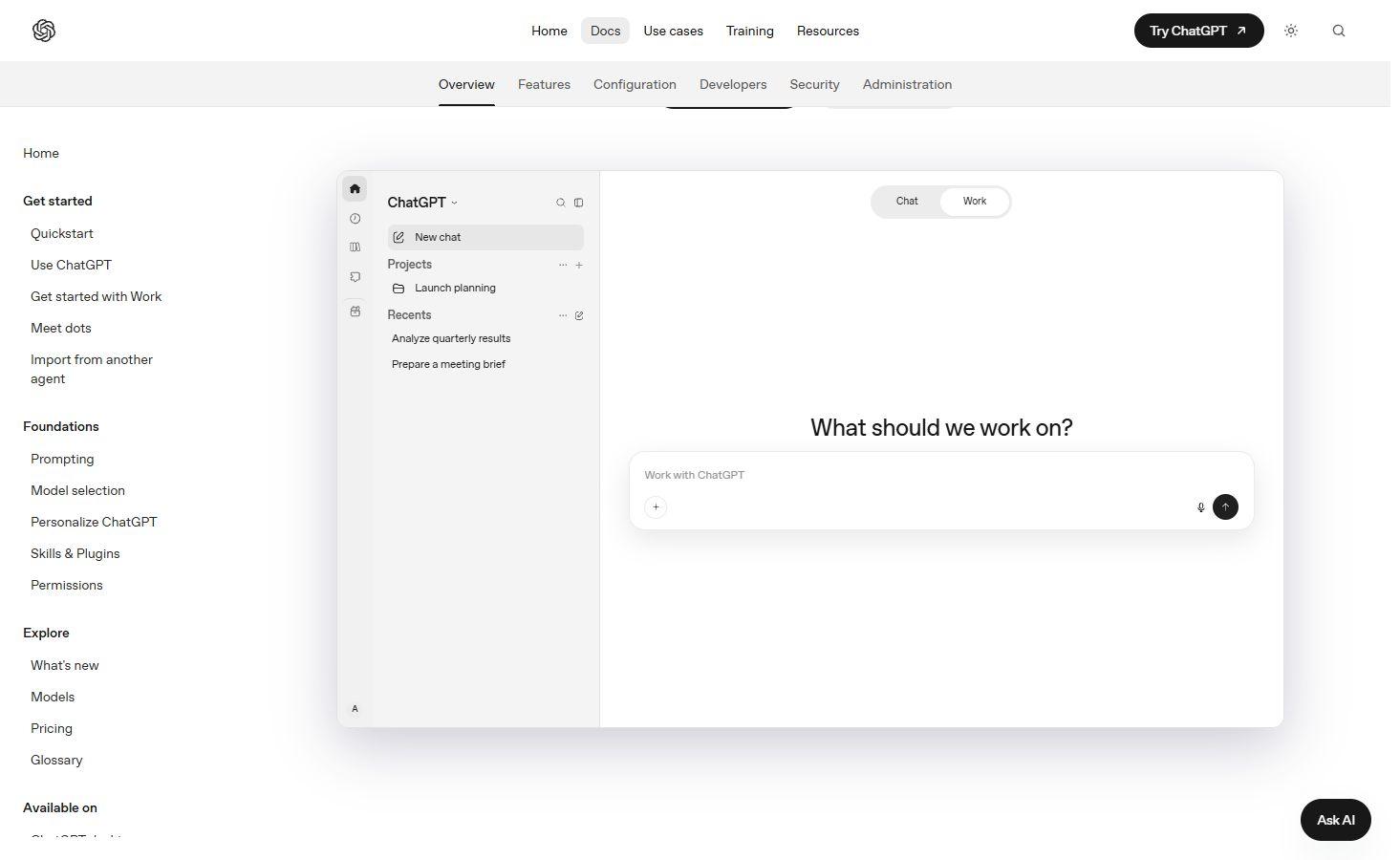
ChatGPT combines conversational help with web research, image creation and tools for documents and data. Projects keep related work together, while ChatGPT Work handles tasks that produce files or reports.
Free plan availableAccount required
- Access
- Free and paid plans
- Example plan
- USD 8 / monthGo
- Available on
- Web, Desktop, Mobile
What is ChatGPT?
ChatGPT is OpenAI’s AI assistant for questions, writing, research and creative tasks. A conversation can start with a prompt, an image or source files, then develop through follow-up requests. Chat provides a direct exchange for answers and drafts. Work can carry a larger task through to a document, analysis or other result.
Web search brings current information and source links into a chat. Deep Research in Work supports investigations across multiple sources, with a report and its references. Projects hold related chats, files and instructions together, making them useful for recurring subjects and longer pieces of work.
Image generation accepts descriptions and references, followed by conversational revisions. File-based tasks can create documents, presentations, workbooks and PDFs, with review tools that depend on the device and surface. ChatGPT subscriptions cover access to the app; the OpenAI API has separate billing.
Best for
- People who want writing, research and creative help in one assistant.
- Teams and individuals producing documents or analysing supplied files.
- Students building study materials from their own course sources.
Limitations
Answers, citations and calculations can contain errors. Tools and models vary by plan, device and workspace settings. Work and Codex share usage limits, and API charges are separate. Access to connected services requires permission.
ChatGPT features
Writing and revision
Draft, reshape and refine text in conversation. Custom instructions can set recurring preferences; Work on the web also offers a writing-style setting based on supported connected sources.
Search and Deep Research
Use web search for current information with source links. Deep Research in Work investigates a broader question and returns a report; access depends on the account and workspace.
Image generation and editing
Create images from a description or uploaded reference, then request changes. The desktop viewer offers individual and multi-image review, with comments for focused revisions.
Documents and file outputs
Create documents, presentations, spreadsheets and PDFs from source material. Supported previews and annotations provide a way to review a result and request targeted changes.
Spreadsheet analysis
Combine exports, clean duplicate records, calculate metrics and create workbook charts. Generated workbooks can include assumptions and a separate view of records that did not join cleanly.
Projects and study materials
Keep related chats, sources and instructions in a project. Course files can become study guides, concept maps, practice questions, schedules and progress trackers.
ChatGPT pricing
ChatGPT has a free plan. Advertised individual subscriptions are Go at USD 8/month, Plus at USD 20/month and Pro at USD 100, 200 or 500/month. Business is USD 25/user/month, or USD 240 per user billed annually, with at least two users. Features and included usage vary by plan, market and surface. OpenAI API billing is separate.
Example plans.
Go
USD 8 / month
ChatGPT subscription
Plan details
Advertised individual monthly plan; availability varies by market.
Plus
USD 20 / month
ChatGPT subscription
Plan details
Individual monthly subscription; tool and model limits apply.
Pro — USD 100
USD 100 / month
ChatGPT subscription
Plan details
Individual monthly tier; allowance depends on the selected Pro plan.
Technical specifications
AI assistants
| Feature | ChatGPT |
|---|---|
| File inputs | Files and connected sources can supply context for conversations and Work tasks; supported tools depend on the surface.Feature availability depends on plan, surface and workspace |
| Web search and citations | Web search returns source links; Deep Research in Work produces a multi-source report.Feature availability depends on plan, surface and workspace |
| Memory controls | Memories can carry recurring preferences and context into later chats. Personalization controls vary between web and desktop.Feature availability depends on plan, surface and workspace |
| Connected apps | Plugins connect supported services; availability and access depend on account permissions and workspace settings.Feature availability depends on plan, surface and workspace |
| Usage limits | Work and Codex share subscription usage. API billing is separate; included tasks do not have a universal fixed prompt quota.Feature availability depends on plan, surface and workspace |
Search and research
| Feature | ChatGPT |
|---|---|
| Source corpus | Public web search, uploaded files and approved connected app context.Feature availability depends on plan, surface and workspace |
| Citation workflow | Web search can show citations in the conversation; Deep Research reports include sources.Feature availability depends on plan, surface and workspace |
| Document inputs | Files and connected app context can accompany a research task.Feature availability depends on plan, surface and workspace |
| Research workflow | Deep Research in Work investigates multiple sources and produces a report; its entry point differs between web and desktop.Feature availability depends on plan, surface and workspace |
| Export formats | File-based Work tasks can produce documents, presentations, spreadsheets and PDFs.Feature availability depends on plan, surface and workspace |
Writing and translation
| Feature | ChatGPT |
|---|---|
| Writing workflow | Conversational drafting and revision; Work can produce editable documents and other file outputs.Feature availability depends on plan, surface and workspace |
| Style and terminology controls | Custom instructions guide recurring preferences. Work on the web can use writing from connected apps after writing-style setup.Feature availability depends on plan, surface and workspace |
| Document integrations | Supported plugins connect source services, subject to permissions and workspace availability.Feature availability depends on plan, surface and workspace |
| Usage and document limits | Available tools and included usage vary by plan and surface.Feature availability depends on plan, surface and workspace |
Image generation
| Feature | ChatGPT |
|---|---|
| Prompt and reference inputs | Text descriptions and uploaded reference images for generation or edits.Feature availability depends on plan, surface and workspace |
| Editing controls | Request revisions in the conversation. Desktop Focused and Canvas views support review; Canvas comments and multi-select target multiple images.Feature availability depends on plan, surface and workspace |
| Style and character controls | Reference images can guide a subject or visual direction across revisions; identical results are not guaranteed.Feature availability depends on plan, surface and workspace |
| API access | SupportedSeparate API billing; ChatGPT subscription access is distinct |
Data analysis
| Feature | ChatGPT |
|---|---|
| Data inputs and connections | Uploaded spreadsheet exports, mapping notes and reporting requirements; approved connected sources can add context.Feature availability depends on plan, surface and workspace |
| Analysis workflow | Clean duplicate records, join tables, calculate metrics and build workbook formulas from supplied data.Feature availability depends on plan, surface and workspace |
| Charts and reproducible outputs | Editable workbooks with charts, reporting views, assumptions and mismatch summaries.Feature availability depends on plan, surface and workspace |
| Data permission controls | Connected sources require permission; a ChatGPT project does not automatically grant access to local computer folders.Feature availability depends on plan, surface and workspace |
| Data and compute limits | File previews and tools depend on the surface. Formulas and joins still need review against source data.Feature availability depends on plan, surface and workspace |
Education and learning
| Feature | ChatGPT |
|---|---|
| Subjects and learner audience | Exam preparation based on course objectives, lecture notes, readings and practice material.Feature availability depends on plan, surface and workspace |
| Learning and feedback mode | Study guides, concept maps, question banks, explanations, practice schedules and progress trackers.Feature availability depends on plan, surface and workspace |
| Study material inputs | User-supplied course materials ground explanations and the planned coverage.Feature availability depends on plan, surface and workspace |
| Educator controls | Use of restricted materials and graded assessments remains subject to the instructor’s rules.Feature availability depends on plan, surface and workspace |
| Accessibility and language support | Web and desktop access to file-based study tasks; tools and previews vary by surface.Feature availability depends on plan, surface and workspace |
ChatGPT alternatives
Other AI assistants for writing, research and creative tasks
Gemini
Google’s assistant combines research, image creation, Canvas and connected apps.
Perplexity
A research assistant centred on questions, web sources and cited answers.
ChatGPT FAQs
Is ChatGPT free?
ChatGPT has a free plan. Advertised individual paid plans start with Go at USD 8 per month, followed by Plus at USD 20. Available features and usage allowances vary by plan, market and surface.
Can ChatGPT work with documents and spreadsheets?
Yes. File-based tasks can produce documents, presentations, spreadsheets and PDFs. Spreadsheet tasks can include joins, formulas and charts. Preview and editing tools vary by surface, and calculations should be checked against the original data.
What is the difference between Chat and Work?
Chat provides an exchange for questions, drafts and revisions. Work is designed to carry a larger task through to a result, such as a research report or file. Both can use project context, while available tools depend on the account and workspace.
Does a ChatGPT subscription include OpenAI API credits?
ChatGPT subscriptions and API billing are separate. Work and Codex share subscription usage, but API token prices do not determine how many app tasks a subscription includes.
Can ChatGPT edit an existing image?
Yes. Attach a reference image and describe the changes you want, then refine the result in conversation. The desktop image viewer also supports comments and selecting multiple images for a shared revision.
How does image generation count toward ChatGPT usage?
In desktop Work and Codex, image generation uses the shared allowance and consumes included usage about 3–5 times faster on average, depending on quality and size. Desktop image generation is unavailable on Free. Image access on ChatGPT web depends on your plan and workspace. API image generation is billed separately.
Explore related AI tools
Is this your product? Claim this page to update your listing.