

Zapier
Zapier review: AI automation, features and pricing
Zapier connects business apps with AI-powered workflows. Explore its automation features, task-based pricing, approval controls and alternatives.
Free plan availableAccount required
- Access
- Free and paid plans
- Example plan
- USD 29.99 / monthProfessional — monthly
- Available on
- Web, API
Business app automation with AI built in
Zapier is built around Zaps: workflows that start with an event and carry out actions in connected apps. A new lead can create a CRM record and notify a sales channel; an incoming support message can become a ticket with a summary. These are examples of what its trigger, action and AI features enable. Professional expands the basic two-step format into multi-step automations with premium apps and webhooks.
AI by Zapier runs inside that same editor. Prompts can return structured fields for later steps, such as a category, summary or extracted contact details. Advanced and Premium models can also use connected app actions, knowledge sources and web browsing. Standard models support prompt-only tasks. Tools are optional, so a summarization step does not need the same permissions as an AI step that updates a CRM.
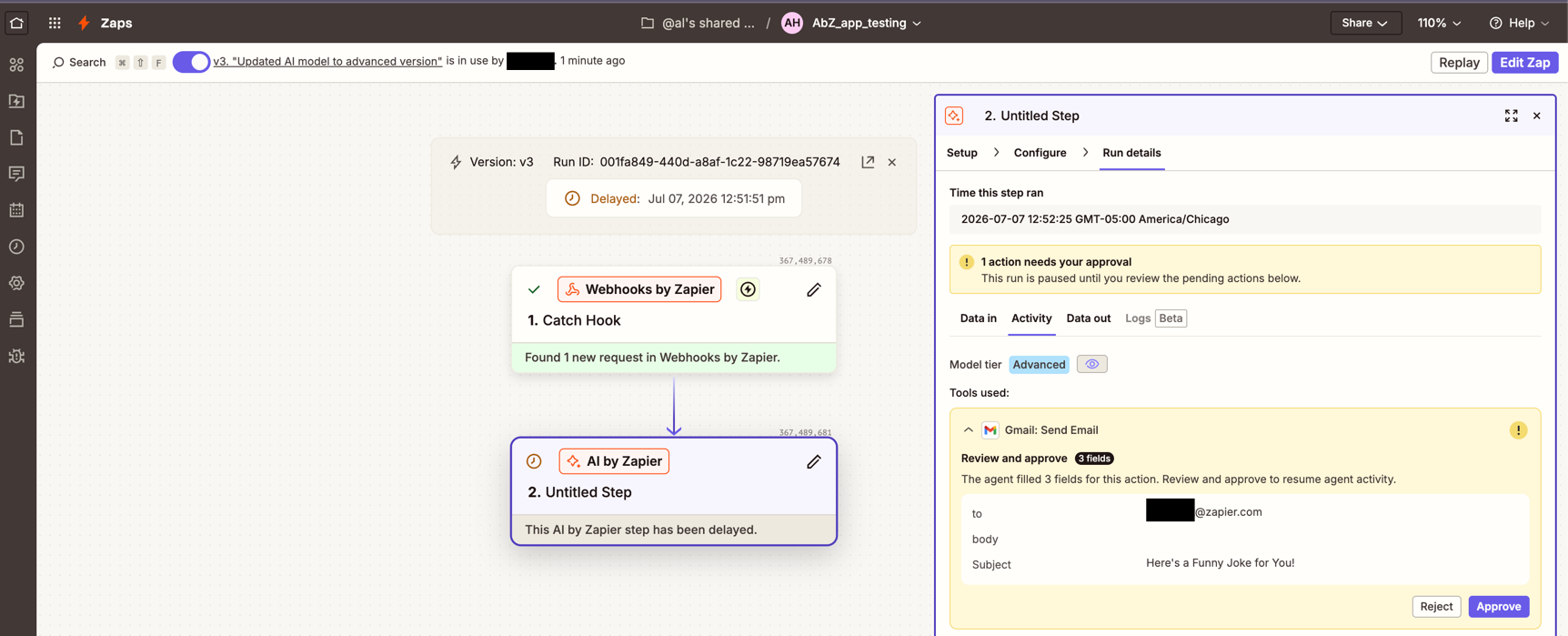
A connected tool can look up a record, send a message or change information using the selected app account. Its inputs can come from a previous step, a fixed value or the AI. Each tool has a separate approval setting: when enabled, the run pauses before that action and waits for a person to approve or reject it. Approval is off by default. Zap history shows the model tier, tools used and task usage, making an automated action easier to trace.
Forms and Tables add an intake form and a place to store shared records alongside the workflows. Copilot helps build automations in the editor. Zapier MCP serves a different entry point: external AI clients can call supported app actions without a Zap trigger. A successful MCP tool call currently uses two tasks from the account allowance. The SDK offers programmatic access and is free during its beta.
Task billing is the main trade-off as an automation grows. A successful ordinary action usually uses one task, while triggers, failed actions and several built-in utility steps do not. An AI by Zapier run uses its model tier rate for the step itself and again for each successful tool call. For example, a Premium AI step with two tool calls uses 15 tasks before any additional paid actions elsewhere in the Zap. Using your own eligible model account reduces the Zapier multiplier, but the model provider still bills separately.
Zapier is migrating standalone Agents into Zaps containing a native trigger and one AI by Zapier step. The prompt, reasoning and connected tools remain together inside that AI step; migration does not automatically turn every tool into a separate workflow action. Zapier has not announced an Agents shutdown date. Chat-triggered agents do not yet have a direct equivalent trigger, some knowledge sources differ, and organization-level Bring Your Own Model is not yet supported in the migrated step. The original Agent and new Zap can both run until the original is unpublished.
Zapier runs in the cloud. Team adds shared app connections and SAML SSO, while Enterprise provides further administrative controls. Its policy automatically excludes Enterprise customer content from Zapier model training and improvement; other customers can opt out. Subprocessors may not train their own models on customer content. Workflow logs and connected app accounts still have their own retention and data-handling arrangements. Using your own API key follows that provider agreement and does not make the whole workflow local.
Best for
- Marketing, sales and operations teams connecting business apps
- AI-assisted lead routing, support intake and record updates
- Teams that want hosted workflows with configurable action approvals
Limitations
Published AI by Zapier steps require a paid plan. Tools and knowledge sources need Advanced or Premium models, including when using your own key. Approval is off by default for each tool. AI calls and extra tasks can raise usage costs, and migrated Agents have gaps in chat triggers, knowledge sources and organization-level model settings.
Zapier features
App integrations and multi-step Zaps
Connect event triggers to actions across your business apps. Professional adds multi-step workflows, premium apps and webhooks.
AI outputs and connected tools
Return structured fields from prompts, or use Advanced and Premium models with app actions, knowledge and web browsing.
Approval before selected AI actions
Require a person to approve a specific tool call before it runs. Approval is configured per tool and is off by default.
Forms, Tables and Copilot
Collect requests, store shared records and build automations with assistance in the same hosted platform.
MCP and programmatic access
Let external AI clients call supported app actions through MCP, or access Zapier from your code with its beta SDK.
Run history and team controls
Trace AI tools and task usage in Zap history. Team adds shared connections and SAML SSO; Enterprise extends administrative controls.
Zapier pricing
Zapier offers Free, Professional, Team and Enterprise plans. Free includes 100 tasks per month and two-step Zaps. Professional adds multi-step workflows, premium apps and webhooks; Team adds shared connections, SAML SSO and 25 users. Paid plans combine a subscription with a task allowance. AI model tiers and tool calls can consume several tasks per run, and your own model provider can charge separately. Annual billing and monthly billing have different rates.
Example plans.
Professional — monthly
USD 29.99 / month
Subscription
Plan details
750 tasks/month; multi-step Zaps, premium apps and webhooks. AI tier/tool usage draws from tasks.
Professional — annual commitment
USD 19.99 / month
Subscription
Plan details
Monthly equivalent, billed annually; 750 tasks/month. Extra tasks and external provider fees may apply.
Team — monthly
USD 103.5 / month
Subscription
Plan details
Starting quota 2,000 tasks/month, 25 users. Shared connections and SAML; tasks are not per-user allowances.
Technical specifications
Automation and agents
| Feature | Zapier |
|---|---|
| Connectors and tool access | App connectors, Forms and Tables; Advanced/Premium AI steps can use app actions, knowledge and web browsing. MCP exposes supported actions to external AI clients.Connector, knowledge-source and model coverage differ |
| Triggers and scheduling | App events start Zaps. Free supports two-step Zaps; Professional adds multi-step workflows and webhooks. Migrated chat-triggered Agents have no direct equivalent trigger yet.Platform plans; migration-specific trigger limitations |
| Human approval controls | Require approval before running is configured separately for each AI tool and is off by default. The run pauses before that action; Zap history records tools, results and task usage.Paid published AI steps; Advanced/Premium tool-capable models |
| Hosting and deployment | Hosted SaaS platform. Team adds shared connections and SAML SSO; Enterprise has further admin controls. Organization-level BYOM is not yet supported in migrated AI by Zapier steps.Plan-specific controls; BYOK and admin-level BYOM are different |
| Execution accounting | AI tasks per run = tier rate × (1 + successful tool calls). Standard 1 (no tools), Advanced 3, Premium 5; BYOK 1 with eligible models plus provider fees. MCP uses 2 per successful call. Legacy Agents keep separate activity billing until migrated.Current AI by Zapier tier rates, not a workflow-execution allowance |
Zapier alternatives
Explore visual app automation, self-hosted workflows and dedicated AI application builders.
Zapier FAQs
Is Zapier free?
Yes. Free includes 100 tasks per month and two-step Zaps. You can preview Standard AI by Zapier in an unpublished workflow, but publishing AI steps requires Professional, Team or Enterprise.
How much does Zapier cost?
Zapier has a Free plan and paid Professional, Team and Enterprise tiers. The current pricing page advertises annual-billing starting rates of USD 19.99 per month for Professional and USD 69 for Team. Monthly billing costs more, and task allowance, AI tool calls and extra usage affect the final price.
How do Zapier AI tasks work?
Standard uses one task per AI step and cannot call tools. Advanced uses three tasks for the step plus three per tool call; Premium uses five plus five per tool call. A Premium step with two tool calls therefore uses 15 tasks. Bring Your Own Key uses one task for the step plus one per tool call with an eligible model, alongside separate provider charges.
Can Zapier require approval before an AI action?
Yes. Approval can be enabled for each tool in AI by Zapier. The run then pauses before that tool executes so a person can approve or reject it. The setting is off by default and does not automatically protect every other tool in the workflow.
Are Zapier Agents being discontinued?
Zapier is moving Agents into AI by Zapier steps, but has not set a shutdown date. A migrated Zap contains a native trigger and one AI step with the original prompt and tools. Some chat-trigger, knowledge-source and organization-level model features do not yet transfer directly.
What are the best Zapier alternatives?
Make offers a visual scenario builder for branching app automations. n8n combines visual workflows and code with Cloud or self-hosted deployment. Dify focuses on AI applications, knowledge and agent workflows. Their billing units and hosting options differ from Zapier’s task-based hosted platform.
Is this your product? Claim this page to update your listing.