

n8n
n8n review: AI agents, workflow automation and pricing
n8n combines visual workflows, custom code and AI agents. Explore its features, Cloud and self-hosted plans, execution pricing and alternatives.
Free plan availableAccount optional
- Access
- Free and paid plans
- Example plan
- EUR 24 / monthCloud Starter — monthly
- Available on
- Web, API
Visual automation with code and AI agents
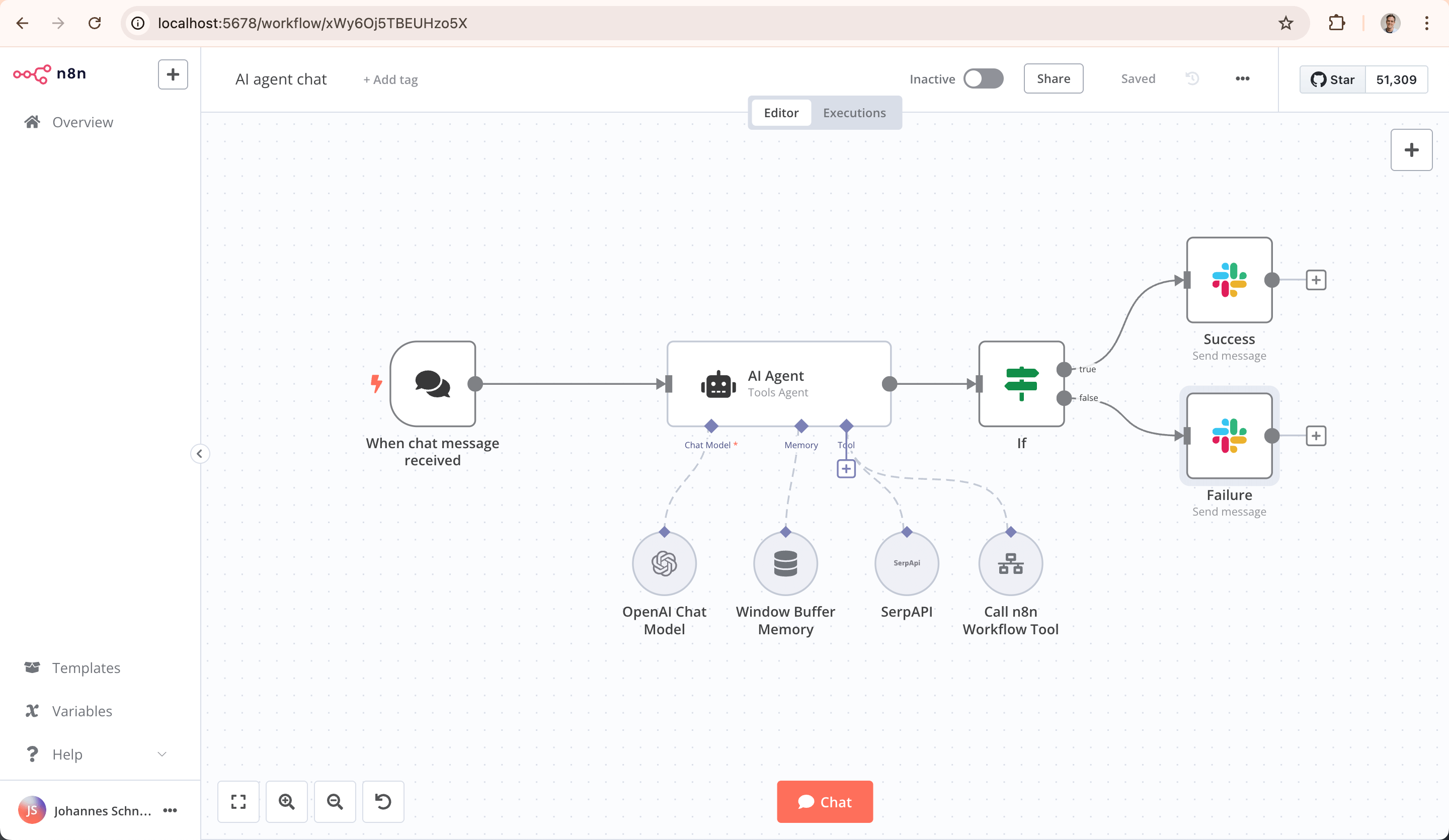
n8n connects apps and APIs through a visual workflow canvas. Nodes receive data, transform it and pass the result to later steps. Webhooks and schedules can start an automation; branching and merging handle different paths. A support request can become a classified ticket and a notification, while a lead can update a CRM and trigger a follow-up. The appeal is a single place for the connections and the logic between them.
Custom code is part of that canvas. JavaScript expressions transform values in node fields, while the Code node adds JavaScript or Python. HTTP Request nodes connect to services with usable APIs when a prebuilt integration is missing. This gives developers more room to handle unusual payloads and business rules, though complex flows still benefit from someone who understands the APIs and data involved.
AI Agent nodes bring model connections, memory and tools into the workflow. An agent can use connected tools alongside the surrounding application logic. The model and its credentials are part of the configuration, so the available services and their costs depend on the setup. The workflow canvas remains useful for combining AI-generated results with ordinary data transformations and app actions.
Human review can pause an agent before a selected tool executes. A reviewer receives the proposed tool and its parameters through chat or services such as Slack, Microsoft Teams and email. Approving runs the action; rejecting cancels it. The approval route can differ from the channel where someone talks to the agent. These controls apply to the tools connected through the configured review step.
The preview n8n Assistant can create, edit and troubleshoot workflows from chat. Its output is an ordinary workflow that can be opened and edited on the canvas. Assistant supports Cloud Starter and Pro, plus self-hosted Community, Registered Community and Business when enabled. Enterprise access is still a preview arrangement. On supported self-hosted instances it uses the owner’s AI provider account; Cloud uses a shared Assistant-credit balance. Generated workflows can need correction before publication.
n8n Cloud provides managed hosting, while self-hosting puts deployment, updates, backups and security in the team’s hands. Business is currently self-hosted only; Enterprise offers both hosting options. Community software uses the Sustainable Use License rather than an unrestricted open-source licence. Internal business automation and consulting services are permitted, but offering customers their own hosted workflow builder needs a separate commercial arrangement. Self-hosting the workflow engine also leaves any connected external apps and AI providers involved in processing.
Paid plans charge for whole-workflow executions, with unlimited steps within a workflow. This differs from paying for each individual action as a flow gets longer. Starter includes 2,500 executions per month, and the default Pro tier includes 10,000; larger allowances and governance features depend on the plan. Execution quotas, concurrent runs and AI allowances are separate limits. The dated plan examples below distinguish monthly billing from the monthly equivalent of an annual commitment.
Cloud AI usage has two separate balances. Assistant credits cover conversations that build or debug workflows; the included monthly balance resets, and extra credits are available on paid Starter and Pro plans. Gateway credits cover supported runtime models and tool services without separate provider keys. Gateway is available on Cloud Starter and Pro, including a trial allowance, but trials cannot top up until upgraded. At an empty Gateway balance, nodes using it stop; nodes with their own provider credentials are unaffected. Topping up one balance never adds to the other.
Best for
- Technical teams connecting apps, APIs and business data
- AI agents with custom logic and approval before selected actions
- Teams choosing between managed Cloud and self-hosted automation
Limitations
Self-hosting requires server maintenance and security management. Community is source-available with commercial-use restrictions. Assistant is a preview with edition-specific availability. Gateway is limited to Cloud Starter and Pro, and AI services can add costs beyond workflow executions.
n8n features
Visual workflows with custom code
Combine app nodes, HTTP requests, webhooks and schedules with JavaScript expressions or JavaScript and Python Code nodes.
AI agents, memory and connected tools
Connect AI models, memory and tools in the same canvas as ordinary app actions and data transformations.
Approval before selected tool calls
Pause an AI tool action for approval through chat, Slack, Teams, email and other supported channels.
Assistant for building and debugging
Create and edit workflows from chat with the preview Assistant. Supported Cloud and self-hosted editions use different AI billing arrangements.
Cloud and self-hosted editions
Choose managed hosting or run your own instance. Community, Business and Enterprise differ in features and licence terms.
Whole-workflow execution billing
Paid plans include an execution allowance rather than a separate charge for every workflow step. Concurrency and plan features have their own limits.
Separate builder and runtime AI usage
Cloud Assistant credits pay for workflow-building conversations; Gateway credits pay for supported runtime services. Your own providers can bill separately.
n8n pricing
n8n offers managed Cloud Starter and Pro plans, self-hosted Business, and Enterprise with Cloud or self-hosted deployment. Paid plans include a workflow-execution allowance; the number of nodes in a workflow is not a separate per-step charge. The self-hosted Community edition has no software subscription fee under its licence, but infrastructure and external services cost extra. Cloud Assistant credits, runtime Gateway credits and your own AI provider charges are separate from execution quotas. Monthly and annual billing have different rates.
Example plans.
Cloud Starter — monthly
EUR 24 / month
Subscription
Plan details
2,500 workflow executions/month. Hosting included; Assistant/Gateway and external provider usage have separate terms.
Cloud Starter — annual commitment
EUR 20 / month
Subscription
Plan details
Monthly equivalent, billed annually; 2,500 executions/month. Runtime services are not unlimited.
Cloud Pro — monthly
EUR 60 / month
Subscription
Plan details
Default 10,000 executions/month. Higher quotas cost more; Assistant allowance depends on plan size.
Technical specifications
Automation and agents
| Feature | n8n |
|---|---|
| Connectors and tool access | App nodes, HTTP requests, JavaScript/Python code and extensible integrations; AI Agent nodes connect models, memory and tools.Cloud and self-hosted; feature availability varies |
| Triggers and scheduling | Webhook and scheduled triggers connect API requests and app actions; expressions, code and branching handle custom logic.Workflow triggers and core nodes |
| Human approval controls | Connect selected AI tools through human review. Chat, Slack, Teams, email and other channels receive the tool and parameters for approval or rejection.Review must be configured on the selected tool route |
| Hosting and deployment | Managed Cloud or self-hosted Community/commercial editions. Business is self-hosted only; Enterprise offers Cloud or self-hosted. External app and model calls retain their own processing.Community licensing and paid governance features differ |
| Execution accounting | Paid plans use whole-workflow executions with unlimited steps. Cloud Assistant credits, runtime Gateway credits and own-provider AI fees are separate; self-hosted Assistant uses your provider account.Assistant/Gateway credits limited to Cloud Starter/Pro; trial top-ups unavailable |
| Included executions (executions per stated period) | 2500Per month; paid Cloud Starter allowance, not the trial or every plan |
n8n alternatives
Explore hosted app automation and dedicated AI application builders.
n8n FAQs
Is n8n free?
The self-hosted Community edition has no software subscription fee under the Sustainable Use License. You provide hosting and pay for any external services. n8n Cloud offers a trial followed by paid plans, rather than a permanent free Cloud tier.
How much does n8n cost?
Cloud Starter and Pro use subscription plans with execution allowances. Business is self-hosted, while Enterprise can be Cloud or self-hosted. Monthly and annual billing differ. See the dated plan examples below for monthly and annual rates. Infrastructure, runtime AI and other connected services can add to the total.
Does every n8n node count as an execution?
No. Paid plan allowances count whole-workflow executions, with unlimited steps within a workflow. Adding another node does not create a separate per-node subscription charge. AI model calls and tool services can still have separate usage fees.
Are n8n Assistant credits and Gateway credits the same?
No. Assistant credits pay for building and debugging through chat, while Gateway credits pay for supported runtime models and tools. Running an Assistant-built workflow does not use Assistant credits. Gateway is limited to Cloud Starter and Pro; self-hosted Assistant uses your own provider account. Trial allowances cannot be topped up until you upgrade.
Can n8n require human approval for AI actions?
Yes. Connect selected tools through a human-review step so the workflow pauses before they run. The reviewer sees the proposed tool and parameters and can approve or reject the action. Review can use chat, Slack, Teams, email or another supported channel.
Is n8n open source?
n8n describes its licensing model as fair-code and source-available. Community uses the Sustainable Use License, which permits internal business automation and consulting but restricts offering n8n as a hosted workflow-building service. A separate commercial agreement is needed for uses outside that licence.
What are the best n8n alternatives?
Zapier focuses on hosted business-app automation with task allowances. Make offers a visual scenario builder with branching and credit-based usage. Langflow focuses on connected AI components and agent applications. n8n stands out for combining visual automation and custom code with a self-hosted option.
Is this your product? Claim this page to update your listing.