

Langflow
Langflow review: AI agents, Python components and pricing
Langflow builds AI agents, retrieval apps and MCP tools on a visual canvas. Explore its Python components, deployment options, costs and alternatives.
FreeAccount optional
- Access
- Free
- Available on
- Web, Desktop, API
Visual AI applications with Python control
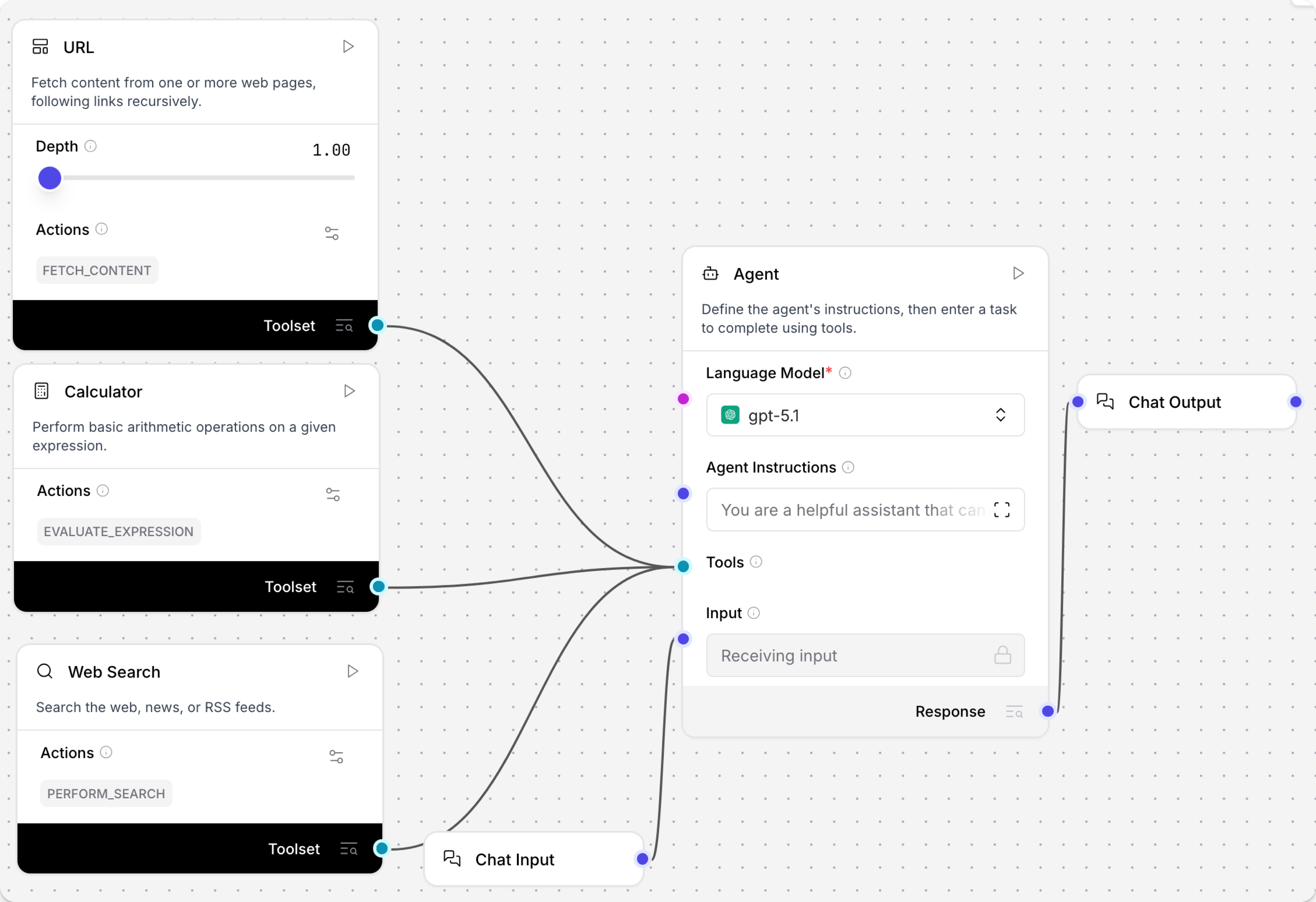
Langflow represents an AI application as connected components on a visual canvas. Prompts, models, data sources and tools each have inputs and outputs, making the path through a flow visible. Templates provide starting points, and flows can be duplicated, imported and exported as JSON. Developers can use the graph to assemble an application while retaining access to the Python behavior underneath it.
Document retrieval combines data ingestion, embeddings and a vector store with the model answering a question. The Vector Store RAG template separates the part that loads and embeds information from the part that retrieves similar material for a reply. Those pieces can use the model and storage services chosen for the application. It suits teams building an assistant around their own documentation, though retrieval quality still depends on the source material and configuration.
The Agent component combines a selected model, instructions and tools. A connected component can expose several actions, with names, descriptions and enabled settings that determine what the agent can use. Another agent or a Run Flow component can become a tool for a larger agent. Available models depend on the configured provider key, its permissions and the provider account’s balance.
Python customization adds API integrations or data-processing behavior beyond the standard components. Custom components define their inputs, outputs and methods, so their behavior can be reused on the canvas and exposed as agent tools. This makes Langflow attractive when an application needs a custom transformation or integration alongside its visual logic. It also means that maintaining a substantial custom component remains a development task.
The Playground provides a chat interface for compatible flows and shows agent tool calls and outputs. It can display and edit message history and use session IDs to keep conversations distinct. Flows with other inputs can be triggered through the API, with relevant model activity reviewed in the Playground. Saved flow versions are explicit snapshots that can be previewed, restored or exported; background auto-save updates the current draft without creating a new saved version.
Human review has two forms. A Human Input component pauses the flow and branches according to the chosen action. A selected agent tool can instead require approval before the call, pausing without adding a decision branch to the canvas. Both resume from a checkpoint after the decision, without rerunning completed steps. A nested Run Flow cannot contain its own human-review pause; that approval belongs in the parent flow.
The API lets an existing application run flows and manage resources such as flow definitions and files. The editor supplies integration snippets, and a deployed server exposes its API specification. A Shareable Playground serves a different purpose: it shares a testing interface for a single flow. It is not a production embedding route and is unavailable in Langflow Desktop.
Langflow supports both sides of MCP. As a client, its MCP Tools component connects an agent to tools from a registered server. As a server, it exposes selected project flows as tools for compatible clients; an exposed flow needs a Chat Output component. Tool names and descriptions can be edited, and flows can be enabled or disabled. Streamable HTTP is the default transport, with legacy SSE available as a fallback. Authentication depends on the server configuration.
Langflow can run locally, through the Mac or Windows Desktop app, or on deployed infrastructure such as a container, remote server or Kubernetes cluster. Its MIT licence permits commercial reuse subject to the licence notice. Model APIs, vector storage and server operation remain separate costs. The Python editor has access to its backend process, filesystem and network, so a shared process is not a tenant boundary. Infrastructure and endpoint controls remain part of operating a production service; local hosting also leaves any configured external model or data service involved in processing.
Best for
- Developers building AI agents and document-retrieval apps
- Teams extending visual components with Python
- AI services delivered through APIs or MCP on chosen infrastructure
Limitations
Production use needs technical ownership of hosting, credentials and access controls. Python components can access the host filesystem and network, and a shared Langflow process does not isolate tenants. Approval must be configured, and nested Run Flow targets cannot pause for their own human decision. Shareable Playground is for testing and is unavailable in Desktop.
Langflow features
Visual flows and reusable templates
Connect prompts, models, data and tools, then duplicate or export flows for reuse.
Document retrieval and vector stores
Build a RAG application with separate ingestion, embedding and retrieval paths using chosen model and storage components.
Agent tools and custom Python
Enable selected tool actions, connect other agents or flows, and add custom components for integrations and data processing.
Playground and saved versions
Inspect agent calls and message history in compatible chat flows. Save explicit versions to preview, restore or export.
Human decisions and tool approval
Pause with a branching Human Input component or require approval before a selected agent tool runs.
Flow APIs and MCP
Call flows from application code, use external MCP tools, or expose selected flows with Chat Output as MCP tools.
Local, Desktop and server deployment
Use the Mac or Windows Desktop app, run locally, or deploy on your chosen infrastructure. Provider usage and hosting costs remain separate.
Langflow pricing
Langflow software is free under the MIT licence. Running an application can still incur model-provider, vector-database and hosting charges through the services you choose. Provider credentials and balances determine model access; free software does not make those calls free. The site also advertises a free cloud account, while managed deployment and support arrangements have their own terms.
Technical specifications
Automation and agents
| Feature | Langflow |
|---|---|
| Connectors and tool access | Configured model providers, data sources and agent tools; components expose selected actions. MCP can connect external tools or publish compatible flows as tools.Provider keys and tool configuration determine availability |
| Triggers and scheduling | Run compatible chat flows in the Playground or trigger flows through the API. Other input types use the API and configured application entry points.Local or deployed server; Playground chat needs compatible input/output components |
| Human approval controls | Human Input creates decision branches; selected agent tools can pause for approval. Checkpoints resume without replaying completed steps. Nested Run Flow targets cannot pause for HITL.Configured gates; nested-flow approval belongs in the parent |
| Hosting and deployment | Local runtime, Desktop for Mac/Windows, containers, remote servers or Kubernetes. A shared process does not isolate tenants; Python can access host files and network.Owner-managed infrastructure and external provider connections |
| Execution accounting | MIT software has no licence subscription fee. Model-provider usage, vector storage, hosting and managed service arrangements have their own costs.Software licence separate from connected services and hosted offers |
| API access | SupportedFlow/resource APIs on the deployment; access controls are configuration-dependent |
Langflow alternatives
Explore AI app platforms and tools for broader business-app automation.
Langflow FAQs
Is Langflow free?
Langflow software is free under the MIT licence. Connected model APIs, vector databases and hosting can still cost money. The official site also advertises a free cloud account; hosted allowances and support arrangements have their own terms.
How much does Langflow cost to run?
The software has no licence subscription fee. Your running costs come from the model calls, storage and infrastructure used by the flow, plus any managed support or deployment service. There is no single per-run price that covers every configuration.
Does Langflow require coding?
Prebuilt components and templates let you assemble flows visually. Python adds custom integrations and behavior, while deploying, debugging and maintaining an application still benefits from developer experience.
Can Langflow build a document chatbot?
Yes. Its Vector Store RAG template includes a path for loading and embedding information and another for retrieving related material to answer questions. Model providers and storage are configured components, and the quality of the answers depends on the documents and retrieval setup.
Can Langflow work as an MCP server?
Yes. Selected project flows can be exposed as MCP tools, with editable tool names and descriptions. The flow needs a Chat Output component. Langflow also works as an MCP client so an agent can use tools from other registered servers.
Can Langflow require human approval?
Yes. Human Input creates decision branches, while selected agent tools can pause for approval before a call. The Playground resolves the decision and resumes the checkpoint. A nested Run Flow cannot pause for its own approval, so that review must sit in the parent flow.
Does self-hosting Langflow keep all data local?
The Langflow runtime can be local or self-hosted, but connected external models, tools and storage can still receive data. Python components can access the runtime’s filesystem and network. A shared process does not isolate tenants; production isolation depends on the surrounding infrastructure.
What are the best Langflow alternatives?
Dify combines AI app building with knowledge bases and managed Cloud plans. n8n combines app automation, code and AI with Cloud or self-hosted deployment. Make focuses on hosted business-app scenarios and branching automation. Langflow stands out for visual AI components that developers can extend with Python.
Is this your product? Claim this page to update your listing.