

Dify
Dify: visual AI workflows, knowledge bases and app deployment
Dify builds AI applications on a visual canvas that connects models, knowledge retrieval, tools and branching logic. Create document workflows, conversational assistants and agents, then share them as web apps or integrate them through an API or MCP. Managed Dify Cloud and self-hosted Community deployments offer different levels of operational control.
Free plan availableAccount optional
- Access
- Free and paid plans
- Example plan
- USD 59 / monthProfessional — monthly
- Available on
- Web, API
Build AI applications around your data and business logic
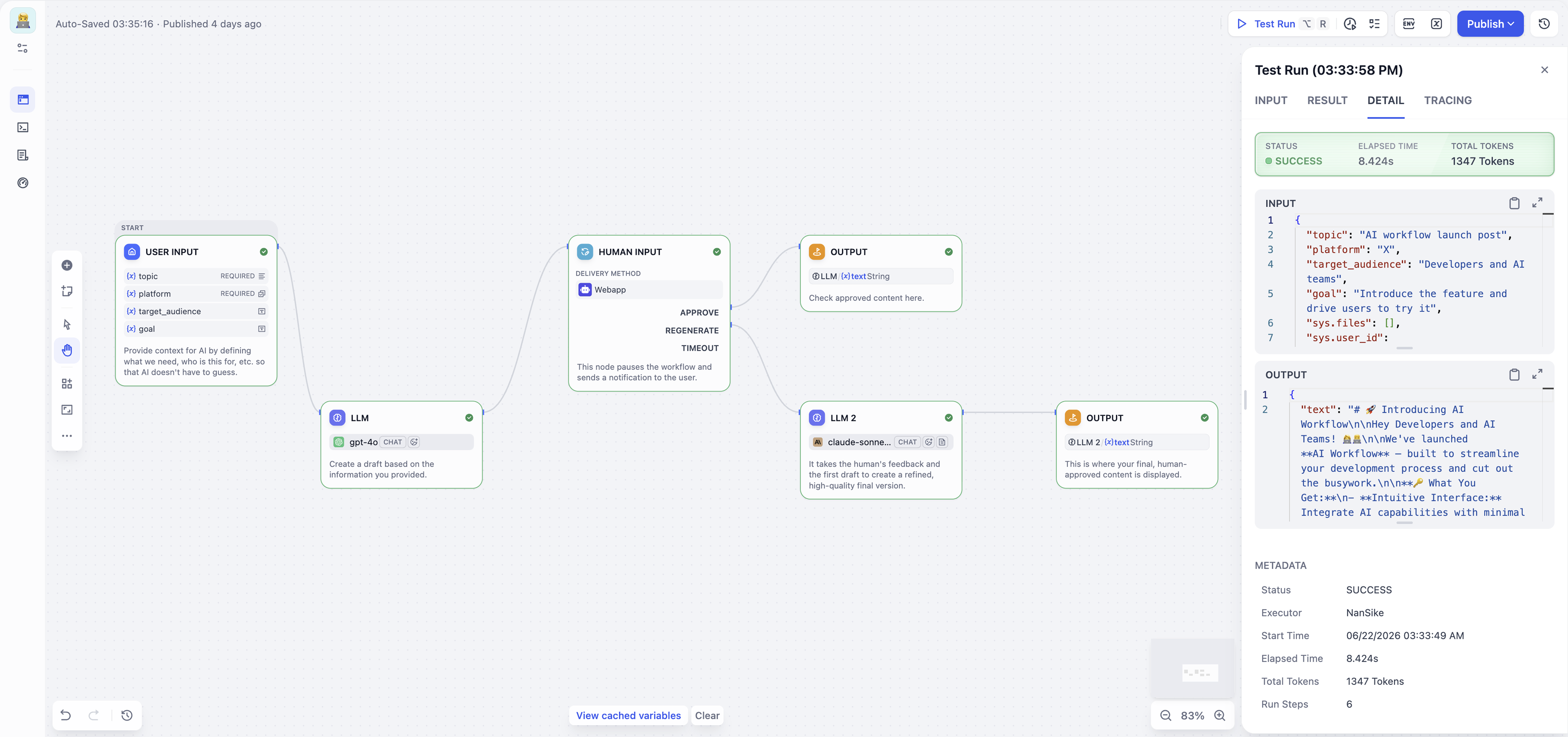
Dify connects individual steps on a visual canvas: accept an input, retrieve relevant knowledge, call a model, branch on a result and return an answer. A Workflow runs a process from start to finish, making it useful for document processing, reports and backend tasks. A Chatflow adds conversation, with each message passing through the configured logic before the assistant replies.
The model layer supports included Cloud credits and your own provider accounts. A response means one model call with an input and output; its credit cost depends on the chosen model. Provider keys work across the workspace and charge your provider account. Model selection and embedding or reranking services therefore remain part of an application’s running costs.
Workflow Studio adds node-level debugging, execution traces, recovery branches and published-version history. Human Input nodes let a flow pause for review, with approval or other responses determining what happens next. Apps can be shared through a hosted web interface, embedded on a website, exposed as an API or published for MCP clients.
Dify Cloud manages the platform and limits resources by workspace plan. Community Edition runs on your infrastructure, while Enterprise adds commercial deployment options and organization controls. The Community licence allows commercial use subject to conditions, including restrictions on multi-workspace services and changes to frontend branding. Hosting and model-provider data handling depend on the deployment you choose.
Best for
- Teams building knowledge-based AI applications
- Visual document workflows and conversational assistants
- Developers publishing AI through APIs or MCP
Limitations
Cloud limits apply to members, apps, knowledge storage, model credits and trigger events. Model credits are not complete workflow runs. Self-hosting requires infrastructure maintenance, and Community licence conditions apply to multi-tenant services and frontend branding. Human review runs where configured; it is not a blanket approval requirement.
Dify workflow and AI application features
Workflow and conversational apps
Build one-pass processes or chat assistants using a shared visual node system.
Knowledge retrieval
Ground model responses in prepared documents and knowledge sources.
Models and connected tools
Combine provider models, app tools, custom APIs, MCP and code in one flow.
Human review steps
Pause at a Human Input node for a decision before the configured process continues.
Debugging and version history
Inspect node outputs and execution traces, route failures and restore published workflows.
Web apps, APIs and MCP
Share a hosted interface, embed it on a site or expose app capabilities to other software.
Dify pricing
Free plan available. Subscription plans. Visit Dify for full plan details and current offers.
Example plans.
Professional — monthly
USD 59 / month
Dify Cloud workspace
Plan details
One workspace, up to three members; 5,000 model credits/month, 50 apps. Provider charges and taxes separate.
Team — monthly
USD 159 / month
Dify Cloud workspace
Plan details
One workspace, up to 50 members; 10,000 model credits/month, 200 apps. Provider charges and taxes separate.
Technical specifications
Automation and agents
| Feature | Dify |
|---|---|
| Connectors and tool access | Visual model, knowledge-retrieval, tool, HTTP and code nodes; custom APIs and MCP tools. Workspace model credentials can be shared by the team.Workflow/Chatflow and configured providers |
| Triggers and scheduling | Workflows start from user inputs, API calls, schedules, webhooks or integration events. Chatflows start from a user message rather than scheduled triggers.Cloud trigger quotas depend on the plan |
| Human approval controls | Human Input nodes pause a configured workflow for approval, edits, comments or forwarding, with timeout handling. Review is part of the designed flow.Configured Human Input nodes |
| Hosting and deployment | Managed Dify Cloud, self-hosted Community and custom Enterprise deployment. Community uses a modified Apache 2 licence with workspace and frontend-branding conditions.Cloud accounts; Community infrastructure and licence |
| Execution accounting | Cloud subscriptions are per workspace. Model credits are consumed per model response at model-specific rates. Own API keys bill the provider separately; trigger-event quotas are separate.Workspace subscription, model usage and event quotas |
| API access | SupportedPublished app API endpoints; Cloud plan limits apply |
Dify alternatives
Explore other visual platforms for agents, app connections and self-hosted workflows.
Langflow
A Python-based visual builder for AI agents, retrieval flows and MCP services.
Compare with DifyMake
A hosted visual canvas for connected apps, transformations and agent tools.
Compare with DifyDify FAQs
Is Dify free?
Dify Cloud offers a free Sandbox with 200 model credits and limited workspace resources. Community Edition has no software charge under its licence, but hosting and provider usage can cost extra.
How much does Dify cost?
Professional is USD 59 per workspace/month or USD 590/year. Team is USD 159/month or USD 1,590/year. Provider charges and taxes are separate; Enterprise uses custom pricing.
Can Dify run on my own infrastructure?
Community Edition supports self-hosting. Its modified Apache 2 licence includes conditions on multi-tenant workspaces and frontend branding; infrastructure maintenance and model connections remain your responsibility.
Does Dify support human approval?
Workflow Studio has Human Input nodes that pause a configured flow for review. Approval behavior depends on the nodes and paths built into that application.
Is this your product? Claim this page to update your listing.