

Trint
Trint: AI transcription, collaborative editing and newsroom tools
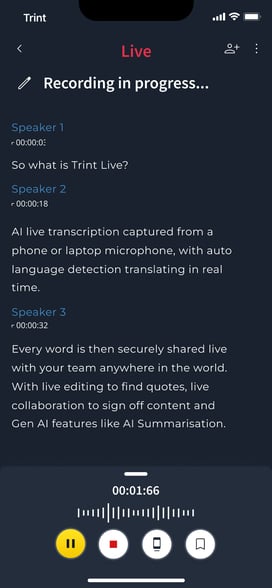
Trint turns interviews, recorded footage and live speech into editable transcripts. Its playback-linked editor, shared drives, captions and Story Builder make it particularly relevant to journalists and production teams. Recorded transcription supports 50+ languages; translation supports 70+, with live capture and collaboration limits depending on the plan.
Free trial availableAccount required
- Access
- Free trial available
- Example plan
- EUR 85 / user / monthPro — monthly
- Available on
- Web, Desktop, Mobile, API
From interviews and footage to transcripts, captions and stories
Trint puts the recording beside its transcript so you can return to the passage behind a quote. Correct speaker names, highlight useful sections and leave comments for colleagues. Review marks show which paragraphs have been checked. Team shared drives bring recordings and transcripts into a common library, with simultaneous editing for up to five collaborators.
Story Builder assembles quotes from different recordings into a draft. Reorder excerpts, shorten them and play the sequence back; source timecodes and links let you return to the original passage. Export a written story as DOCX or a rough cut as EDL or XML for further production. A live transcript becomes available to Story Builder once the recording session has ended.
The Caption Editor creates a separate subtitle file from a transcript. Adjust caption text, line breaks and duration, then export SRT, VTT, STL or Avid TXT subtitles. Changes in the transcript and caption file do not update each other. Transcript CSV exports can include comments, highlights and markers. Interactive HTML exports are no longer available.
The AI Assistant can answer questions about a transcript, find relevant quotes and produce summaries, including during live events. Follow-up questions refine the response. It is a beta feature, and its chat clears when you navigate away. Keep useful responses before leaving and review quoted passages in the recording before using them in a story.
The desktop and mobile apps support recording, review and sharing with a Trint license. The mobile app needs an internet connection. Upload recordings from a device or import them from Dropbox or Google Drive; pasting a public video URL is unsupported. Trint processes content in the cloud and says customer data is not used to train its own models. Original uploaded media is retained for 30 days, while transcripts and transcoded playback remain until you delete the transcript.
Best for
- Journalists editing recorded interviews
- Production teams building stories from footage
- Newsrooms sharing transcripts, captions and rough cuts
Limitations
“Unlimited” recorded transcription has fair-use exclusions for bulk and archive projects. Live hours are limited on Pro/Team, and Team requires at least two seats. The trial processes only five minutes per file. URLs cannot be uploaded directly, and caption edits do not synchronize with the source transcript.
Trint transcription and editorial features
Recorded and live transcription
Transcribe uploaded interviews or capture live speech, with separate language coverage and plan allowances.
Playback-linked editing
Review passages against the recording, rename speakers and add highlights, comments or dictionary terms.
Shared drives and collaboration
Team adds a common recording library and simultaneous transcript editing with up to five collaborators.
Story Builder
Bring linked quotes from multiple recordings into written stories or production rough cuts.
Caption and production exports
Create SRT/VTT/STL captions or move stories into production with EDL/XML exports.
Licensed desktop and mobile apps
Capture, review and share recordings across desktop, mobile and web with a Trint license.
Trint pricing
Pro costs EUR 85 per month for an individual. Team costs EUR 78 per seat per month for two to five members, starting at EUR 156 per month. Annual billing totals EUR 828 per Pro seat or EUR 708 per Team seat. These are regional EUR prices. Recorded transcription has fair-use limits that exclude archive and bulk projects. Pro includes one live hour per month; Team includes one per seat. Business is custom-priced. The seven-day trial transcribes the first five minutes of three files.
Example plans.
Pro — monthly
EUR 85 / user / month
Subscription
Plan details
Individual plan; current regional EUR price. Recorded fair use; one live hour/month.
Team — monthly
EUR 78 / user / month
Subscription
Plan details
Two to five members; minimum two seats (EUR 156/month). One live hour per seat/month; shared drives.
Technical specifications
Transcription and meetings
| Feature | Trint |
|---|---|
| File and meeting capture | Upload audio/video or import from Dropbox/Google Drive. Browser, desktop and mobile editing; Trint Live captures speech. Public video-link uploads are unsupported.Recorded files and licensed apps; advanced live capture is Business-specific |
| Transcription languages | 50+ recorded-transcription languages, 70+ translation languages and 40+ Trint Live languages. Advanced automatic/mixed-language live capture depends on Business access.Current plans/apps; recorded, translation and live coverage differ |
| Speaker-label workflow | Editable speaker labels, linked playback, highlights, comments and review marks. Team adds shared drives and real-time editing with up to five collaborators.Editor tools and Team collaboration scope |
| Transcript exports | DOCX/CSV transcripts; SRT/VTT/STL captions; EDL/XML story exports for production. Interactive HTML exports were withdrawn in June 2026. Caption edits do not sync back to transcripts.Current export guide; formats vary by file type |
| Recording and usage limits | Recorded transcription is unlimited subject to fair use, excluding bulk/archive/continuous-live projects. Pro includes 60 live minutes/month; Team 60/seat/month. Team requires two to five members.Current Pro/Team plans; Business custom |
| Maximum recording duration (minutes) | 180Recorded uploads should be under three hours and 3 GB |
| API access | SupportedBusiness: API integrations; not included in Pro/Team |
Trint alternatives
Other transcription products emphasize multilingual file editing, human transcription or editing the finished media itself.
Trint FAQs
Is Trint free?
Trint has a seven-day trial rather than a permanent free plan. The trial transcribes only the first five minutes of three files; paid use requires a subscription.
How much does Trint cost?
Regional EUR pricing starts at EUR 85 per month for Pro or EUR 156 per month for the minimum two-seat Team subscription. Annual billing is cheaper per month but paid annually. Business has custom pricing.
Can Trint transcribe live speech?
Yes. Trint Live supports 40+ languages. Pro includes one live hour per month; Team includes one hour per seat per month. More advanced live capture options are Business features.
Does Trint use recordings to train AI?
Trint says customer data is not used to train or improve its own models. Processing is cloud-based; deleting original uploads after thirty days does not also delete the transcripts and transcoded playback.
How does Trint Story Builder work?
Story Builder combines quotes from multiple transcripts into a draft you can reorder and play back. Each excerpt retains its source timecodes and a link to the original transcript. Export written stories as DOCX or rough cuts as EDL or XML. Live transcripts can be added after their recording session finishes.
Do Trint caption edits update the transcript?
No. Creating captions makes a separate file, and later edits do not synchronize in either direction. The Caption Editor lets you adjust text, line breaks and timing before exporting SRT, VTT, STL or Avid TXT subtitles.
Does Trint save AI Assistant conversations?
The current AI Assistant beta clears its chat when you navigate away. You can copy a response before leaving. It can find quotes and answer questions about a transcript, but generated answers can contain mistakes and need checking against the source.
Is this your product? Claim this page to update your listing.