

Sonix
Sonix: AI transcription, translated subtitles and a browser editor
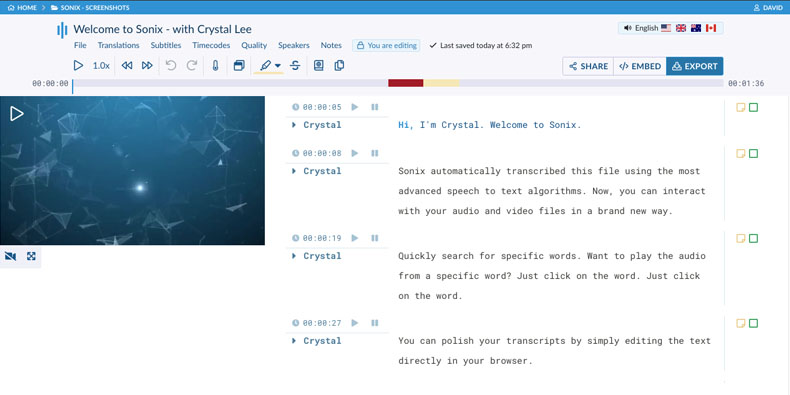
Sonix turns audio and video into editable transcripts in 54+ languages. Its browser editor links each word to the recording, with speaker labels, comments and document or subtitle exports. Paid workspaces add AI analysis and team features, while pay-as-you-go transcription suits occasional recordings.
Free trial availableAccount required
- Access
- Free trial available
- Example plan
- USD 25 / monthCore — monthly
- Available on
- Web, API
From recorded interviews to editable text and subtitles
Sonix turns recorded interviews and video into text you can edit alongside the original audio. Click a word to hear that passage, correct speaker names and add timestamped comments. A custom dictionary supplies names and specialist vocabulary before transcription. You can also import an existing transcript with its recording to add synchronized word-level timestamps.
Export finished transcripts as Word, PDF or plain text, or download SRT and VTT subtitles for video. Core adds API access, Zapier, subtitle burn-in and an embeddable media player. Advanced adds library-wide search, speaker voiceprints and version history; Pro adds webhooks and administrative controls. Occasional transcription needs fewer of these extras than a team managing a growing interview library.
Sonix processes recordings in the cloud. It says customer content is not used to train its machine-learning or generative AI models. Deleting an account removes its stored content, although backups can persist for up to 90 days; limited billing records remain. Enterprise offers SSO and custom retention controls.
Meeting integrations import recordings for transcription. With Zoom connected, recordings can be transcribed after the meeting ends. Cloud-storage imports and API automation reduce manual uploads, while the editor remains the place to correct and export the finished text.
AI Workspace adds summaries, chapters, themes and questions across collections of transcripts. Its answers include references to the underlying material, making it easier to return to a passage. AI analysis uses a separate allowance from transcription and translation, measured by recording duration. Pay As You Go does not include it.
Connecting an external AI application can share the transcripts, files and account information you authorize it to access. The recipient then handles that information under its own terms. You can revoke the connector through Sonix account settings.
Best for
- Journalists and researchers transcribing interviews
- Video producers creating translated subtitles
- Teams editing and sharing recorded-file transcripts
Limitations
Translation, alignment and burned-in subtitles share the transcription hour pool; AI analysis has a separate allowance. Extra seats add no hours. Annual hours cover the full year rather than resetting monthly. Pay As You Go has no AI workspace, and the 30-minute trial is not a permanent free plan.
Sonix transcription, subtitle and collaboration features
Transcripts in 54+ languages
Transcribe recorded audio/video and translate finished text with billable media usage.
Audio-synchronized editing
Click words to hear the original recording, correct text and edit speaker names.
Document and subtitle exports
Download DOCX, PDF, TXT, SRT or VTT; paid workspaces also support burned-in subtitles.
Shared transcript libraries
Advanced and Pro add library-wide search, voiceprints, version history and team permissions.
Separate AI analysis allowance
Subscription workspaces include AI hours measured by the length of recordings analyzed.
API and publishing tools
Core and higher provide API/Zapier and an embedded media player; webhooks require Pro.
Sonix pricing
Pay As You Go is USD 10/audio hour, prorated to the second. Monthly workspaces cost USD 25 Core, USD 50 Advanced or USD 80 Pro, including 5, 20 or 40 shared transcription/translation hours respectively. Annual totals are USD 275, USD 550 and USD 880, with hours available for the full year. One seat is included; extra seats cost USD 25/month or USD 275/year each and add no hours. Subscription overage is USD 10/hour. A 30-minute trial is available.
Example plans.
Core — monthly
USD 25 / month
Subscription
Plan details
One workspace/seat; five shared transcription/translation hours and five AI workspace hours. Extra seats add no hours.
Advanced — monthly
USD 50 / month
Subscription
Plan details
One workspace/seat; twenty shared transcription/translation hours and twenty-five AI workspace hours.
Pro — monthly
USD 80 / month
Subscription
Plan details
One workspace/seat; forty shared transcription/translation hours and one hundred AI workspace hours.
Technical specifications
Transcription and meetings
| Feature | Sonix |
|---|---|
| File and meeting capture | Upload audio/video files or import recordings from supported cloud storage. Direct uploads support files up to 4 GB; the browser editor links text to playback.Recorded-file transcription |
| Transcription languages | Transcription and translation in 54+ languages. Translation draws from the same usage pool as transcription.All plans; usage charges apply |
| Speaker-label workflow | Automatic speaker separation with editable names and word-level timestamps. Reusable voiceprints and transcript version history require Advanced or Pro.Basic labels versus higher-tier voice recognition |
| Transcript exports | DOCX, PDF, TXT, SRT and VTT on all plans. Core and higher add burned-in subtitles and an embedded media player; translation/alignment/burn-in consume usage hours.Export formats and billable media operations |
| Recording and usage limits | Monthly workspace pools: Core five hours, Advanced twenty, Pro forty for transcription/translation. Separate AI pools are five, twenty-five and one hundred hours. Extra seats add no hours; annual pools apply to the full year.Workspace allowances, not per-user allowances |
| Included monthly transcription (audio minutes) | 300Core monthly; workspace transcription/translation pool |
| API access | SupportedCore and higher; webhooks require Pro |
Sonix alternatives
These alternatives cover human transcription, larger recorded files and transcript-based media editing.
Sonix FAQs
Is Sonix free?
Sonix offers a 30-minute transcription trial and advertises that no credit card is required. Continued use costs extra through pay-as-you-go credits or a subscription.
How much does Sonix cost?
Pay As You Go costs USD 10 per audio hour. Monthly Core, Advanced and Pro workspaces cost USD 25, USD 50 and USD 80. One seat is included; extra seats and usage above the shared allowance cost more.
Does each Sonix user receive separate transcription hours?
No. Included hours belong to the workspace. An extra seat costs USD 25/month or USD 275/year and adds no hours. Annual allowances are available for the full year rather than monthly resets.
Can Sonix create translated subtitles?
Yes. Sonix supports translation and SRT/VTT exports. Translation draws from the same pool as transcription; burned-in subtitles require Core or higher and also consume that pool.
Do Sonix AI summaries use my transcription hours?
AI analysis has its own workspace allowance, measured by the duration of the recordings analyzed. Core, Advanced and Pro include 5, 25 and 100 AI hours per month respectively. Translation, transcript alignment and subtitle burn-in use the transcription allowance instead. Pay As You Go does not include AI Workspace.
Can Sonix transcribe Zoom meetings automatically?
Yes. Connecting Zoom lets Sonix import and transcribe recordings after meetings finish. This uses a meeting recording; it is a different process from a bot joining a scheduled call to take live notes.
Can I upload an existing transcript to Sonix?
Yes. Upload the transcript with its audio or video, and Sonix aligns the text with the recording and adds word-level timestamps. Alignment consumes transcription hours. You can then review the synchronized text in the browser editor.
Is this your product? Claim this page to update your listing.