

Superhuman Docs
Superhuman Docs: collaborative documents, tables and built-in AI
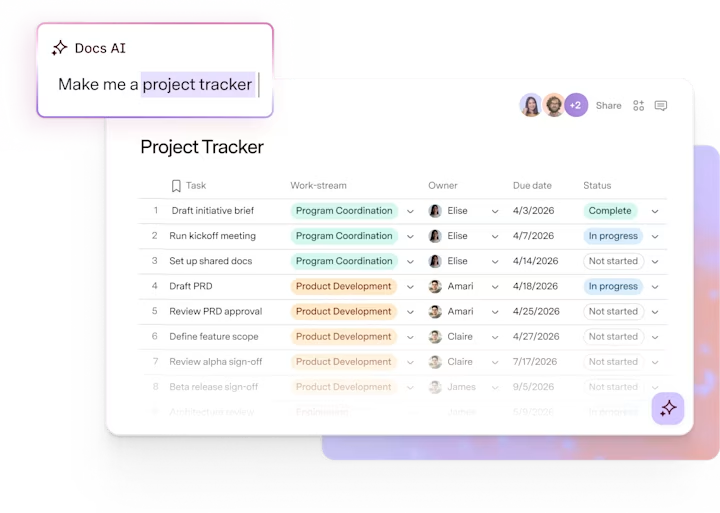
Superhuman Docs, formerly Coda, combines team documents with connected tables, formulas, forms and automations. Docs AI can draft content and take actions inside the document, from building a tracker to updating its rows.
Free plan availableAccount required
- Access
- Free and paid plans
- Example plan
- EUR 15 / user / monthPro
- Available on
- Web, Desktop, Mobile
A shared document that can also run a team’s processes
Superhuman Docs brings prose, tables, charts and interactive controls into a shared document. A project brief can sit alongside its tracker; a knowledge hub can include data and intake forms. Formulas, buttons and automations help turn those documents into working team tools rather than static reference pages.
Docs AI is a new beta experience that replaced Coda AI. It can create or edit pages, organise tables and resolve comments. AI columns apply prompts to rows, while AI blocks generate summaries or themes from referenced content. Document and file context can be attached to requests, with AI extraction supporting PDFs and images. Paid Doc Makers receive AI access subject to fair use; editors and Free workspace members have limited trial access.
The Docs MCP connects external AI assistants to document actions. Paid Doc Makers can use read and write tools within their access, while editors receive a limited read-only taste of 30 requests per week and a maximum of 60 per month. Enterprise administrators can control AI access by workspace and separately restrict MCP authentication for selected members.
Packs connect outside services and data to documents. Their availability depends on the subscription and connected service account. Eligible existing Docs workspaces can move into a Superhuman bundle when upgraded, while other workspaces remain on Docs-only plans. This makes workspace eligibility and the number of Doc Makers relevant to the subscription cost.
Best for
- Teams keeping project information and tracking in one place
- Operations teams building forms and repeatable processes
- People combining written context with live structured data
Limitations
Docs AI is in beta, and access depends on role and plan. Shared-doc size, automation quotas and connector refresh frequency vary by tier. Enterprise workspaces requiring HIPAA have AI disabled. A Docs upgrade can also change an eligible workspace’s suite subscription.
Superhuman Docs features
Documents with live tables
Combine written context, structured project data, charts and forms in a shared workspace.
Docs AI
Draft and edit content, build tables and make changes inside the document.
AI columns and summaries
Apply prompts across rows and generate insights from referenced content.
Formulas and automations
Create reusable controls and processes around your team’s data.
Packs and connected data
Bring external services into documents, with refresh rates based on plan.
MCP and enterprise controls
Connect external AI tools and govern workspace AI access on Enterprise.
Superhuman Docs pricing
Free plan available. Plans priced per user. Visit Superhuman Docs for full plan details and current offers.
Example plans.
Pro
EUR 15 / user / month
Observed regional Docs subscription
Plan details
Per paid Doc Maker, including admins; editors and viewers are free. Bundle eligibility and plan limits apply.
Business
EUR 40 / user / month
Observed regional Docs subscription
Plan details
Per paid Doc Maker, including admins; editors and viewers are free. Bundle eligibility and plan limits apply.
Technical specifications
Productivity and knowledge
| Feature | Superhuman Docs |
|---|---|
| Workspace workflow | Collaborative documents, connected tables, formulas, forms and automations.Plan quotas apply |
| Connected knowledge | Document pages, tables, rows and attached PDF/image context.Docs AI beta; role and access limits apply |
| Permission and sharing controls | Enterprise admins can control workspace AI access and MCP authentication by member.Enterprise only; HIPAA-required organisations have AI disabled |
| Editable outputs | Draft and edited pages, created tables, updated rows, summaries and resolved comments.AI may change document content |
| Workspace integrations | Packs for connected services and MCP read/write tools for external assistants.Editors receive limited read-only MCP access |
Superhuman Docs alternatives
Notion offers documents and flexible databases. ClickUp combines documents with task management, while Glean retrieves company knowledge across connected services.
Notion
Documents, databases and AI knowledge search in a flexible workspace.
Compare with Superhuman DocsClickUp
Collaborative documents alongside projects, tasks and Brain AI.
Compare with Superhuman DocsGlean
Enterprise search and agents across connected company information.
Compare with Superhuman DocsSuperhuman Docs FAQs
Is Superhuman Docs the same product as Coda?
Coda became Superhuman Docs in July 2026. Docs AI is a newer beta experience with actions inside the document, rather than simply a renamed Coda AI assistant.
Who is billed in a Docs workspace?
Maker billing charges for Doc Makers, including workspace admins. Editors and viewers are free. Bundled workspace billing is managed through the Superhuman Admin Hub.
Is Docs AI available to every editor?
Paid Doc Makers have included access subject to fair use. Editors and Free workspace members have limited trial access and need a paid Maker role to continue after that allowance.
Can external AI assistants update my documents?
Docs MCP supports read and write tools for paid Doc Makers within their access. Editors have a limited read-only taste; Enterprise admins can restrict connections.
Does Enterprise always include AI access?
Enterprise administrators decide which workspaces can use Docs AI. Workspaces in organisations requiring HIPAA compliance have AI automatically disabled.
Will upgrading Docs change my other subscriptions?
Eligible workspaces can be enrolled in a Superhuman bundle when upgraded. Already bundled workspaces upgrade the suite; ineligible workspaces remain on Docs-only plans.
Is this your product? Claim this page to update your listing.