

SlidesAI
SlidesAI: AI presentations with editable slides and brand kits
SlidesAI turns topics, notes and documents into editable presentations. Create in its browser editor, Google Slides or PowerPoint, then refine the content, reuse your brand and share the finished deck.
Free plan availableAccount required
- Access
- Free and paid plans
- Example plan
- EUR 10.7 / user / monthIndividual Pro — monthly
- Available on
- Web, Desktop
Create slides from your content, then keep editing
SlidesAI supports a browser presentation editor, a Google Slides add-on, a PowerPoint add-in and a ChatGPT helper. Start with a topic or notes, or use a paid plan to work from a script, PDF or Word document. Set the audience, tone, language and slide count, then review the outline before generating your deck. Slides remain editable, so you can revise the text, adjust layouts and replace visuals after generation.
The editing tools combine slide design with AI writing. Rewrite, shorten, expand or translate content, change a layout and add slides. Stock images and AI-generated visuals provide alternatives to a text-heavy deck. PowerPoint users can continue working in the host editor, while the web platform offers its own workspace. Sharing in Google Slides and PowerPoint follows those applications’ permissions; the SlidesAI platform includes view and edit permissions and comments.
Brand Kits store colours, typography, slide styles and image libraries. Import an existing PowerPoint file of up to 100 MB or build a kit from colours and fonts. An imported template can be prepared for AI to reuse its slide designs; a kit without that step applies your brand to SlidesAI layouts. Free includes one personal kit, Pro three and Premium six. Paid plans allow custom font uploads. Kits can also belong to a team or organization.
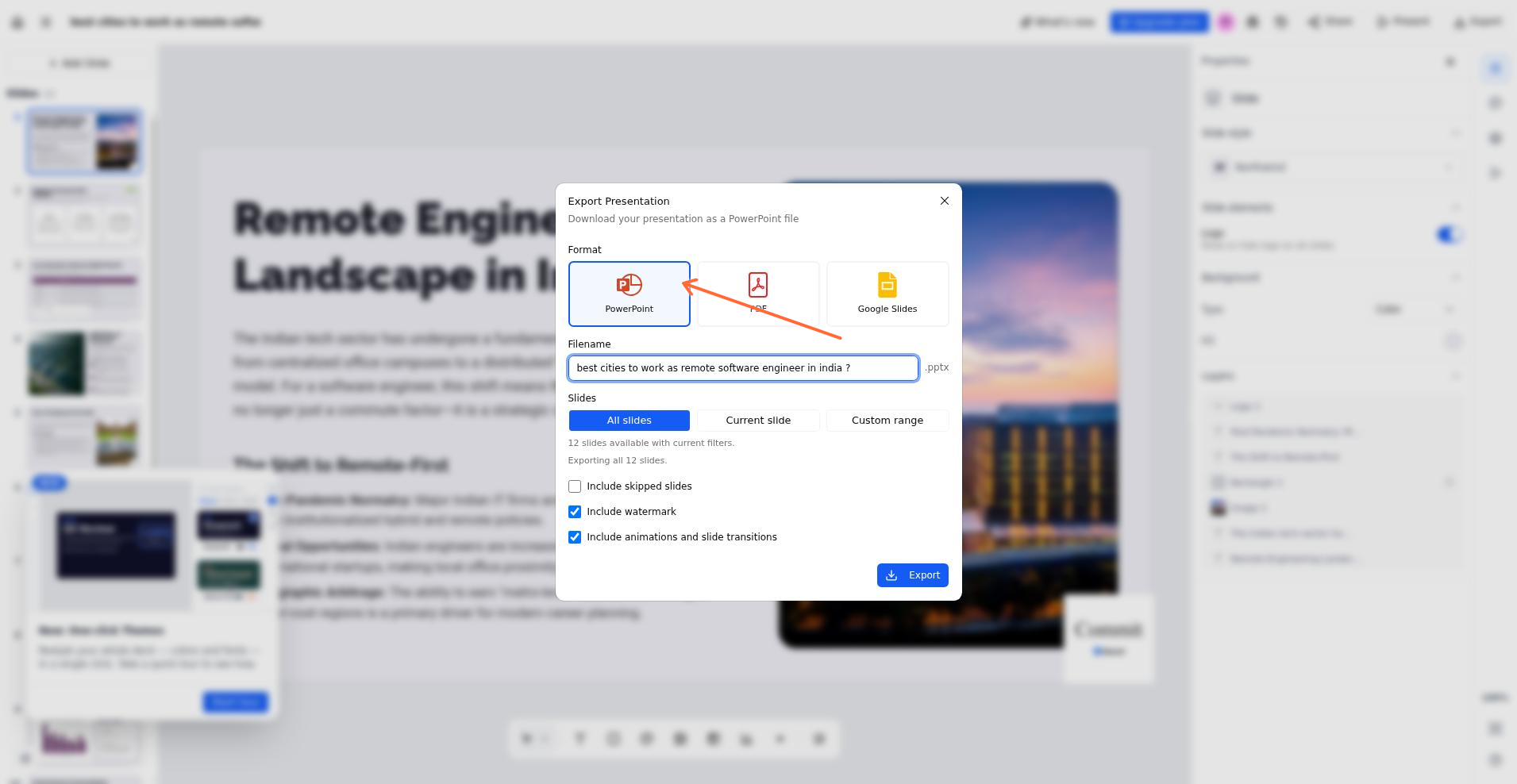
Export a presentation to editable PowerPoint, Google Slides or PDF. The free plan adds a small SlidesAI badge to exported slides and an end screen for eligible public-link viewers. Paid plans can remove the export badge, but the watermark option must be switched off each time an export is opened. Files exported before upgrading keep their original branding until you export again.
Best for
- Teachers preparing lesson presentations
- Professionals turning notes into slide decks
- Teams reusing PowerPoint designs and brand assets
Limitations
Document uploads and custom fonts require a paid plan. Free exports carry SlidesAI branding. Paid users must turn off the watermark option for each export. Credit allowances and prices differ between monthly, annual and team plans.
SlidesAI features
Topics, notes and document inputs
Start with a presentation brief or notes; paid plans add scripts, PDF and Word documents.
Editable slide decks
Refine text, visuals and layouts in the web editor, Google Slides or PowerPoint.
AI rewriting and translation
Shorten, expand, rephrase or translate presentation content and add new slides.
Reusable Brand Kits
Store colours, fonts, slide styles and visual assets, with an existing PPTX as a template source.
PowerPoint, Google Slides and PDF exports
Continue editing in another slide application or distribute a PDF; free exports include branding.
Sharing and team credit pools
Use view/edit permissions and comments in the platform; paid team plans pool their members’ credit allowances.
SlidesAI pricing
Free plan available. Plans priced per user. Visit SlidesAI for full plan details and current offers.
Example plans.
Individual Pro — monthly
EUR 10.7 / user / month
Current regional EUR offer
Plan details
Regional EUR price; 2,500 monthly AI credits. Taxes excluded.
Individual Premium — monthly
EUR 22.3 / user / month
Current regional EUR offer
Plan details
Regional EUR price; 7,000 monthly AI credits. Taxes excluded.
Team Pro — monthly
EUR 10.7 / user / month
Current regional EUR offer
Plan details
Per seat, observed with two members (EUR 21.40 total); 2,500 credits per seat/month pooled in the team wallet. Taxes excluded.
Technical specifications
Presentations
| Feature | SlidesAI |
|---|---|
| Brief and document inputs | Topic/notes; paid script, PDF and Word uploads. Current character limits: Basic 2,500; Pro 50,000; Premium 100,000.Platform and subscription scope stated in the fact |
| Slide editing controls | Editable slides, AI rewriting/shortening/expansion/translation, themes, layouts and new slides; web, Google Slides and PowerPoint surfaces.Platform and subscription scope stated in the fact |
| Presentation exports | PPTX, Google Slides and PDF. Free exports carry a badge; paid users untick Include watermark each export. Existing files require re-export after upgrading.Platform and subscription scope stated in the fact |
| Brand templates | Basic 1, Pro 3, Premium 6 personal Brand Kits; import PPTX up to 100 MB or build colours/fonts/styles. Paid custom fonts; imported templates can be made AI-ready.Platform and subscription scope stated in the fact |
| Sharing and collaboration | Platform sharing with view/edit permissions and comments; host-native Google Slides/PowerPoint sharing. Paid team credits pooled in one wallet.Platform and subscription scope stated in the fact |
SlidesAI alternatives
Plus AI also works in PowerPoint and Google Slides, Pitch offers a collaborative presentation workspace, and Canva combines slides with a wider design library.
Plus AI
Presentation generation and AI editing in PowerPoint and Google Slides.
Compare with SlidesAIPitch
Shared presentation editing, branded templates and viewer analytics.
Compare with SlidesAICanva
Presentation templates alongside graphics, video and other visual designs.
Compare with SlidesAISlidesAI FAQs
Is SlidesAI free?
Basic is free and currently includes 200 monthly AI credits, a 2,500-character input limit and one Brand Kit. Free exports include SlidesAI branding. Document uploads and custom fonts require a paid plan.
Does SlidesAI work with PowerPoint and Google Slides?
Yes. SlidesAI has add-ins for both, as well as a web platform and a ChatGPT helper. Generated slide decks remain editable.
Can SlidesAI create presentations from PDF or Word files?
Paid plans support PDF and Word uploads. You can also create presentations from a topic, notes or written content.
Can I use my own PowerPoint template?
Brand Kits can import a PPTX file up to 100 MB to extract colours, fonts, assets and slide designs. Preparing the imported template for AI lets generated presentations reuse its slides.
Can I export without a SlidesAI watermark?
Paid plans support watermark-free exports when you turn off Include watermark in the export dialog. The option resets when the dialog is opened again. Free exports retain the badge.
Is this your product? Claim this page to update your listing.