

Pitch
Pitch: AI presentations and a shared workspace for teams
Pitch combines AI slide creation with an editable presentation workspace. Build a deck from a prompt and source files, keep it consistent with your templates, and collaborate with colleagues before sharing a link or exporting to PowerPoint.
Free plan availableAccount required
- Access
- Free and paid plans
- Example plan
- EUR 12 / user / monthPlus — monthly
- Available on
- Web, Desktop, Mobile
AI slide creation inside a collaborative editor
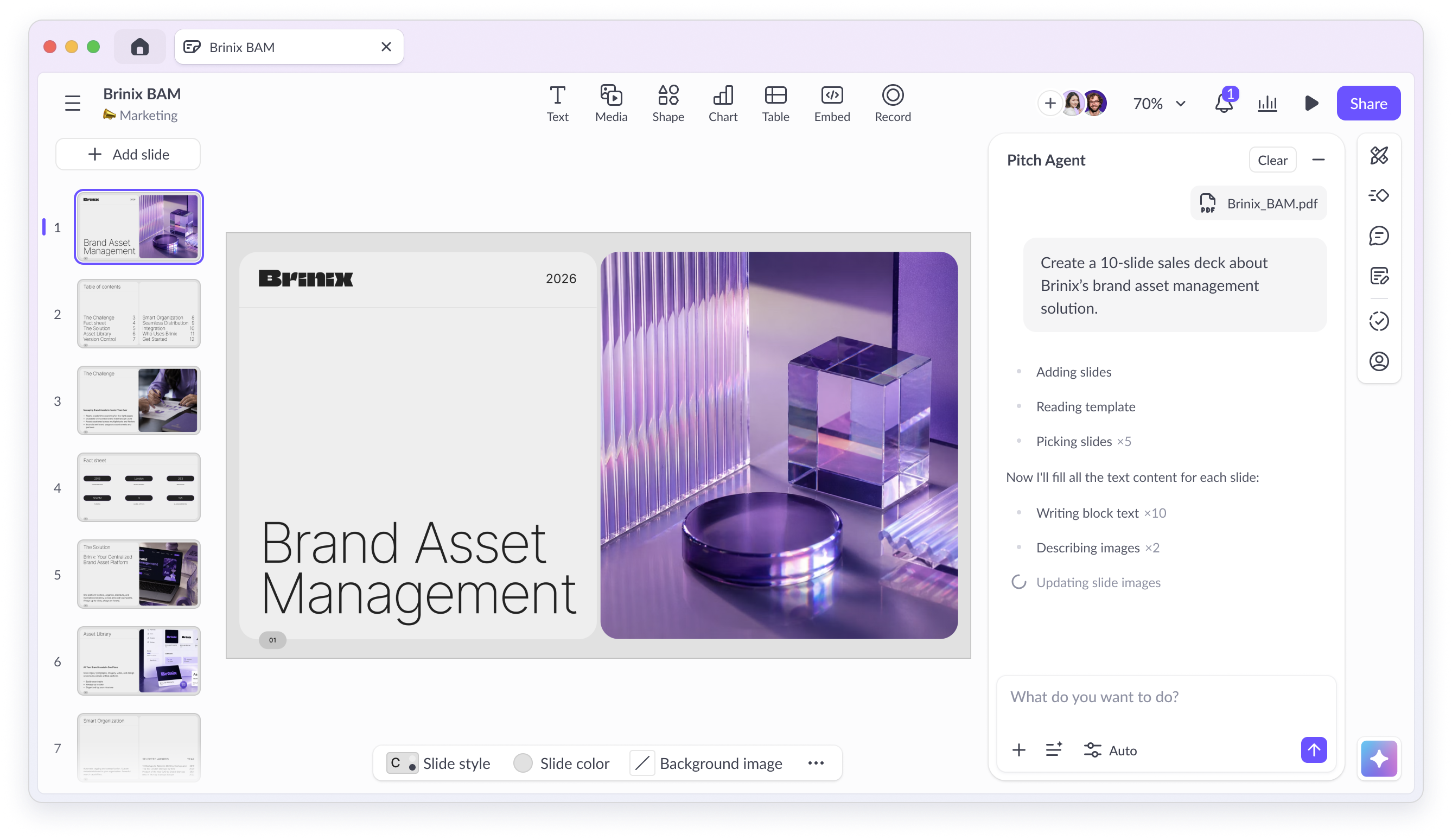
Pitch brings AI generation into a presentation editor built for shared work. Pitch Agent creates a deck from a prompt, a chosen template and optional PDF, Markdown, text or CSV files. Images can accompany the source material. The generated slides remain editable: refine the content through chat, add slides, replace images or adjust individual elements in the editor.
Templates provide the design foundation. Pitch can build a branded template from a company domain, then apply its colours, fonts and slide patterns. Custom templates are available on Free; uploading custom fonts requires Plus or above. Team and Business add workspace roles and shared spaces, with paid editing seats and free commenter roles. Guests receive access to individual presentations rather than the entire workspace.
Share a live presentation link, publish an embed or export a PDF. Plus and higher also support editable PowerPoint files. PPTX keeps text, shapes, tables and speaker notes, but animations and transitions are omitted. Uploaded videos and recordings become thumbnails, and charts or fonts can look different. PowerPoint export requires an internet connection and the web or desktop app; it is unavailable in the mobile app.
Pitch’s AI uses credits pooled across the workspace. Free provides 100 lifetime credits. Paid allowances renew with the subscription: monthly plans receive a monthly allocation, while annual plans receive a yearly allocation. Team adds engagement analytics for up to 25 advanced links and two shared pitch rooms; Business removes those limits and extends version history. The free editor remains useful after its initial AI credits run out.
Best for
- Teams creating sales decks and client presentations
- Professionals reusing branded slide templates
- Collaborators who need editable slides and viewer analytics
Limitations
Free AI credits do not renew, and PowerPoint export requires a paid plan. Annual AI credits reset at annual renewal. PPTX omits Pitch animations and replaces uploaded videos and recordings with thumbnails.
Pitch features
Prompt and document-based decks
Create editable slides from a brief, PDF, Markdown, text or CSV files and reference images.
AI editing beside your slides
Add slides, revise content, replace images and ask questions about the deck with Pitch Agent.
Reusable branded templates
Apply saved slide styles or create a template from your company domain; custom font uploads require Plus or above.
Shared editing and feedback
Collaborate through editing seats, commenter roles, guest invitations and plan-specific teamspaces.
PowerPoint and PDF exports
Use PDF on Free or eligible editable PPTX on paid plans, with documented media and animation limitations.
Presentation engagement analytics
Team and Business offer advanced sharing links and shared pitch rooms with viewer analytics.
Pitch pricing
Free plan available. Plans priced per user. Visit Pitch for full plan details and current offers.
Example plans.
Plus — monthly
EUR 12 / user / month
Current documented product
Plan details
One editing member. Monthly billing; taxes excluded.
Team — monthly
EUR 18 / user / month
Current documented product
Plan details
Per paid editing seat; 1–25 workspace members. Taxes excluded.
Business — monthly
EUR 24 / user / month
Current documented product
Plan details
Per paid editing seat; 1–200 workspace members. Taxes excluded.
Technical specifications
Presentations
| Feature | Pitch |
|---|---|
| Brief and document inputs | Prompt with PDF, MD, TXT or CSV context and reference images; choose a gallery or workspace template. |
| Slide editing controls | Editable slide elements; Pitch Agent chat, new slides, image replacement and block-level quick actions. |
| Presentation exports | Free branded PDF/embeds; paid editable PPTX with speaker notes. PPTX omits animations and replaces uploaded videos/recordings with thumbnails; web/desktop online export only. |
| Brand templates | Custom templates on all plans; domain-based branded templates. Custom font uploads require Plus or higher. |
| Sharing and collaboration | Free up to 5 members; Plus 1; Team up to 25; Business up to 200. Guests have deck-specific access; Team/Business support free commenter roles. |
Pitch alternatives
Gamma emphasizes flexible card-based presentations, Beautiful.ai automates slide layouts, and Canva adds a broad visual-design workspace.
Gamma
AI-generated presentations with editable cards, web sharing and slide exports.
Compare with PitchBeautiful.ai
Smart Slide layouts that automatically arrange presentation content.
Compare with PitchCanva
Presentation design alongside graphics, videos and shared brand assets.
Compare with PitchPitch FAQs
Is Pitch free?
Yes. Free includes unlimited presentations, up to five workspace members and 100 lifetime AI credits. The AI allocation does not renew. PDF exports and embeds carry Pitch branding; PowerPoint export requires a paid plan.
Can Pitch generate slides from a document?
Pitch Agent accepts PDF, Markdown, text and CSV files as context, plus reference images. It uses your prompt and selected template to create editable slides.
Can I export Pitch presentations to PowerPoint?
Plus, Team and Business support PPTX export from the web or desktop app. Text, shapes, tables and notes are supported; animations are omitted, uploaded videos and recordings become thumbnails, and charts or fonts may change.
Do Pitch AI credits reset each month?
Monthly subscriptions reset at monthly renewal. Annual subscriptions receive an annual allocation that resets yearly: 6,000 credits per seat for Plus or Team, and 9,000 for Business. Workspace members share the available credits.
Does Pitch work offline?
Previously opened presentations can be edited and presented offline in supported web and desktop modes. Some media, integrations and sharing features need a connection. PDF and PowerPoint exports require being online.
Is this your product? Claim this page to update your listing.