

Mem
Mem: AI notes, voice capture and personal follow-ups
Mem combines AI notes, voice capture and a personal agent for follow-ups. Explore its search, sharing, pricing, platform limits and alternatives.
Free plan availableAccount required
- Access
- Free and paid plans
- Available on
- Web, Desktop, Mobile
Capture knowledge and keep unfinished work in view
Mem combines a notes workspace with a personal AI agent. You can save ideas, meeting context and research, then ask the assistant to retrieve or use that material. The agent also tracks commitments and brings unfinished work back to your attention with relevant context. It is a strong fit for people whose knowledge arrives as conversations, fragments and follow-ups, rather than a carefully maintained project database.
The workspace remains editable. Its editor supports Markdown, collapsible headings and bullets, and AI cleanup for rough notes. Collections provide visible groupings that you can maintain yourself or ask Mem to organize. This gives the AI useful context without making your knowledge an opaque chat history. You can keep writing normally and use the assistant when a draft or collection needs attention.
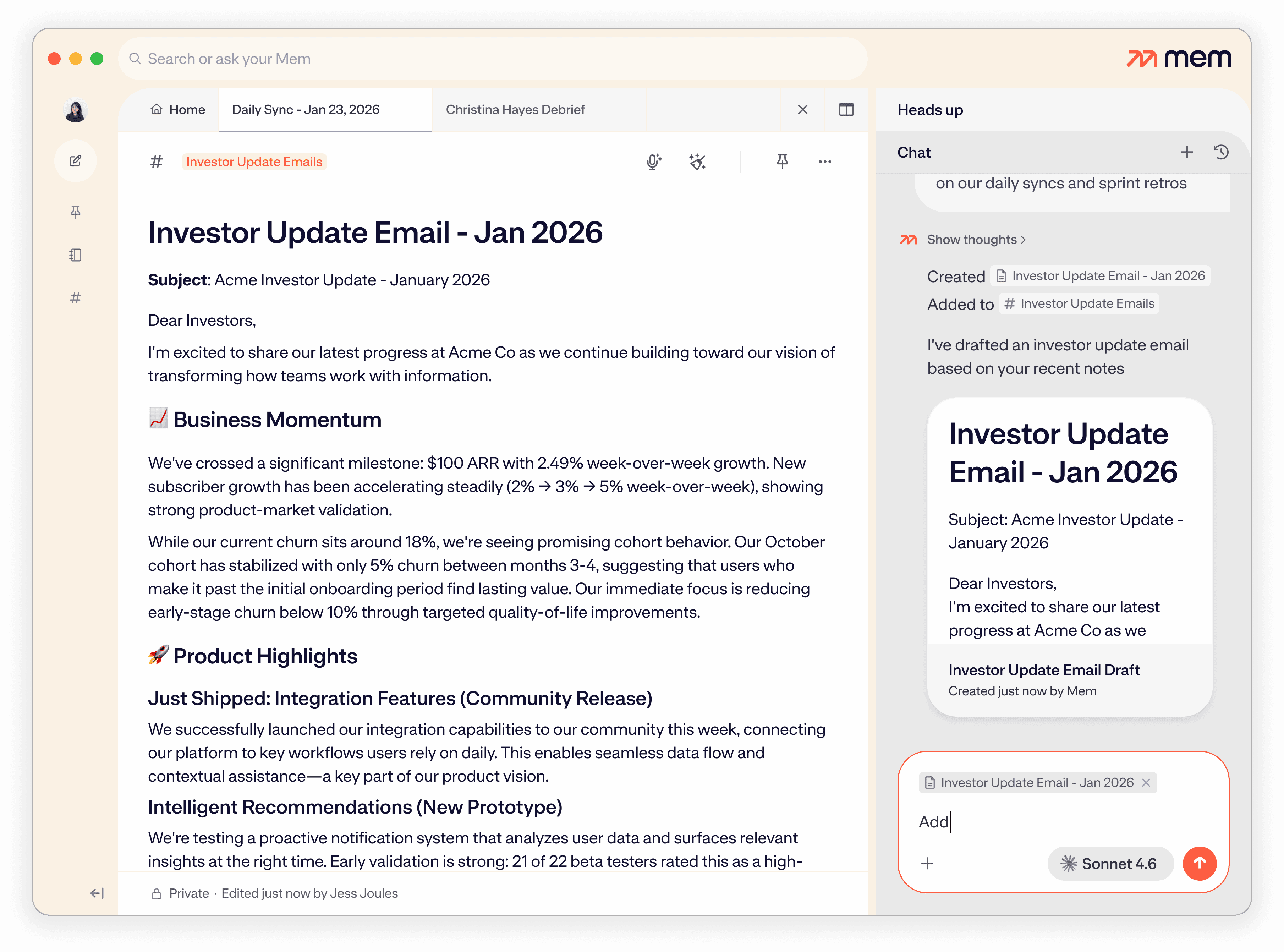
Search works at different levels. Suggestions as you type match note titles; the full results page offers keywords and filters. Deep Search finds semantic matches in note contents, so a remembered description can be useful even without the original wording. Heads Up brings related notes and meeting timelines beside the current note. Chat can then summarize, draft, edit notes or organize Collections using that context. Deep Search and templates are available on every plan, within the applicable usage limits.
Voice Mode turns spoken ideas or meetings into structured notes, with the recording and transcript attached. Mac and Windows desktop capture can include microphone and computer audio, while web and iOS use the microphone only. Full system-audio recording and meeting detection require supported Windows devices or Apple silicon Macs; an Intel Mac can be limited to the microphone. Voice Mode currently supports English. These distinctions matter for video calls, where microphone-only capture can miss other participants.
Push-to-Remember is a separate desktop route into Mem Agent. Hold a global shortcut, speak and release to send the request; a double tap starts a hands-free message. The desktop app must remain running, although its window can be hidden. The shortcut is available on every plan and uses the normal agent-message allowance. Unlike dictation into another app, it sends a request that can use your saved notes and perform supported actions in Mem.
Mem Agent uses notes, messages and calendar context to identify commitments and choose a useful moment to follow up. You can tell it when work is finished or no longer relevant. Pro plans add custom routines for scheduled briefs, research, reminders or note organization, plus connections to supported sources such as Gmail, Slack and Todoist. These features have separate allowances. Calendar-aware reminders do not establish that Mem can automatically reschedule events or complete work in every connected app.
The personal agent sits alongside a workspace that supports sharing. Notes are private by default, but you can share individual notes with teammates for collaboration. Shared Collections grant members access to notes added to them, and the same note can belong to more than one Collection. Invited people need a Mem account to open the shared content. Sharing knowledge is different from turning the personal agent into a company-wide enterprise-search service.
Mem can save new notes and edits locally while offline, then sync them to the cloud when the connection returns. That does not make the cloud AI an entirely offline system. Imports accept Markdown and plain text, but do not preserve source folders or bring attachments across with the notes. Export supports notes and Collections as Markdown. Mem also presents MCP access for Claude and ChatGPT to search and create notes. Bringing context from another assistant through a reviewed summary is a manual transfer, not an ongoing import of its full chat history.
The main cost question is capacity. Free and Plus support capture and tracking at smaller allowances; Pro adds routines, connections and larger limits. Messages, newly created notes and voice time are measured separately from the tasks or projects open at once. An email can consume both a message and a new-note allowance. Mem encrypts data in transit and at rest but is not end-to-end encrypted, because the service processes it for AI features. Notion offers a broader documents-and-databases workspace, Reflect focuses on connected personal notes, and ClickUp brings documents into project management.
Best for
- People collecting ideas, research and meeting notes in one place
- Founders and consultants keeping track of commitments and follow-ups
- Writers using saved knowledge as context for AI drafts
Limitations
Mem is cloud-based and is not end-to-end encrypted. Monthly activity and active-work limits apply even on paid plans. Full meeting-audio capture needs a supported Windows or Apple silicon Mac setup; web and iOS capture the microphone only. Voice Mode currently supports English, and scheduled routines and external connections require eligible Pro plans.
Mem features
Editable notes and Collections
Write in a Markdown-friendly workspace, clean up rough notes with AI and organize knowledge into visible Collections.
Deep Search and Heads Up
Retrieve notes by meaning or keywords, and surface related notes and meeting timelines beside the current document.
Chat over your saved knowledge
Ask questions, summarize research, draft content or request changes to notes and Collections using workspace context.
Voice and meeting notes
Turn recordings into structured notes and transcripts. Supported desktop setups capture computer audio; web and iOS use the microphone.
Desktop Push-to-Remember
Send a spoken request to Mem Agent from another desktop app, using a customizable shortcut while Mem remains running.
Task tracking and Pro routines
Track unfinished work and receive contextual follow-ups. Eligible Pro plans add scheduled routines and external connections.
Shared notes and Collections
Collaborate on shared notes and give Collection members access to the notes added to a shared group.
Import, export and connected AI
Bring in Markdown or plain text, export notes as Markdown and use supported MCP access to give Claude or ChatGPT workspace context.
Mem pricing
Mem offers Free, Plus and Pro plans, with larger Pro variants for higher usage. The website lists Plus at $9 per month and Pro at $29 per month. Free covers entry-level notes, messages, task tracking and Voice Mode; Plus increases capacity, while Pro adds custom scheduled routines and external connections. Messages, new notes, notes reviewed for task tracking, voice hours and routine executions have separate activity limits. Open work, active routines and connections are capacity limits rather than monthly creation quotas. Monthly activity resets each billing period. Additional paid usage is available on the highest Pro tier. Notes and Collections remain exportable as Markdown.
Technical specifications
Productivity and knowledge
| Feature | Mem |
|---|---|
| Workspace workflow | Editable personal notes, platform-specific voice capture, AI retrieval, task tracking and proactive follow-ups.Separate activity and active-work limits; English Voice Mode; full meeting capture requires supported desktop setup |
| Connected knowledge | Notes, transcripts, Agent conversations and calendar context; eligible Pro connections to sources such as Gmail, Slack or Todoist.External connections and custom routines have separate Pro capacity allowances |
| Permission and sharing controls | Private notes by default; individual note sharing and Shared Collections; Mem Agent is a personal one-to-one assistant.Adding a note to a Shared Collection shares it with its members; sharing and Agent access are distinct |
| Editable outputs | Editable notes and Collections, structured recordings/transcripts, AI drafts and Markdown exports.Voice platform and language restrictions; monthly new-note and voice allowances |
| Workspace integrations | Mac/Windows desktop capture, iOS and web access, calendar context, plus MCP access for Claude and ChatGPT.Desktop app must run for global Push-to-Remember; full system audio requires supported device and permissions |
Mem alternatives
Notion combines notes with flexible databases and team projects. Reflect offers a focused connected-notes environment, while ClickUp brings notes and AI into task management.
Mem FAQs
Is Mem free?
Yes. Mem has an ongoing Free plan with smaller allowances for messages, new notes, task tracking and Voice Mode. Deep Search, templates and Push-to-Remember are available on every plan. Custom routines and external connections begin on eligible Pro plans.
How much does Mem cost?
Mem offers Free, Plus and Pro plans, with larger Pro variants for higher usage. The website lists Plus at $9 per month and Pro at $29 per month. Free covers entry-level notes, messages, task tracking and Voice Mode; Plus increases capacity, while Pro adds custom scheduled routines and external connections. Messages, new notes, notes reviewed for task tracking, voice hours and routine executions have separate activity limits. Open work, active routines and connections are capacity limits rather than monthly creation quotas. Monthly activity resets each billing period. Additional paid usage is available on the highest Pro tier. Notes and Collections remain exportable as Markdown.
Does Mem work offline?
Mem saves new notes and edits on your device while offline and syncs them when you reconnect. This supports offline writing; it does not mean cloud AI requests, external connections or all voice features work without internet access.
Can Mem record everyone in an online meeting?
Use a supported Windows or Apple silicon Mac setup with microphone and computer-audio permissions for full call capture. Web and iOS use the microphone only, and Intel Macs can have the same limitation. Voice Mode currently supports English.
Can I use Mem with a team?
Yes. You can share individual notes and Shared Collections with other Mem users. Notes added to a Shared Collection become accessible to its members. Mem Agent is presented as a personal assistant, so workspace sharing and agent access are different features.
How do Mem’s usage limits work?
Messages, new notes, notes reviewed for tracking, voice hours and routine executions have separate activity allowances. Open tasks or projects, active routines and connections measure concurrent capacity. Monthly activity resets each billing period. Sending an email that creates a note can use both message and note allowances.
Can I move my notes into or out of Mem?
Yes. Imports accept Markdown and plain-text notes, but source folders and attachments are not carried across automatically. Mem exports notes and Collections as Markdown. You may need to recreate groupings and add attachment links after an import.
Is Mem end-to-end encrypted?
No. Mem encrypts data in transit and at rest, but the cloud service processes your content for AI features. Default-private notes, shared access and encryption are separate controls; Mem does not provide an end-to-end encryption guarantee.
Is this your product? Claim this page to update your listing.