

Lindy
Lindy review: AI assistance for Slack, email and meetings
Lindy brings AI assistance to Slack, email and meetings. Explore its routines, shared knowledge, integrations, seat pricing and best alternatives.
Free trial availableAccount required
- Access
- Free trial available
- Example plan
- USD 49.99 / user / monthTeam — starting active-user price
- Available on
- Web
An AI assistant across your team’s daily work
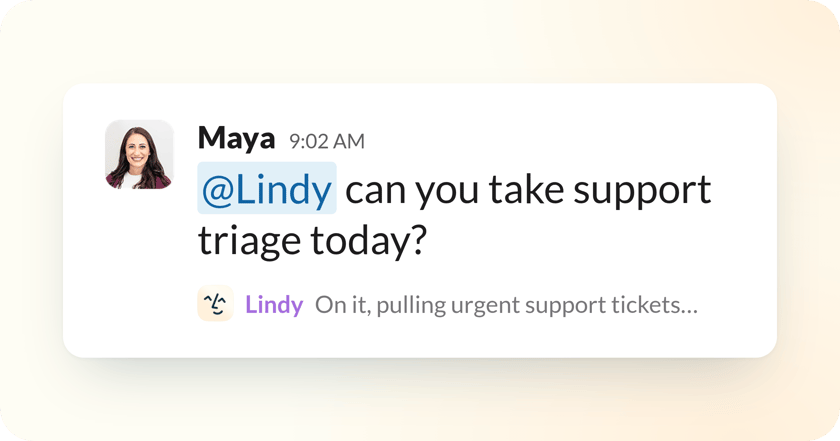
Lindy is an AI assistant for work across Slack, email, calendars and connected business apps. In a channel, a team member can request a report, research an account or ask for an update in another tool. Private chats handle personal requests and context. The appeal is a conversational assistant that carries a task across several apps, rather than requiring every request to start with a workflow diagram.
Email and calendar connections support inbox assistance, reply drafts, meeting preparation and scheduling. A visible notetaker can join Google Meet, Zoom and Microsoft Teams calls, then produce recordings, transcripts and summaries. The meeting library supports questions about one call or a folder of calls, with access for selected people or the team. Folder rules can suggest matching meetings for review or add them automatically with each participant’s chosen setting.
Routines handle recurring work on a schedule or an event such as an incoming email, a Slack message or a meeting ending. A routine combines a trigger, instructions and a destination; personal routines serve one person, while admins manage workspace routines. Smart Filters narrow event triggers, and dry runs show the proposed work using real data without sending or writing it. Personal routines can also be converted to Python scripts, though those scripts do not inherit connected email, calendar or Slack credentials.
Skills capture reusable instructions for jobs such as a weekly report or customer-call preparation. Lindy selects a relevant skill by its name and description, with personal, team and built-in versions. Skills are in gradual early-access rollout, so they are not available to every account yet. Memory provides a file explorer for the assistant’s saved knowledge and work, with editable personal files, admin-managed team files and version history for restoring earlier changes.
Native integrations connect services such as Gmail, Notion, HubSpot, Google Drive and GitHub. A connection can belong to one person or be shared across the workspace; owners and admins manage shared native connections. Shared access uses the connected account’s permissions. Saved API credentials can also be personal or shared, with values that cannot be read back after saving. These credentials have a different control scope from integrations and do not receive integration guardrails.
MCP adds tools from a hosted server with a publicly reachable HTTPS, streamable-HTTP endpoint. Lindy imports tools whose schemas it supports, and those actions begin enabled. The connection owner controls sharing, while each user chooses whether calls require approval or can run automatically. This extends Lindy beyond its native catalogue, though it does not mean every server or tool schema is compatible.
Artifacts turn reports, dashboards and prototypes into hosted pages with a persistent link. Updates rebuild the page at the same address. A new artifact is accessible to signed-in members of the workspace, not just its creator; publishing it makes the page accessible to anyone with the link. This is useful for recurring team reports, where colleagues can open the updated page without passing around another exported file.
Approval behavior is more specific than a universal confirmation before every action. Native integration guardrails can allow writes, require approval or block writes, but they apply only in shared Slack threads. They do not cover the web chat, Slack DMs, iMessage or SMS, and they do not gate reads. MCP connections have separate controls chosen per person. This scope matters when an assistant can change tickets, send messages or update shared records.
Billing combines active-user seats with a pooled credit balance. Each seat contributes an allowance, and different tasks consume different amounts. Admins can set per-person limits, although a task already running can finish beyond the limit. Monthly credits reset without rolling over; purchased top-ups remain until used. Enterprise adds SSO, SCIM and audit logs, while computer use and inbox limits depend on the chosen plan. Lindy is best suited to conversational assistance across daily work; teams needing a self-hosted, explicit workflow graph have different options.
Best for
- Teams requesting research, reports and app updates from Slack
- Founders and account managers handling email, meetings and follow-ups
- Teams sharing meeting knowledge and recurring reporting routines
Limitations
Lindy is a hosted service, with costs that grow through seats and task usage. Integration approval rules cover shared Slack threads, but not private chats or messaging; separate MCP controls are per person. Shared connections use the connected account’s permissions. Skills are still rolling out, and computer use and connected-inbox limits depend on the plan. New hosted artifacts are visible to signed-in workspace members, rather than private to their creator alone.
Lindy features
AI assistance in Slack and private chat
Request research, reports and connected-app work in a shared channel, or handle personal email and calendar requests privately.
Searchable meeting library
Record Google Meet, Zoom and Teams calls, then query transcripts and summaries across a call or shared meeting folder.
Recurring routines
Run scheduled or event-triggered work, narrow triggers with Smart Filters and preview proposed actions with a dry run.
Skills and versioned memory
Reuse personal or team playbooks and manage saved files with history. Skills are still rolling out to accounts.
Native integrations and MCP
Connect business apps or compatible hosted MCP servers, with personal and shared connections and selectable tools.
Hosted reports and dashboards
Create a page with an updatable link. New artifacts are workspace-accessible; public publishing opens them to anyone with the link.
Controls for connected actions
Set native-integration write rules for shared Slack threads. MCP approval settings are separate and chosen per person.
Shared credits and team administration
Pool seat allowances, manage per-person usage and buy top-ups. Enterprise adds SSO, SCIM and audit logs.
Lindy pricing
Lindy starts at $49.99 per active user per month with 5,000 credits contributed to a shared workspace pool. Larger credit bundles and Enterprise arrangements are available. New users can try $50 in credits for seven days without a credit card. Top-ups cost $10 per 1,000 credits and remain available until used; unused monthly credits do not roll over. Task costs vary, and work pauses when the pool runs out. Using Lindy through Slack can create another seat, with a seven-day trial for new teammates.
Example plans.
Team — starting active-user price
USD 49.99 / user / month
Subscription
Plan details
5,000 credits per active user/month, pooled across the workspace. Larger credit bundles and Enterprise arrangements differ.
Technical specifications
Automation and agents
| Feature | Lindy |
|---|---|
| Connectors and tool access | Native business-app connections can be personal or workspace-shared; shared access uses the connected account’s permissions. Compatible hosted MCP servers add tools; saved credentials have their own sharing scope.Connection type, credentials and supported tool schemas determine access |
| Triggers and scheduling | Slack/channel or private-chat requests; routines run on schedules or email, Slack and meeting events. Smart Filters narrow triggers; workspace routines are admin-managed.Configured personal or workspace routines and connected services |
| Human approval controls | Native integration guardrails allow writes, require approval or block writes only in shared Slack threads; reads and private chats are outside those rules. MCP approvals are per user. Saved credentials have no integration guardrails.Connection-specific controls; no universal approval guarantee |
| Hosting and deployment | Hosted service with web, Slack and messaging surfaces. Enterprise adds SSO, SCIM and audit logs; no self-hosted runtime described.Enterprise controls and plan-dependent feature access |
| Execution accounting | Starting seat contributes 5,000 monthly credits to the workspace pool. Monthly credits expire at reset; purchased top-ups remain until used. USD 10 buys 1,000 top-up credits; task consumption varies.Active-user seats plus pooled task credits, not fixed workflow executions |
Lindy alternatives
Explore workflow automation and agent-building platforms alongside Lindy’s conversational assistant.
Lindy FAQs
Is Lindy free?
New users can try $50 in credits without a credit card, with the credits expiring after seven days. Continued usage requires a paid plan; this is a trial rather than an ongoing monthly free allowance.
How much does Lindy cost?
The published starting price is $49.99 per active user per month, contributing 5,000 credits to the shared workspace pool. Top-ups cost $10 per 1,000 credits. Larger bundles and Enterprise arrangements differ, and the number of tasks those credits cover depends on the work.
Does Lindy always ask before sending or changing something?
No. Native integration rules can allow writes automatically, require approval or block writes, and they apply only in shared Slack threads. Web chat, Slack DMs, iMessage and SMS are outside those guardrails. MCP connections have separate approval controls per user, while saved API credentials do not receive integration guardrails.
Can Lindy record meetings and answer questions about them?
Yes. Its notetaker joins Google Meet, Zoom and Microsoft Teams as a visible participant, then saves recordings, transcripts and summaries. You can ask about one meeting or a folder of meetings available to you, with folder access set for selected people or the team.
What is the difference between Lindy skills and routines?
A skill is a reusable set of instructions Lindy selects for a relevant request. A routine runs instructions on a schedule or an event, such as an email arriving or a meeting ending. Skills are in gradual early-access rollout; workspace skills and routines are managed by admins.
Can Lindy connect to an MCP server?
Yes, when the server exposes a publicly reachable HTTPS, streamable-HTTP endpoint. Lindy imports tools with supported schemas, with action toggles and personal or workspace access. Each user has a separate approval setting for calls to the server.
Can Lindy be self-hosted?
Lindy is a hosted service used through its web app, Slack and messaging surfaces. n8n provides a different option for teams that want to operate their own automation runtime.
What are the best Lindy alternatives?
Zapier suits connected-app workflows and trigger-to-action automation. n8n offers a technical workflow canvas with Cloud or self-hosted deployment. Relevance AI focuses on building agents for business processes. Lindy’s appeal is conversational assistance around email, meetings and shared work.
Is this your product? Claim this page to update your listing.