

LanguageTool
LanguageTool review: multilingual grammar checking and Premium
Explore LanguageTool’s grammar checker, multilingual corrections and sentence rewrites, with free website access and Premium browser tools, plans and limits.
Free plan availableAccount optional
- Access
- Free and paid plans
- Example plan
- EUR 19.9 / monthPremium monthly — regular
- Available on
- Web, Desktop, Mobile, API
Grammar checking across languages and writing apps
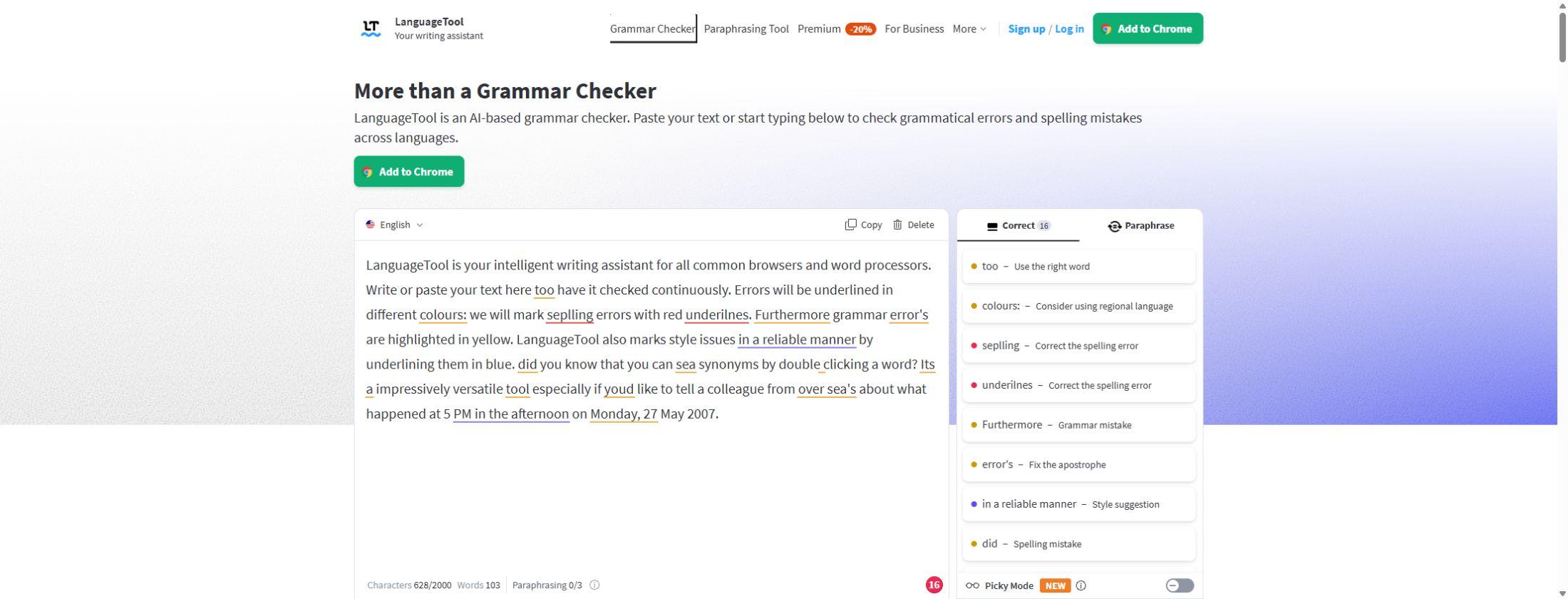
LanguageTool is a useful choice for proofreading in several languages, especially if you want grammar, punctuation and style suggestions alongside sentence rewrites. The public website checker is free to use without an account. Its hosted browser extension now requires Premium, so free website access and in-browser writing assistance are different offers.
The checker supports more than 30 languages and dialects, including regional forms of English, German, French and Portuguese. Premium adds deeper checks in English, German, French, Spanish, Dutch, Polish and Portuguese. The breadth of supported languages does not mean identical checking in each one: Chinese, Japanese, Persian and Tamil have no spellchecker, and suggestion depth varies by language.
Premium adds advanced punctuation, word choice, typography and consistency suggestions, plus a personal style guide for preferred wording. Picky Mode surfaces more detailed style feedback. Personal dictionaries help prevent names and specialist terms being flagged, while Team subscriptions add a shared style guide, team dictionary and user management for consistent company writing.
Sentence paraphrasing offers general, formal, concise, fluent and simple alternatives. Free website users receive three paraphrases per day; Premium offers unlimited sentence paraphrasing in its supported languages. Rewriting coverage is narrower than grammar-checking coverage. Premium’s browser tools also include translation between more than 10 languages and prompt-based drafting in supported web applications.
Chrome, Edge, Firefox, Safari and Opera extensions bring suggestions into supported writing fields. LanguageTool also offers Word and Google Docs integrations, LibreOffice support, Windows and macOS apps and an iOS app. Availability differs by application: the macOS app can open DOCX, TXT, HTML and RTF files, while the Windows app offers a system-wide shortcut for checking selected text.
The free public website field allows 2,000 characters. Premium’s website allowance rises to 150,000 characters per text field, with different limits possible across other surfaces. LanguageTool checks one language at a time; mixed-language passages may be checked only in their dominant language. Checking separate language sections avoids missing corrections in the less-used language.
The hosted checker processes text through LanguageTool’s services, and saved Editor documents are stored for later access. Learneo’s privacy policy excludes LanguageTool Individual and Team inputs from model training by default. Developers can run the basic open-source checker on their own server, but this does not include the cloud-only AI rules, and the official Windows app does not use that self-hosted server.
LanguageTool fits multilingual proofreading, everyday writing corrections and shared terminology. Grammarly adds broader drafting and personal voice tools; DeepL specialises in translation; QuillBot places more emphasis on paraphrasing and summaries. Developers who need proofreading inside their own software can buy API access separately from the writing assistant, with request-length and daily-call limits of its own.
Best for
- Writers proofreading in multiple languages
- People correcting emails and documents
- Teams sharing terminology and style rules
Limitations
The hosted browser extension requires Premium. Checking and rewriting coverage differ by language; mixed-language passages are checked one language at a time. The self-hosted basic checker does not include cloud AI features.
LanguageTool grammar and writing features
Multilingual proofreading
Check grammar, punctuation and spelling in supported languages and dialects, with deeper Premium checks in seven principal languages.
Advanced style suggestions
Premium adds word-choice, typography and consistency checks; Picky Mode surfaces more detailed style feedback.
Sentence paraphrasing
Rewrite sentences in formal, concise, fluent, simple or general wording. Free website access includes three daily paraphrases; Premium removes that daily sentence limit.
Premium browser assistance
Use the hosted Chrome, Edge, Firefox, Safari or Opera extension with Premium. The website checker remains free.
Translation and drafting
Premium browser tools offer translation between more than 10 languages and AI prompt assistance in supported web apps.
Writing-app integrations
Use supported Word, Google Docs, LibreOffice, Windows, macOS and iOS integrations. The macOS app opens DOCX, TXT, HTML and RTF files.
Personal and team terminology
Personal dictionaries and style guides support preferred wording. Team plans add shared dictionaries, a team style guide and user management.
Basic self-hosted checker
Developers can run the open-source checker on their own infrastructure and connect the extension to it. Cloud-only AI rules are not included.
Separate proofreading API
Paid API access supports requests up to 60,000 characters, with daily-call packages. Its limits are separate from Premium website text fields.
LanguageTool pricing
The website checker is free. Premium adds the hosted browser extension, deeper writing suggestions and unlimited sentence paraphrasing. Individual subscriptions have monthly, quarterly, annual and two-year options; Team plans and the proofreading API have separate terms. Regional prices, promotions and renewal charges vary.
Example plans.
Premium monthly — regular
EUR 19.9 / month
LanguageTool
Plan details
Regular EUR price including VAT, before temporary promotions.
Technical specifications
Writing and translation
| Feature | LanguageTool |
|---|---|
| Writing workflow | Grammar, spelling, punctuation, casing and style suggestions, plus AI sentence paraphrasing. The public checker can be used without an account.Hosted writing assistant |
| Languages | More than 30 languages and dialects, with enhanced checks in English, German, French, Spanish, Dutch, Polish and Portuguese. Chinese, Japanese, Persian and Tamil do not have spellchecking.Language-specific feature coverage |
| Style and terminology controls | Sentence paraphrasing offers formal, fluent, simple, concise and general alternatives. Personal style guides and Team dictionaries/style guides support consistent wording.Premium and Team features |
| Document integrations | Chrome, Edge, Firefox, Safari and Opera extensions, Word, Google Docs and LibreOffice integrations, plus Windows, macOS and iOS. Hosted extension checking requires Premium; features differ by app.Hosted apps and integrations |
| Usage and document limits | The public web checker shows 2,000 characters per text field and 3 free paraphrases daily. Premium lists 150,000 characters per text field and unlimited sentence paraphrasing.Web text-field ceilings; not monthly character credits Paid proofreading API supports up to 60,000 characters per request and daily-call packages of 100, 250, 500, 1,000 or 10,000. These are separate from web Premium text-field limits.Proofreading API; separate from web Premium |
LanguageTool alternatives
These writing assistants offer different strengths for proofreading, translation and rewriting.
Grammarly
Grammar and tone assistance, AI drafting and personal voice features in supported writing apps.
DeepL
Dedicated text and document translation, with DeepL Write for wording improvements in supported languages.
Quillbot
Paraphrasing modes, summarisation and other writing tools for revising existing text.
LanguageTool FAQs
Is LanguageTool free?
The public website grammar checker is free without an account, with a 2,000-character text field and three daily paraphrases. Saved Editor documents need an account. The hosted browser extension requires Premium.
Does the LanguageTool browser extension require Premium?
Yes, for the hosted service. Premium is required for its grammar checking and paraphrasing after the offered trial ends. Developers can still connect the extension to their own basic LanguageTool server; that setup has different features from cloud Premium.
Which languages does LanguageTool support?
It supports more than 30 languages and dialects. Premium adds deeper checks in English, German, French, Spanish, Dutch, Polish and Portuguese. Chinese, Japanese, Persian and Tamil do not have spellchecking.
How much does LanguageTool Premium cost?
Premium has monthly, quarterly, annual and two-year subscriptions. Regional pricing and offers vary. An annual price covers a full year; Team plans and API packages are priced separately.
Can LanguageTool check long documents?
Premium’s website supports up to 150,000 characters per text field. The macOS app can open DOCX, TXT, HTML and RTF files. Application-specific limits can differ; this is not an unlimited document-size allowance.
Does LanguageTool work with several languages in the same text?
It checks one language at a time and may focus on the dominant language in a mixed passage. Separate the sections and select the appropriate language for each to check both.
Does LanguageTool use my writing to train AI?
Learneo’s privacy policy excludes inputs from LanguageTool Individual and Team users from training its language algorithms and models by default. Saved Editor documents are still stored, and hosted checking involves processing by the service.
Is the proofreading API included in Premium?
API access is sold separately, with its own daily-call packages and a paid maximum of 60,000 characters per request. The free public API has different size and rate limits and is not offered as a service for automated production requests.
Is this your product? Claim this page to update your listing.