

Julius
Julius: AI data analysis for spreadsheets and business questions
Julius turns questions about spreadsheets and connected data into calculations, charts and reports. Its chat keeps follow-up questions together and exposes the code behind an analysis.
Free plan availableAccount required
- Access
- Free and paid plans
- Example plan
- USD 20 / monthPlus monthly
- Available on
- Web
From a spreadsheet to a clearer answer
Julius is a conversational data-analysis tool. Upload a spreadsheet or connect a data source, then ask about trends, groups, relationships or calculations. Follow-up questions retain the conversation’s context, so an analysis can progress from an initial summary to a chart or a more specific breakdown.
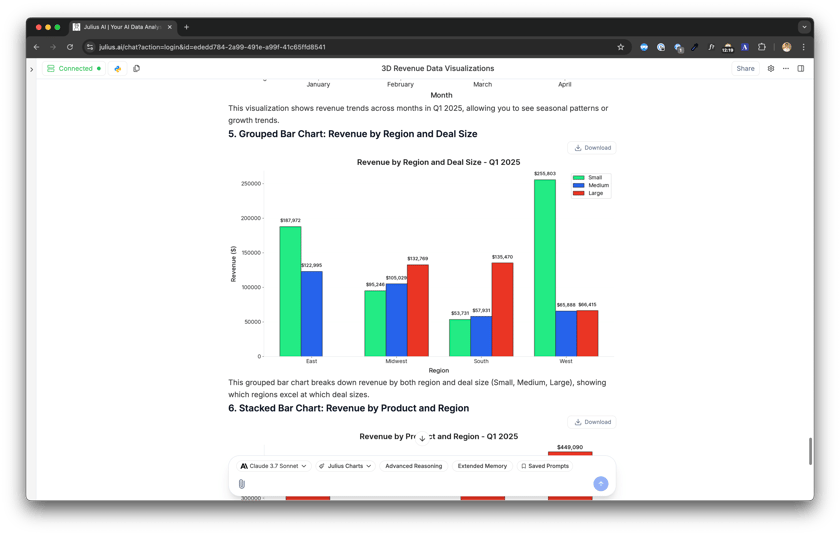
The generated result can include tables, explanations and visualizations, with the underlying code available for inspection. That makes Julius useful for recurring business questions, exploratory analysis and turning raw exports into material for a report. Data Explorer provides an interactive view of generated tables and a CSV export.
CSV, Excel and JSON are among the supported inputs; Julius also accepts documents and images for relevant tasks. Warehouse connections offer a route beyond files stored in its analysis sandbox. Its FAQ describes a practical 32 GB memory limit for that sandbox, rather than a fixed maximum number of rows.
The current product centers on chat-based analysis. Julius has retired its separate Custom Agents and Notebooks features; Custom Instructions and reusable Skills provide personalization within the remaining experience. Credit use varies with the actions, model and complexity of a task, so a plan’s credit allowance is not a guaranteed number of analyses.
Best for
- People analyzing spreadsheet exports without writing every calculation
- Business teams exploring sales, operations and financial data
- Analysts who want generated code alongside answers
Limitations
Large or complex analyses can exceed the sandbox’s memory. Generated calculations and explanations can contain mistakes. Custom Agents and Notebooks have been retired, even though the pricing comparison still mentions Custom Agents.
Julius features
Questions in plain language
Ask about trends, calculations and relationships in your data.
Visible analysis code
Inspect the code produced behind an answer.
Charts and report material
Generate visualizations, tables and written explanations.
Interactive Data Explorer
Inspect generated dataframes and export them as CSV.
Files and connected data
Work with spreadsheets, supported documents and warehouse connections.
Reusable instructions
Personalize analysis with Custom Instructions and Skills.
Julius pricing
Free plan available. Subscription plans. Visit Julius for full plan details and current offers.
Example plans.
Plus monthly
USD 20 / month
Current documented product
Plan details
Individual plan; 2,000 credits renewed monthly. Consumption varies by task and model.
Pro monthly
USD 45 / month
Current documented product
Plan details
Individual plan; 5,000 credits renewed monthly. Consumption varies by task and model.
Business monthly
USD 450 / month
Current documented product
Plan details
Business account supporting up to 50 members; 60,000 monthly credits. Credit consumption varies by task and model.
Technical specifications
Data analysis
| Feature | Julius |
|---|---|
| Data inputs and connections | CSV, Excel, JSON, supported documents and images; database and warehouse connections.Chat and connected data |
| Analysis workflow | Natural-language questions with contextual follow-ups and generated analysis code; charts, calculations and explanations.Current chat product |
| Charts and reproducible outputs | Charts, tables and report material; CSV and Excel data exports. Data Explorer exports generated tables as CSV.Chat outputs and Data Explorer |
| Data permission controls | The vendor describes isolated user storage and execution; its product page states that customer data is not used for AI training.Hosted analysis; vendor-described safeguards |
| Data and compute limits | Practical sandbox memory is 32 GB; no fixed row-count maximum is stated. Task complexity affects memory and credit use; warehouse connections can handle larger data outside the sandbox.Hosted sandbox; not a per-file or row-count guarantee |
Julius alternatives
These alternatives cover reusable analyst projects, established BI reporting and general-purpose file analysis.
Power BI with Copilot
AI-assisted reports built around governed semantic models.
Compare with JuliusJulius FAQs
Is Julius free?
Julius has a free plan with a daily allowance and paid plans with larger credit allocations. The vendor does not give a universal number of analyses per credit.
Can Julius analyze Excel files?
Yes. Excel and CSV are supported, alongside JSON and other inputs. Available memory and the complexity of an analysis affect practical file handling.
Does Julius still offer Notebooks or Custom Agents?
Its current documentation says both separate features have been retired. Chat handles multi-step analysis; Custom Instructions and reusable Skills provide personalization.
Can I export my analysis?
Julius supports exporting charts and data. Data Explorer provides a CSV export of generated tables; the getting-started documentation also describes Excel data exports.
Is this your product? Claim this page to update your listing.