

Hex
Hex review: AI analytics, SQL and Python notebooks, and shared data apps
Hex review: AI-assisted SQL and Python notebooks, conversational data analysis and shared apps, with pricing, credit costs, permissions and alternatives.
Free plan availableAccount required
- Access
- Free and paid plans
- Example plan
- USD 36 / user / monthProfessional Editor
- Available on
- Web
From exploratory analysis to a shared data app
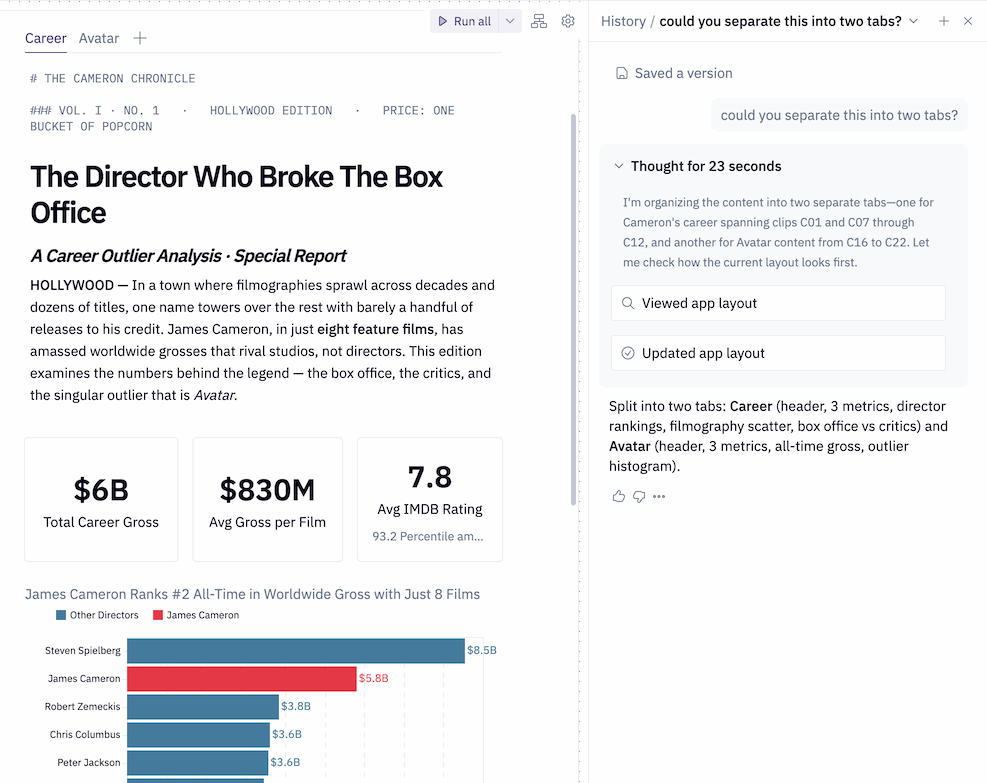
Hex combines SQL, Python, charts and interactive inputs in a collaborative analytics workspace. Its appeal is to data teams that investigate questions and then publish the results for colleagues. The Notebook Agent helps technical users build and revise that analysis, while Threads provides conversational access for people who do not write code.
The Notebook Agent can generate or edit cells, debug code and arrange a notebook into an app. Proposed cell changes can be confirmed or undone. It requires an Editor, Manager or Admin role plus Can Edit access on the project, and is separate from the assistant used in published apps. The AI features previously called Hex Magic now cover several distinct experiences.
Threads answers questions using the data connections, semantic models and published projects a user can access. It can query connected warehouses and combine uploaded CSV data with warehouse data when uploads are enabled. Explorer users are restricted to endorsed assets by default; administrators can change that setting. The results can include tables and charts, with an underlying notebook available to Editors.
Publishing an app keeps its relationship to the notebook analysis, but does not grant other people access. Can View App lets a colleague use the app without opening the notebook. Can Explore exposes the underlying project. On Team and Enterprise, Chat with App requires an Explorer role or higher, Can Explore project access and Can Query access on all connections used by the app. It can answer questions, change inputs and extend the analysis.
Generative Apps is a separate beta that builds custom interfaces from a prompt and the underlying notebook. Its code can be edited directly, while Classic apps use standard components. The beta currently excludes PDF export, saved views, Google Sheets export, published-app comments and screenshot notifications. SQL cell outputs are capped at 5 MB; larger results display the current table page, usually 50 rows. That is an app output limit rather than a warehouse-size limit.
Team and Enterprise include Context Studio. Administrators and Managers can review usage patterns, warnings and the context supporting AI answers, then manage guides, endorsements and semantic models. Access is granular: individual conversations are available to Admins, while Editors and Explorers have read-only access to context settings. Data teams retain responsibility for business definitions and the accuracy of generated analysis.
The free Community plan offers a starting point, and the Team trial lasts 14 days without a payment card. Professional suits individual analysts and includes up to five published apps. Team adds unlimited apps, scheduled runs and longer project history. Paid plans include Medium compute with 8 GB RAM and one CPU; eligible Team and Enterprise workspaces can pay for larger or GPU profiles. Compute capacity is separate from warehouse limits.
AI consumption depends on request complexity, context and model effort, so a credit is not a fixed number of questions. Monthly seat grants are personal and expire at the billing-cycle reset. Optional top-ups use a shared workspace pool and roll over; annual committed credits expire with the contract. Enterprise BYOK sends eligible inference through the organization’s provider account, with provider costs separate from Hex credit consumption.
Hex says its model providers do not train on customer data. Default provider arrangements use zero retention, but selected advanced models can retain prompts and outputs for safety monitoring when an Admin enables them. Hex’s own use of AI-session data to improve its features depends on the plan and opt-out settings. Team and Enterprise also offer a public API and beta MCP integration; both respect role and project access, and sensitive connections have separate external-access controls.
Best for
- Data teams working with SQL warehouses and Python
- Analysts publishing reusable reports for colleagues
- Organizations managing AI context and data permissions
Limitations
AI access depends on workspace roles, project permissions and data-connection access. Seat fees, AI credits and optional compute have separate charges. Generative Apps remains a beta with different exports and output limits from Classic apps.
Hex features
SQL and Python notebooks
Combine queries, code, charts and input controls in one analysis.
Notebook Agent
Generate and edit cells, debug code and confirm or undo proposed changes.
Conversational Threads
Ask questions about permitted warehouse data, semantic models and published analysis.
Published data apps
Share an interactive app with separate app-only and notebook permissions.
Chat with App
Explore and extend published-app analysis on eligible plans with query permissions.
Generative Apps beta
Create custom app layouts from a prompt, with direct code editing and separate export limits.
Context Studio
Manage AI context and observe usage on Team and Enterprise, with role-specific access.
Automation and integrations
Use eligible scheduled runs, public APIs and beta MCP tools to connect existing work.
Hex pricing
Community is free. Professional costs USD 36 per Editor per month; Team costs USD 75, with Enterprise quoted separately. Self-serve plans bill monthly; signed order forms use their agreed annual terms. Editor AI grants are 30 credits per month on Professional and 40 on Team. Optional shared top-ups cost USD 25 for 50 credits. Larger compute is charged separately on eligible plans, and Enterprise BYOK uses your provider’s billing.
Example plans.
Professional Editor
USD 36 / user / month
Current documented product
Plan details
One Editor on a monthly self-serve subscription; 30 personal monthly AI credits and up to five published apps. Extra credits are separate; order-form terms may differ.
Team Editor
USD 75 / user / month
Current documented product
Plan details
One Editor on a monthly self-serve subscription; 40 personal monthly AI credits, unlimited published apps and scheduled runs. Extra credits and advanced compute are separate.
Technical specifications
Data analysis
| Feature | Hex |
|---|---|
| Data inputs and connections | Warehouse tables, semantic models and published analysis the user can access; Threads also accepts CSV and image uploads when enabled.Configured data connections and AI upload settings |
| Analysis workflow | SQL, Python and visual cells; Notebook Agent for eligible editors, Threads for Explorers and above, and Chat with App with project and query permissions.Role, plan and project permission dependent |
| Charts and reproducible outputs | Notebook analysis and published apps. Generative Apps beta has a 5 MB SQL cell output cap and configured CSV downloads up to 100 MB; PDF export remains a Classic app feature.Classic and Generative apps have different output support |
| Data permission controls | Projects are private by default. Can View App provides app-only access, while Can Explore includes the notebook; AI privacy and provider retention depend on workspace settings.Configured project, connection and AI policies |
| Data and compute limits | Paid plans include Medium compute with 8 GB RAM and one CPU. Team and Enterprise can add larger or GPU compute; Large compute is USD 0.32/hour, billed per minute.Medium included; advanced compute is additional |
| API access | SupportedCore Admin APIs on Team and Enterprise; Observability endpoints on Enterprise; user and project permissions apply |
Hex alternatives
These tools offer simpler file conversations or a different approach to established business dashboards.
Hex FAQs
What is Hex used for?
Hex is an analytics platform for SQL and Python analysis, conversational data questions and publishing interactive data apps. It brings technical notebooks and business-facing results into the same workspace.
How much does Hex cost?
Professional is USD 36 per Editor per month and Team is USD 75. Community is free, and Enterprise uses a quote. Self-serve billing is monthly; order-form contracts have their own annual terms. Extra AI credits and larger compute can add charges.
Can I try Hex for free?
Yes. Community is a free plan, and the Team trial lasts 14 days without a payment card. If you do not choose a paid plan afterward, the workspace falls back to Community and loses premium features.
Does every Hex user need to write SQL or Python?
Notebook authors need enough technical understanding to assess generated code. Threads lets Explorer users and above ask conversational questions about accessible data. Chat with App has additional plan, project and data-connection requirements.
Can I share an app without showing its notebook?
Yes. Can View App provides app-only access. Can Explore includes the notebook and is required for Chat with App. Publishing and sharing are separate actions; publishing alone does not make the project visible to colleagues.
Do Hex AI credits roll over?
Monthly seat grants do not roll over or transfer. Purchased auto top-ups go into the shared workspace pool and roll over to the next monthly cycle. Annual committed credits expire at the end of the contract.
Can Generative Apps export a PDF?
The Generative Apps beta currently does not support PDF export; Classic apps are the option for that feature. Generative Apps supports configured CSV downloads up to 100 MB, while its SQL cell output limit is separately 5 MB.
Does Hex train AI models on my data?
Hex says its third-party model providers do not train on customer data. Hex’s own AI-session improvement use depends on your plan and opt-out settings. Provider retention is zero by default; some advanced models require limited retention and an Admin must enable them.
Is this your product? Claim this page to update your listing.