
HubSpot Sales Hub
HubSpot Sales Hub review: CRM, AI features and pricing
HubSpot Sales Hub brings CRM, AI prospecting and sales automation together. Explore its features, seat pricing, HubSpot Credits and alternatives.
Free plan availableAccount required
- Access
- Free and paid plans
- Example plan
- USD 20 / user / monthStarter
- Available on
- Web, Mobile
CRM and sales automation on a shared customer record
HubSpot Sales Hub combines contact and deal management with seller tools for outreach, meetings and pipeline reporting. Its main strength is the shared HubSpot CRM: sales activity and customer context live alongside the records used by other purchased Hubs. Free tools cover basic CRM needs, while paid editions add deeper sales automation and reporting.
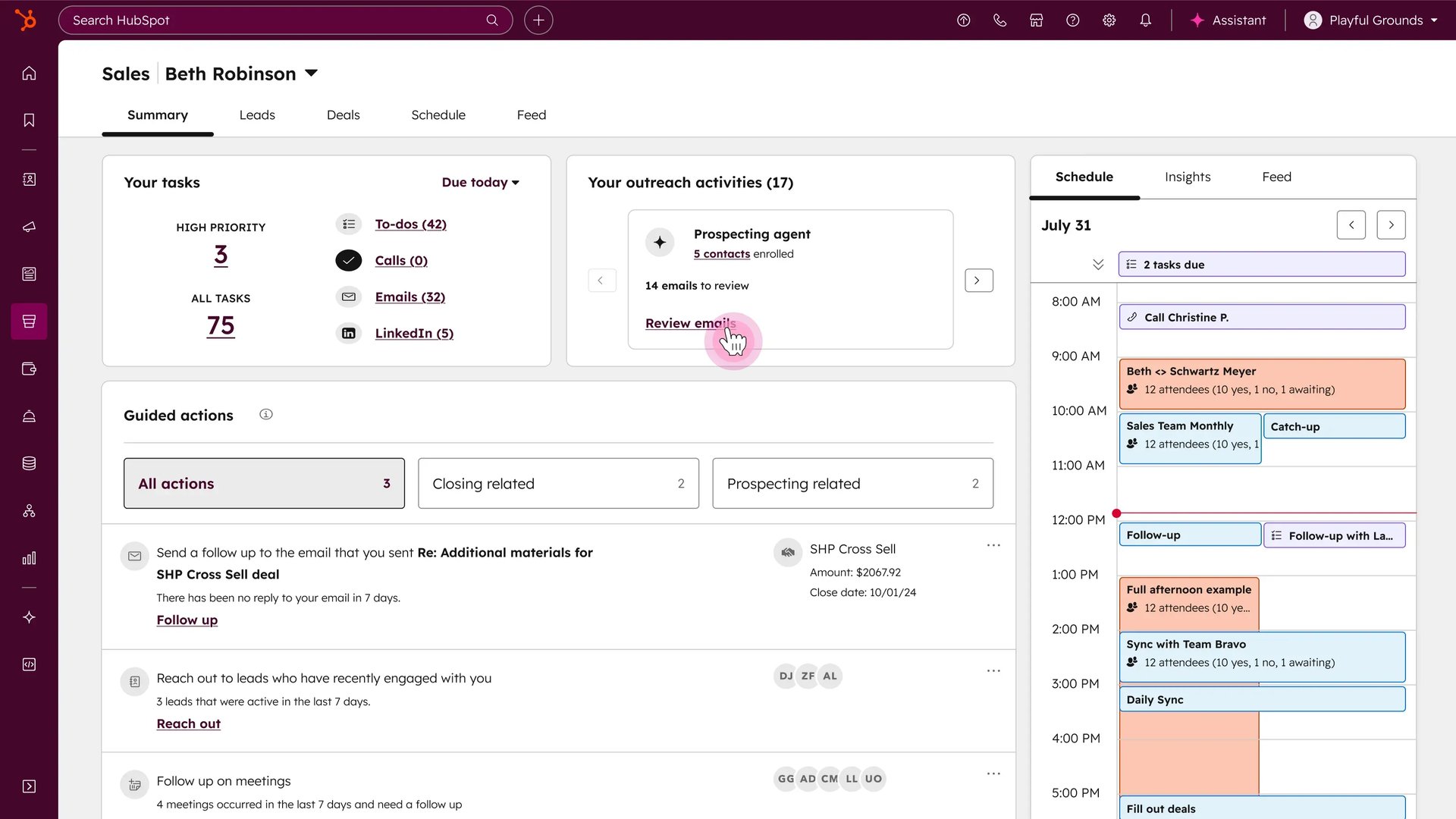
Breeze Prospecting Agent finds companies showing relevant signals, identifies contacts and prepares personalised outreach. Teams define Plays around target company segments, buyer personas, selling context and intent signals, including company news and research activity. The agent can suggest contacts or work with manually enrolled records. Its current access includes paid Starter editions, using HubSpot Credits; it is separate from the Professional sequences tool.
Each Prospecting Agent Play can use adaptive email outreach or configured multichannel steps. Sellers can review every email before sending or allow sending without review. Controls cover suggested-contact limits, email frequency, business days, sending windows, language and the connected sender. Changing a Play affects new enrolments; contacts already enrolled continue with the version they joined.
Professional and Enterprise sales sequences combine timed email templates with follow-up tasks. They require an eligible Sales seat, the relevant permissions and a connected individual work inbox; a shared team inbox cannot send sequence emails. Replies and booked meetings can trigger unenrolment. Dynamic sequences focus manual rep activity on contacts showing engagement, while templates, document sharing and scheduling support ordinary sales follow-up.
Calling keeps recordings and activity associated with CRM records. Conversation Intelligence adds transcription, searchable conversations, speaker tracks and coaching for eligible Professional and Enterprise seats; tracked terms require Enterprise. Supported conferencing integrations create meeting records rather than call records. Predictive deal scores add an estimate of open-deal win likelihood, while the Buying Groups beta maps stakeholders and relationship gaps.
Sales forecasting and reporting help managers review pipeline and team submissions. AI forecasting is a separate beta for eligible Professional and Enterprise accounts, using closed-won deals from the previous three months to add another projection. It depends on sufficient, current deal data. Advanced AI quoting, contracts, billing and payments sit in Revenue Hub, formerly Commerce Hub, with separate application and seat requirements.
Seats provide feature access, while HubSpot Credits pay for selected AI actions. Prospecting Agent uses 100 credits for an outreach recommendation for one lead, rather than a charge for each sent email. Included credits reset monthly, do not roll over and are shared across the account; purchased Hubs do not simply add their allowances together. With only included credits, exhaustion pauses usage-based features. Buying extra capacity enables the configured pay-as-you-go or automatic-upgrade billing, with account and feature limits to control usage.
Administrators manage access to generative AI and its CRM, conversation and file data sources. HubSpot AI model-training participation has a separate account setting, and Prospecting Agent has dedicated administration and assignment permissions. Sales Hub is a strong fit for teams building sales activity around HubSpot CRM, especially alongside its marketing or service products. The relevant seat types, AI usage and additional Hubs determine how much of the platform each team can use.
Best for
- Teams building sales activity around HubSpot CRM
- Growing businesses organising outreach and deals
- Sales managers connecting pipeline activity with forecasts
Limitations
Sequences and advanced sales tools require eligible Professional or Enterprise seats. Prospecting uses shared credits and paid capacity can incur overages. AI forecasting and Buying Groups remain beta features; advanced quoting uses separate Revenue Hub access.
HubSpot Sales Hub features
Connected CRM and pipelines
Keep contacts, companies, opportunities and sales activity together, with visual pipelines and reporting.
Breeze Prospecting Agent
Find signal-matched companies and contacts, then prepare personalised outreach through configurable Plays.
Outreach review and automation
Choose approval before sending or automatic sends, with limits, languages, sender selection and business-hour controls.
Sales sequences
Combine timed one-to-one emails and follow-up tasks on eligible Professional or Enterprise Sales seats.
Calling and conversation intelligence
Review recordings and, on eligible seats, transcripts and coaching; supported conferencing recordings use meeting records.
Deal scores and Buying Groups
Prioritise open opportunities with predictive scores and map stakeholders through the Buying Groups beta.
Forecasting and AI projections
Review pipeline forecasts and team submissions; an optional AI forecasting beta uses recent closed-won deal history.
HubSpot Credits and usage controls
Manage shared monthly AI credits, paid capacity, overage settings and account or feature-level limits.
AI and data administration
Configure feature access, CRM/conversation/file data sources, agent permissions and HubSpot model-training participation.
HubSpot Sales Hub pricing
HubSpot offers free CRM tools plus Starter, Professional and Enterprise editions. Standard catalogue starting rates are USD20 and USD100 per seat per month for Starter and Professional, and USD150 per seat per month for Enterprise billed annually. Professional and Enterprise require onboarding and eligible Sales seats. AI credits and Revenue Hub are separate cost considerations. Pricing checked 10 October 2026; promotional and limited-release offers can differ.
Example plans.
Starter
USD 20 / user / month
HubSpot Sales Hub
Plan details
Standard catalogue price; promotional offers and limited-release bundles excluded.
Professional — standard catalogue
USD 100 / user / month
HubSpot Sales Hub
Plan details
Standard catalogue starting rate per Sales seat; required USD1500 onboarding is separate. Promotional offers may differ.
Enterprise — annual billing
USD 150 / user / month
HubSpot Sales Hub
Plan details
Monthly equivalent billed annually; eligible Sales seat; required USD3500 onboarding is separate.
Technical specifications
Sales
| Feature | HubSpot Sales Hub |
|---|---|
| Sales workflow | Native CRM,signal-based prospecting Plays,sequences,calling,deal scoring and forecasts; advanced CPQ in Revenue Hub.Sequences/advanced seller tools need eligible Sales seats; Prospecting Agent has broader paid-tier access. |
| Prospect and account sources | CRM activity,contact-linked engagements within the past year,configured company intent signals and enabled AI data sources.Plays define segments,personas,signals and selling context; recommendations depend on available engagement and company data. |
| CRM integrations | Native HubSpot CRM;sequence emails use a connected individual work inbox,not a shared team inbox.Professional/Enterprise Sales seats and sequence permissions required; additional Hubs and Revenue seats have separate scope. |
| Review and sending controls | Agent admin/assignment permissions,reviewed or automatic sending,contact/email limits,AI data/training settings and credit limits.Training participation is a separate account setting; feature data toggles do not establish zero retention or no training. |
| Contact and enrichment limits | Standard SalesHub included credits500/3000/5000 monthly;largest eligible product allowance shared,not additive. Prospecting100credits/lead.Unused credits expire. Extra capacity permits configured overages/auto-upgrades; account and feature limits can pause usage. |
HubSpot Sales Hub alternatives
Salesforce offers a broader configurable sales CRM. Apollo combines contact discovery with outreach, while Salesloft specialises in managed team engagement.
Salesforce Sales Cloud
Configurable CRM, sales reporting and separately scoped AI agents.
HubSpot Sales Hub FAQs
How much does HubSpot Sales Hub cost?
HubSpot has free CRM tools and three paid Sales Hub editions. Its standard catalogue starts at USD20 per seat per month for Starter, USD100 for Professional and USD150 for Enterprise billed annually. Professional and Enterprise require onboarding; AI usage and additional Hubs can add costs. These standard rates were checked on 10 October 2026, and promotional offers can differ.
Can Starter use Breeze Prospecting Agent?
The current Prospecting Agent documentation lists paid Starter, Professional and Enterprise editions among the eligible subscriptions. It requires HubSpot Credits, AI data settings and agent permissions. This does not unlock the separate Professional or Enterprise sales sequences tool.
Does Prospecting Agent need approval before sending?
Approval is configurable. A Play can require review of each email or send without review using the chosen outreach settings. Teams can also control suggested contacts, email frequency, sending windows, language and the sender.
What do HubSpot Credits pay for?
Credits pay for specific AI actions rather than general seat access. Prospecting Agent uses 100 credits to recommend outreach for one lead. Included allowances are shared across the account and are not added together for every Hub. Free and view-only users cannot use credits.
Do HubSpot Credits roll over or stop at the included allowance?
Unused credits expire at the monthly reset. If the account only has included credits, usage-based features pause when those are used. Purchased capacity supports pay-as-you-go overages or automatic pack upgrades, depending on the billing setting. Administrators can set monthly account and feature limits; a feature limit does not reserve credits for that feature.
What do I need to use HubSpot sales sequences?
Sequences require Sales Hub Professional or Enterprise, an eligible Sales seat and sequence permissions. Emails send through a connected individual work inbox, not a shared team inbox or HubSpot’s marketing email servers. Replies and booked meetings can trigger unenrolment.
Does HubSpot provide AI sales forecasts?
Yes, through an opt-in AI forecasting beta on eligible Professional or Enterprise accounts. It uses closed-won deals from the previous three months and requires enough usable deal data. The AI projection adds perspective alongside sales forecasts and is not a guaranteed revenue outcome.
Does Sales Hub include advanced CPQ and payments?
Advanced quoting, contracts, billing and payments belong to Revenue Hub, formerly Commerce Hub. Full Professional or Enterprise CPQ requires the corresponding Revenue seat. A Sales Hub subscription alone does not establish access to all Revenue Hub features.
Is this your product? Claim this page to update your listing.