
GitHub Copilot
GitHub Copilot: AI coding across editors and GitHub
Get code suggestions, ask questions about a repository and delegate coding tasks with GitHub Copilot across supported editors, its desktop app, the terminal and GitHub.
Free plan availableAccount required
- Access
- Free and paid plans
- Example plan
- USD 10 / monthPro monthly
- Available on
- Web, Desktop, Mobile
Coding assistance from an inline suggestion to a pull request
GitHub Copilot covers several levels of coding assistance. Inline suggestions help with code already being written, while chat can explain a function or discuss a problem in the project. Agents take on broader changes by gathering relevant context, editing files and using development tools. Its appeal is the connection between these experiences and the places developers already work: an editor, the terminal and GitHub.
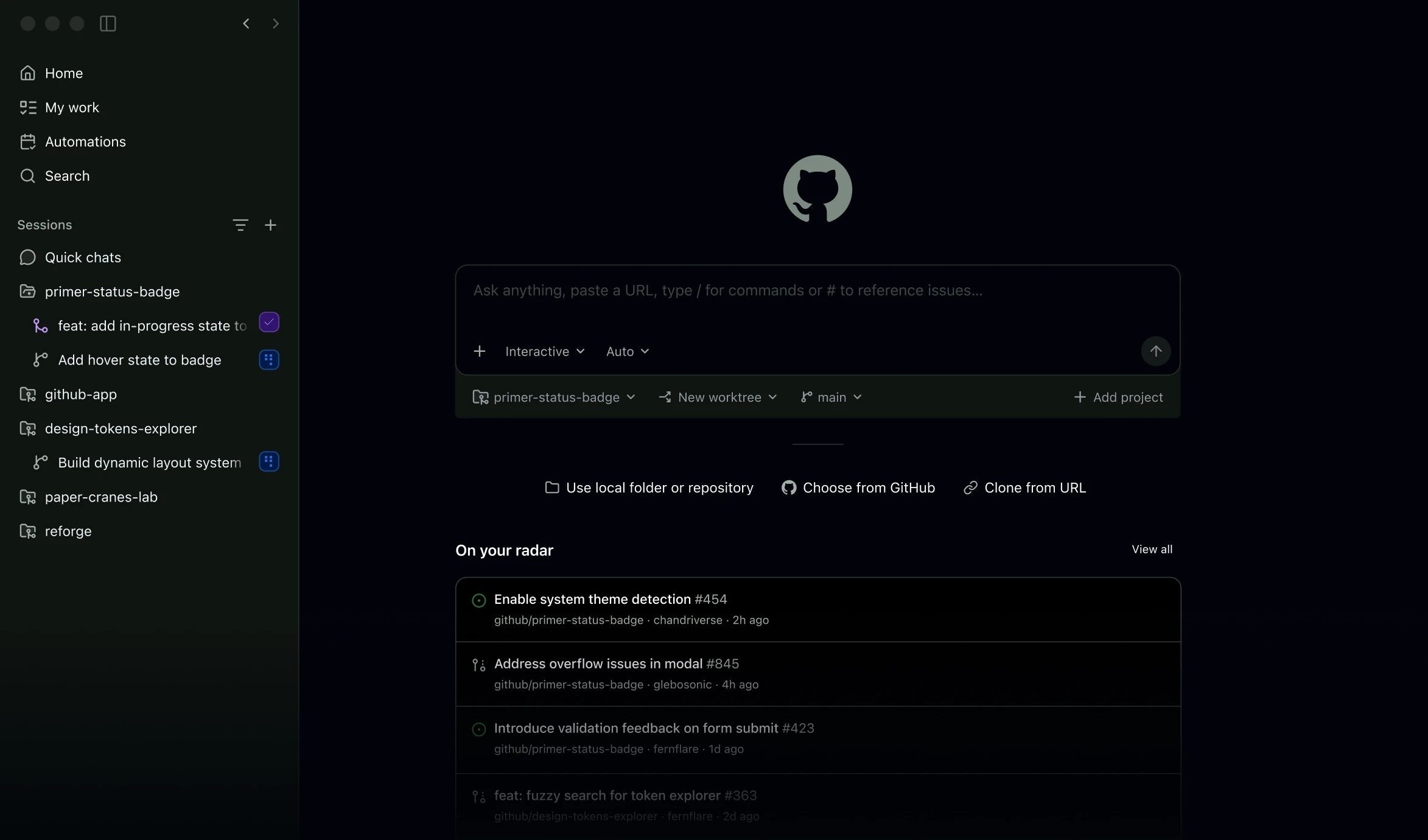
Local agent sessions can work alongside the repository, with changes available for review in the development environment. Cloud-agent tasks move work into a separate hosted session and can return a pull request. The desktop app adds a dedicated place to manage sessions, repositories and issues. These are different ways to access the same product family, although feature coverage, models and third-party agents vary by interface and subscription.
Copilot’s current billing separates typing assistance from model-intensive work. Paid inline completions and next-edit suggestions sit outside AI Credit charges, while chat, agents and related features consume credits according to model and token usage. Individual subscriptions combine base and variable flex credits; business plans pool allowances and provide policy controls. For a team, Copilot is therefore both a coding assistant and an administered service with usage budgets, repository access and data preferences to manage.
Best for
- Developers using AI assistance in an existing editor
- GitHub teams reviewing and delegating repository changes
- Organisations needing shared billing and policy controls
Limitations
AI-generated changes still need code review and testing. Included credits expire monthly and flex allowances can change. Extra agent usage and code-review Actions usage can add charges. Features vary by editor and plan; individual and business training policies differ.
GitHub Copilot features
Inline completions and next edits
Receive code suggestions in supported editors, with a monthly completion allowance on Free and broader access on paid plans.
Project-aware chat
Discuss code using project context, with Copilot Spaces for reusable reference material.
Local and cloud coding agents
Make multi-file changes locally or delegate eligible tasks to a cloud agent that can return a pull request.
Desktop, terminal and GitHub access
Work through Copilot’s app, CLI and GitHub surfaces as well as supported editor integrations.
Team policy and billing controls
Business and Enterprise offer organisation policies, pooled credit allowances and usage budgets.
GitHub Copilot pricing
Free plan available. Plans priced per user. Visit GitHub Copilot for full plan details and current offers.
Example plans.
Pro monthly
USD 10 / month
GitHub Copilot
Plan details
Currently 1,500 AI Credits/month including variable flex credits. Paid inline completions and next edits are outside credit charges.
Pro+ monthly
USD 39 / month
GitHub Copilot
Plan details
Currently 7,000 AI Credits/month including variable flex credits. Broader model and agent access.
Max monthly
USD 100 / month
GitHub Copilot
Plan details
Currently 20,000 AI Credits/month including variable flex credits. Flex amounts may change.
Technical specifications
Coding assistants
| Feature | GitHub Copilot |
|---|---|
| Editor and terminal interfaces | Supported IDEs include VS Code, Visual Studio, JetBrains, Eclipse and Xcode. Copilot also offers a CLI, desktop app and GitHub web/mobile access; features differ by interface.Current plan and interface matrix |
| Repository context | Chat and agents use project files and repository context. Copilot Spaces can collect reusable code, documents and other reference material.Context availability depends on the interface |
| Agent actions | Agent mode can edit several files and run commands or tests. Paid cloud-agent access can prepare changes and pull requests; additional third-party cloud agents have separate plan restrictions.Cloud agents and code review vary by plan |
| Model access | Paid plans provide model choice within their entitlements; Free uses automatic selection. Chat and agent actions consume model-dependent AI Credits. Paid inline completions and next-edit suggestions do not consume those credits.Paid model entitlements; Free automatic selection |
| Execution and review controls | VS Code provides change review, permissions and sandboxing options. Business and Enterprise add organisation policies and pooled budgets. Individual subscribers can opt out of model training; Business and Enterprise data is not used to train GitHub models.Editor controls and plan-specific data policies |
GitHub Copilot alternatives
These coding tools take different approaches to editor assistance and repository work.
Cursor
An AI-focused code editor with chat, project context and agents.
Compare with GitHub CopilotClaude Code
Claude-based coding agents for the terminal, editors and hosted sessions.
Compare with GitHub CopilotTabnine
Code assistance with organisation-focused deployment and governance options.
Compare with GitHub CopilotGitHub Copilot FAQs
Is GitHub Copilot free?
Copilot Free includes 2,000 code completions per month and limited chat and agent use. Paid plans expand access and include AI Credits for model-intensive features.
How much does GitHub Copilot cost?
Individual monthly subscriptions are USD 10 for Pro, USD 39 for Pro+ and USD 100 for Max. Business costs USD 19 per seat per month and Enterprise USD 39. Additional model usage can incur separate charges.
What are GitHub AI Credits?
AI Credits measure eligible chat and agent usage based on the model and tokens processed. One credit has a USD 0.01 usage value; a credit is not a fixed number of coding requests. Included credits reset monthly and do not roll over.
Does Copilot use my code for training?
GitHub says individual subscribers can opt out of using Copilot interaction data for model training. It does not use Copilot Business or Enterprise data to train its models.
Is this your product? Claim this page to update your listing.