

WorldEngen by Masterpiece X
WorldEngen review: AI scene creation, pricing and availability
WorldEngen combines AI concepts, assets and scene assembly with Blender, Unity and Unreal. Its companion service is currently unavailable.
Account required
- Access
- See product plans
- Available on
- Desktop, Web
From visual direction to a mesh-based 3D scene
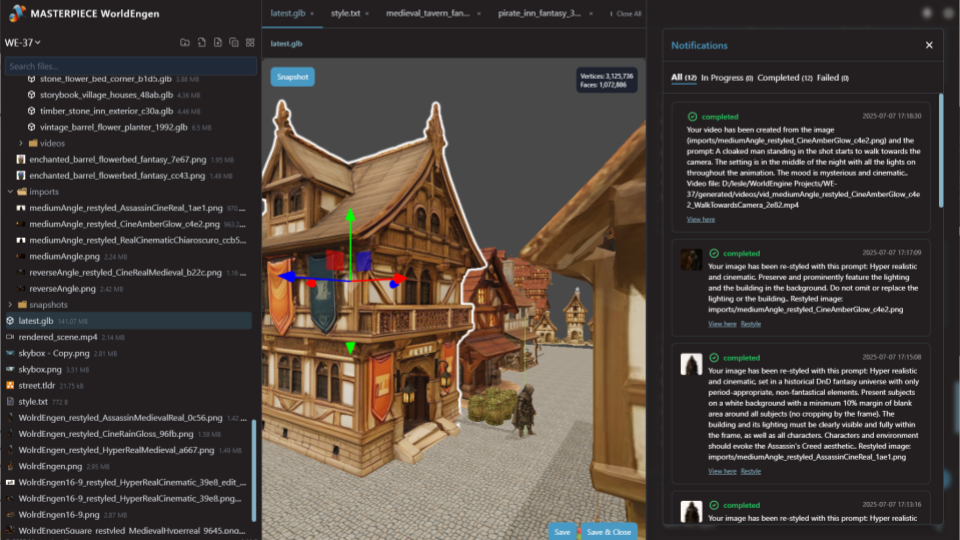
WorldEngen by Masterpiece X is an AI-assisted desktop editor for building 3D environments. Its emphasis is the scene as a whole: references, concept art, layout, individual assets and the tools used to finish them. It suits artists and teams developing game worlds, interactive scenes, animation environments or visual concepts across an existing 3D pipeline.
Scene development can begin with a rough layout. Layout and scene agents use top-down diagram images to create a greybox built from simple shapes. This provides a starting point for composition and spatial relationships before the environment is filled with detailed objects. Existing assets, reference boards and scenes can sit alongside generated material in the editor.
Style guides establish the visual direction for concept art and asset creation. Image editing and restyling tools help refine that direction. Image Kits then separate objects from an approved scene image into individual reference images for 3D generation. The vendor’s illustrated guide describes up to ten objects per kit; it also allows a prompt to focus extraction on particular objects.
WorldEngen also describes direct support for World Labs’ Marble model to create Gaussian splats from images. These explorable scenes help develop composition, mood and spatial ideas. In this approach, the splat acts as a visual reference for building separate mesh assets. It is not automatically converted into a collection of finished, editable production meshes.
Individual object images become mesh models that can be arranged in the scene. Basic model optimization is available through the editor’s object controls. The vendor’s production guide uses separate optimization software for more advanced polygon reduction and levels of detail. Lighting, materials and final rendering can continue in Blender, so the scene editor complements a broader production toolkit.
Blender, Unity and Unreal connections are central to WorldEngen’s product positioning. The desktop application is installed and paired with the companion account. The documented Blender workflow sends a complete scene or individual objects to Blender and combines WorldEngen commands with manual editing. Exact supported versions, transport limits and file-format options are not established by the current accessible pages.
WorldEngen is distinct from Masterpiece X — Generate, the earlier browser-based text-to-3D product. The web generator, community library and VR app are marked as legacy offerings on the current site. The public credit-pack pricing page explicitly describes Generate. Its monthly packs, one-off credits and free-credit offer should not be treated as WorldEngen’s current pricing.
Availability is the immediate limitation. Checked on 10 October 2026, the WorldEngen companion service and getting-started documentation returned an unavailable-service response, while the marketing site continued to advertise a seven-day trial. A working trial and current paid rate could not be confirmed. Contact Masterpiece X about access before planning a production project around the service.
Best for
- Teams planning game environments and interactive scenes
- Artists working across references and asset libraries
- Studios connecting scene creation with existing 3D software
Limitations
WorldEngen’s companion service is currently unavailable, checked on 10 October 2026. Trial access, paid pricing and current output terms need confirmation from Masterpiece X. Legacy Generate prices and licences do not establish WorldEngen’s terms.
WorldEngen features
Scene-based workspace
Bring concepts, references, existing assets and scene composition into one editor.
Greybox layout
Use top-down diagrams to develop a rough environment before adding detailed models.
Style guides and image editing
Set an art direction and refine reference imagery across a scene.
Object Image Kits
Extract separate object images from concept art for subsequent 3D creation.
Marble-powered visual exploration
Develop Gaussian-splat concepts as references for a separate mesh-based scene.
Mesh creation and basic optimization
Create objects from images and refine them before further production work.
Blender and engine connections
Continue scene work alongside Blender, Unity and Unreal.
Previsualization tools
Develop concept imagery and video alongside the 3D environment.
WorldEngen by Masterpiece X pricing
Pricing and availability checked on 10 October 2026. Masterpiece X advertises a seven-day WorldEngen trial, but its companion service is currently unavailable. No current paid WorldEngen rate is confirmed. The public credit-pack page covers the legacy Generate product.
Technical specifications
3D assets
| Feature | WorldEngen by Masterpiece X |
|---|---|
| Text and image inputs | Text prompts, top-down layout diagrams, concept art, style guides, reference boards, existing assets and scenes. Image Kits separate object images for subsequent model generation.WorldEngen documented desktop workflow; companion service currently unavailable |
| Mesh and topology workflow | Scene assembly, image-based mesh creation and basic model optimization, with Blender, Unity and Unreal connections. Marble-generated Gaussian splats serve as visual references rather than automatically converted mesh assets.WorldEngen documented desktop workflow; companion service currently unavailable |
WorldEngen alternatives
Create and refine individual 3D assets for use in your scene editor or game engine.
WorldEngen by Masterpiece X FAQs
What is WorldEngen by Masterpiece X?
WorldEngen is an AI-assisted desktop scene editor. It combines concepts, style guides, layout, asset generation and scene assembly, with connections to Blender, Unity and Unreal. Its focus is building an environment around a shared visual direction.
Is WorldEngen currently available?
The companion service and getting-started documentation were unavailable when checked on 10 October 2026. The public marketing site remains live and advertises a seven-day trial. Contact Masterpiece X to confirm current access; a working trial is not confirmed.
How much does WorldEngen cost?
A current WorldEngen paid rate is not confirmed. The public Masterpiece X credit-pack page describes the legacy Generate product, so its prices are not listed here as WorldEngen plans. Ask Masterpiece X about trial access, usage charges and team arrangements.
Does WorldEngen require installation?
Yes. Its public setup instructions describe installing the desktop application and pairing it with the companion account. It is not presented as an installation-free browser utility.
How do WorldEngen Image Kits work?
An Image Kit separates objects in a concept image into individual reference images for 3D generation. The vendor’s guide describes up to ten objects per kit, with an optional prompt to focus on particular items. The resulting images can be refined before generating meshes.
Does WorldEngen turn Gaussian splats into finished game assets?
The vendor describes using Marble-generated splats as visual references. Individual objects are generated separately as meshes, then arranged and refined into a scene. This is different from automatically converting an entire splat into production-ready assets.
Which software does WorldEngen connect with?
Masterpiece X names Blender, Unity and Unreal. Its illustrated Blender workflow sends individual objects or a scene into Blender for further arrangement, lighting, material work and rendering. Current version compatibility and transport limits are not confirmed.
What are the best WorldEngen alternatives?
Sloyd provides editable templates and AI tools for creating scene assets. 3D AI Studio brings together several model generators and asset-processing tools, while Meshy offers model creation, materials and character tools. These focus on producing individual assets for a broader scene workflow. Explore our AI 3D model generator category for more options.
Is this your product? Claim this page to update your listing.