

Stable Audio
Stable Audio review: music generation, editing and pricing
Stable Audio generates instrumentals and sound effects with audio editing, WAV exports and a Mac plugin. Explore its features, pricing and music licences.
Free plan availableAccount required
- Access
- Free and paid plans
- Example plan
- USD 12 / monthSolo — monthly
- Available on
- Web, Desktop, API
From an audio idea to an editable instrumental
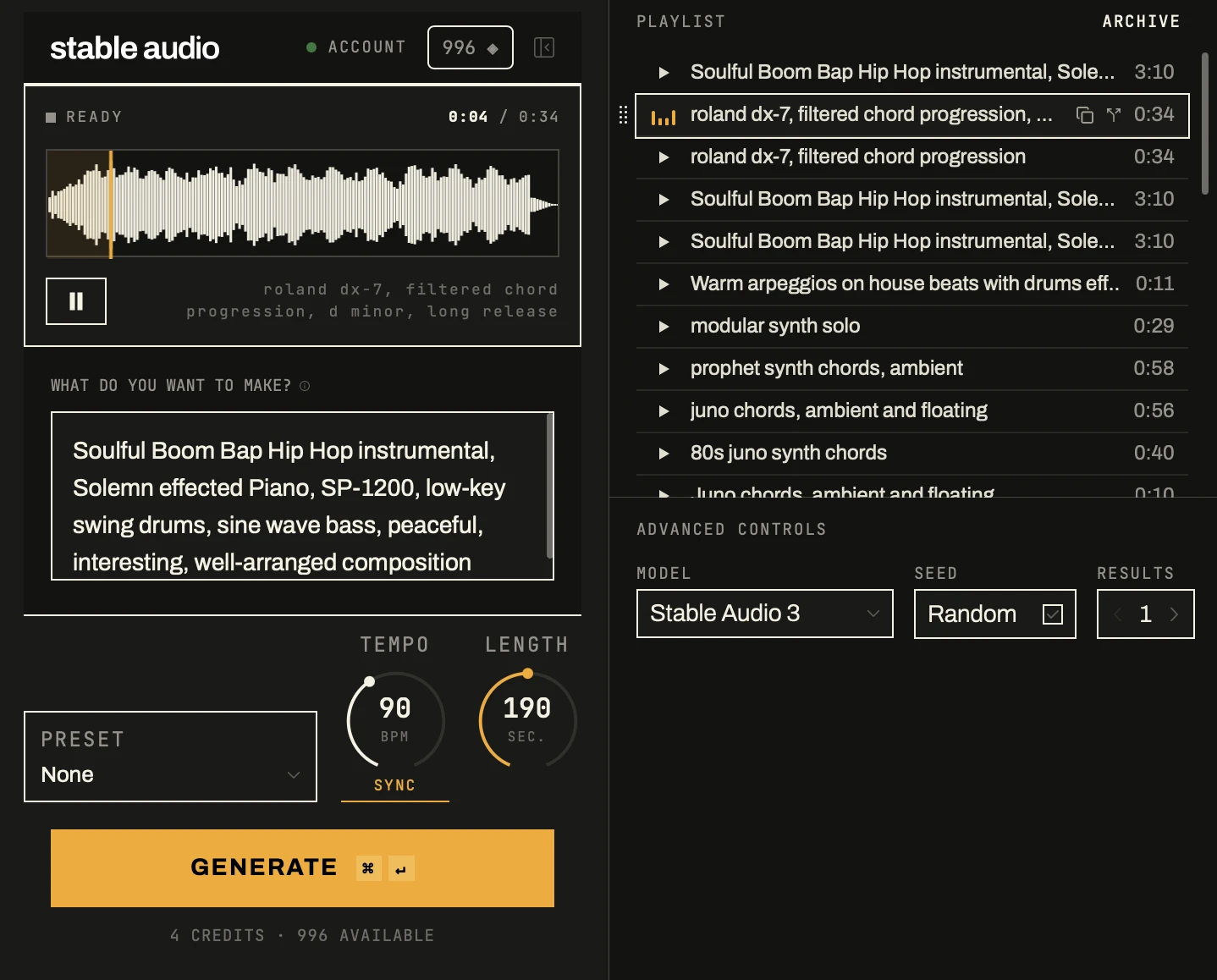
Stable Audio creates instrumental music, loops, ambience and sound effects from a description. Its web app combines generation with audio editing, while its Mac plugin brings generated material into a DAW. Stable Audio 3 supports compositions up to six minutes. It is aimed at instrumental production and sound design; it is not designed to turn lyrics into a finished vocal performance.
Full Mix creates a mixed track from a prompt. Experimental Multi-Track generation produces separate parts for further arrangement. A web session has four track slots, with levels, pan, mute, solo and effects for individual tracks and the master. Those slots are editing capacity rather than a promise that every generation produces four isolated stems.
Audio-to-audio uses an uploaded recording as a starting point for a new version. You can change the mood, genre or instrumentation, replace a selected passage, regenerate a track or extend it. Chat-style direction provides another way to refine an idea. Upload recordings only when you have the necessary permissions in the source audio.
The editor can cut, copy, paste and splice existing audio, with tape effects including reverse, stutter and freeze. Printing these edits processes audio already in the session without spending generation credits. Adding newly generated audio, regenerating a track, replacing a selection and extending a track consume credits. Mixing, editing and exporting existing audio remain available when generation credits run out.
Mixdown exports a single WAV file. The Stems option packages the individual session tracks in a ZIP, with an optional normalization setting. These exports let you continue arranging or mixing in other audio software. A session track is not necessarily an isolated instrument, and the experimental multi-track feature should not be confused with guaranteed separation of an existing song.
The Mac plugin supports AU and VST3 on Apple Silicon and Intel Macs. It runs as an instrument, synchronizes with DAW tempo, keeps generated takes in a session playlist and lets you drag audio into a track. Large uses cloud generation; Medium Music and Small SFX offer on-device options. Windows is listed as coming soon. Cloud and on-device models have different deployment requirements.
Free and paid subscriptions use monthly credits, with different charges for generation operations. Credits reset rather than rolling over. Prices recorded on 5 October 2026 started at USD 12 per month for Solo, followed by higher-capacity Session, Producer and Studio plans. See the current plans for prices and allowances. Audio generated under a paid plan retains its original licence after cancellation.
Free-plan permissions need clarification: Stability’s licensing guide permits commercial Free-plan output, including monetized content and embedded app or game audio, while the pricing page labels Free personal and non-commercial. Confirm the applicable permission before a commercial release. Downloaded models follow separate licences: Stable Audio 3 Small and Medium require commercial registration under the Community route, and businesses exceeding its aggregate annual revenue threshold need a separate licence.
Best for
- Producers creating loops and song starters
- Sound designers generating and revising audio cues
- Mac musicians using a VST3 or AU plugin
Limitations
The licensing guide permits commercial Free-plan output, but the pricing page labels Free personal and non-commercial. Confirm the applicable permission for a commercial project. Multi-Track is experimental; downloaded models have separate licensing conditions. Output rights do not guarantee copyright protection or exclusivity.
Stable Audio generation and editing features
Instrumental music and sound effects
Generate background music, loops, ambience and production audio from a description.
Full Mix and experimental Multi-Track
Create mixed audio or separate parts for a web session with four track slots.
Audio-to-audio variations
Use an authorized recording to guide a new mood, genre or instrumental arrangement.
Replace, regenerate and extend
Revise a passage or develop a track with generation operations that consume credits.
Built-in audio editing
Cut, splice and print tape effects on existing audio without generation credits.
Track and master effects
Adjust levels, pan and effects before exporting a mix or session tracks.
WAV mix and track exports
Download a WAV mix or a ZIP of individual session tracks, with optional normalization.
Mac AU and VST3 plugin
Synchronize with DAW tempo, keep takes in a playlist and drag generated audio into a track.
Cloud and on-device models
Use Large in the cloud or the plugin’s Medium Music and Small SFX on-device options.
Stable Audio pricing
Stable Audio has Free and paid monthly credit plans. Prices last recorded on 5 October 2026 were Solo USD 12, Session USD 30, Producer USD 90 and Studio USD 199 per month. Current prices and allowances may differ. Generation operations have different credit charges, and unused monthly credits do not roll over. Paid-generated audio retains its original licence after cancellation; API and downloaded-model access have separate terms.
Example plans.
Solo — monthly
USD 12 / month
Stable Audio subscription
Plan details
660 credits/month; approximately 165 full-mix or 110 multi-track generations up to 6 minutes; commercial licence.
Session — monthly
USD 30 / month
Stable Audio subscription
Plan details
1,800 credits/month; approximately 450 full-mix or 300 multi-track generations; commercial licence.
Producer — monthly
USD 90 / month
Stable Audio subscription
Plan details
6,000 credits/month; approximately 1,500 full-mix or 1,000 multi-track generations; commercial licence.
Technical specifications
Music generation
| Feature | Stable Audio |
|---|---|
| Music output type | Instrumental music, loops, ambience and sound effects; Full Mix, experimental Multi-Track and audio-to-audio editing. Not designed for vocal output.Current web app and model scope |
| Composition controls | Web replace/regenerate/extend, four track slots and track/master effects. Mac AU/VST3 instrument: tempo sync, playlist and DAW drag; Windows coming soon.Mac AU/VST3 and web editing; model-specific options |
| Audio and stem exports | WAV mixdown or ZIP of individual session tracks, with optional normalization. Experimental Multi-Track is not guaranteed instrument separation.Experimental stems; model-specific output |
| Ownership and use rights | Paid-generated audio retains original licence after cancellation. Guide permits commercial Free output but pricing says noncommercial; confirm permission. Models separate.Generation-time paid tier and applicable terms |
| Maximum track duration (seconds) | 360Compositions up to six minutes |
Stable Audio alternatives
Other music tools offer composition editing, beats and vocal songs.
Stable Audio FAQs
Is Stable Audio free?
Stable Audio has a Free plan with a monthly credit allowance. Credits reset rather than rolling over. Its pricing page and licensing guide differ on commercial use of Free-generated audio, so confirm the applicable permission before using it commercially.
How much does Stable Audio cost?
Prices last recorded on 5 October 2026 were USD 12 per month for Solo, USD 30 for Session, USD 90 for Producer and USD 199 for Studio. These are dated monthly prices. Check the current plans for prices, credits and included generation capacity.
Can Stable Audio generate vocals and lyrics?
Stable Audio 3 is designed for instrumental audio rather than vocal output. Its official guide recommends instrumental prompts. Suno is an alternative for songs built around lyrics and vocals.
Can I edit or extend generated music?
Yes. The web app supports audio-to-audio variations, selected-passage replacement, regeneration and extension. Generating new audio consumes credits. Cutting, splicing and printing effects on existing audio do not spend generation credits.
Can I export WAV files and stems?
Mixdown exports a single WAV file. Stems exports the individual session tracks in a ZIP, with optional normalization. Multi-Track generation is experimental, and a track is not necessarily an isolated instrument stem.
Does Stable Audio have a DAW plugin?
Its Mac instrument plugin supports AU and VST3 on Apple Silicon and Intel Macs. It synchronizes with DAW tempo and can drag generated audio into a track. Large runs in the cloud; Medium Music and Small SFX provide on-device options. Windows is listed as coming soon.
Can I use Stable Audio music commercially?
Paid-generated audio retains its original licence after cancellation. For Free output, the licensing guide permits commercial use while the pricing page labels it personal and non-commercial; confirm the applicable permission. Input permissions and third-party rights still apply, and assigned output rights do not guarantee copyright protection or exclusivity.
Is Stable Audio Open the same as the web app?
The hosted app, API and downloaded models are separate access routes. Stable Audio 3 Small and Medium are listed under the Community model licence, which requires commercial registration and a separate licence above the aggregate annual revenue threshold. Other models may have different licences. Service terms also provide an opt-out from using inputs and outputs for model training.
Is this your product? Claim this page to update your listing.