

AIVA
AIVA review: AI music composition, MIDI and pricing
AIVA creates editable AI music with styles, chord progressions and MIDI tools. Explore its editor, free plan, pricing, export formats and music-use rights.
Free plan availableAccount required
- Access
- Free and paid plans
- Example plan
- EUR 11 / monthStandard — annual billing monthly equivalent
- Available on
- Web, Desktop
Editable music for scores and soundtracks
AIVA creates music compositions that can be developed into a score or soundtrack. Its library includes more than 250 styles, and new pieces can start from a style, a chord progression or an uploaded influence. The editor and MIDI downloads give composers room to change notes, instruments and arrangements after generation, while MP3 provides a rendered audio version.
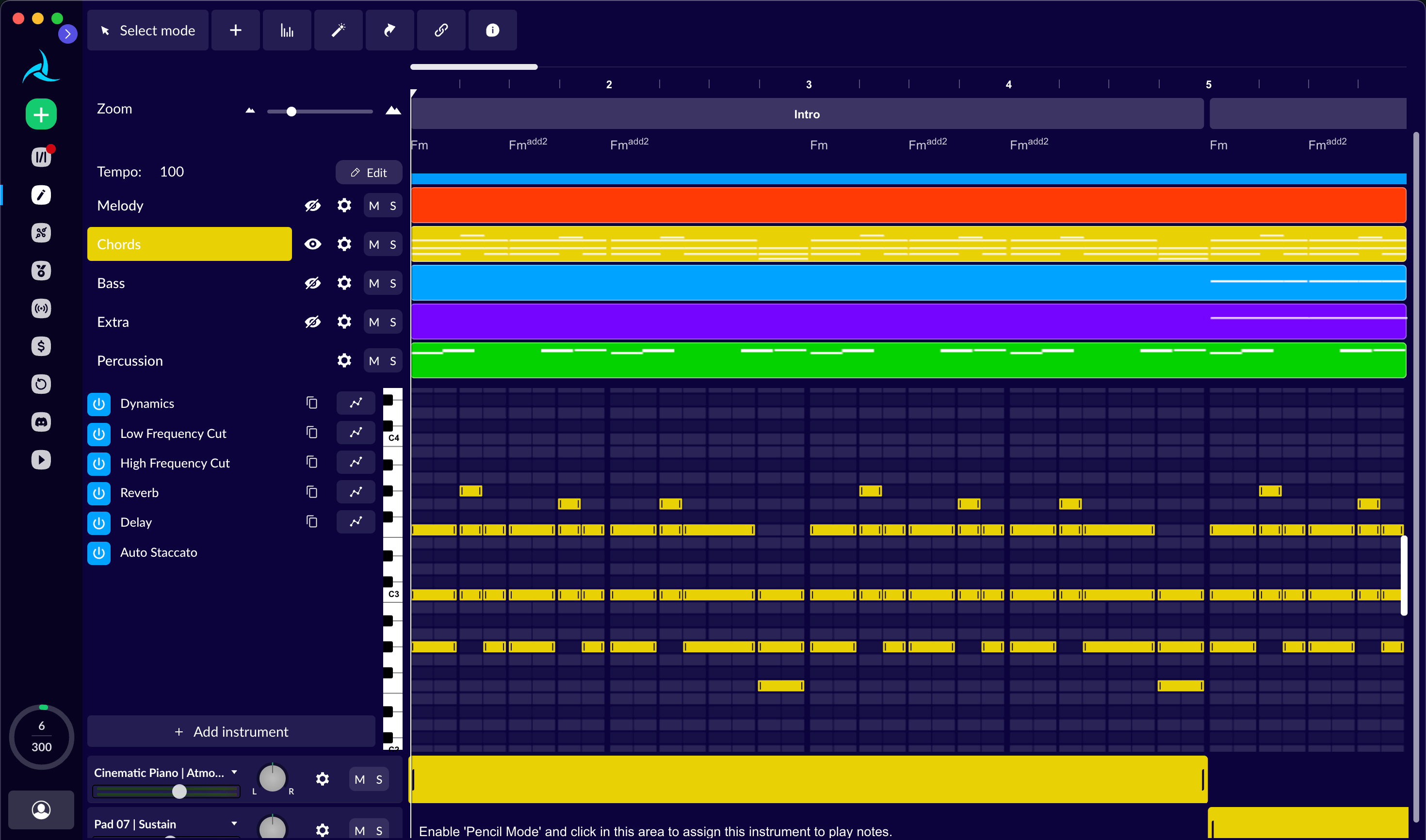
Chord-based composition offers a more specific starting point than a genre alone. Set a key signature, time signature and tempo, then enter or generate a progression. Chord blocks can be changed, extended or split before creating a composition. AIVA also supports building a piece around a melody, accompaniment or percussion idea, with saved composition settings available for later use.
The Style Designer controls the ingredients of new compositions. It includes melody, harmony, bass and percussion layers, instrument choices and pitch ranges. Layer priorities determine which parts enter first. Styles can be saved and reused, and the library includes styles shared by other creators. Publishing a custom style to the public library requires AIVA’s review.
AIVA’s editor works with notes and instrument layers. Move notes, change their length, add new notes or regenerate part of a layer. Sections can be inserted, copied or deleted, and tempo can be changed. Instrument controls include mute, solo, dynamics, filters, reverb and delay; percussion has its own pattern editing. Those controls suit composers who want to develop an arrangement rather than keep the first generated take.
MIDI import brings an existing composition into the piano-roll editor, where AIVA’s virtual instruments can play it and layer in-painting can help develop parts. MIDI export takes the composition into compatible music-production or notation software. A MIDI file contains note and performance data rather than recorded audio, so its sound in another application depends on the instruments assigned there. MP3 is available on Free and Standard; Pro adds high-quality WAV.
Upload Influence accepts MIDI or an MP3/WAV recording as a reference for a new composition. Audio must be at least 60 seconds long; MIDI must contain at least eight bars, and files longer than 100 bars are trimmed. Recordings longer than five minutes 30 seconds can be trimmed during upload. You need the relevant input rights, and the agreement grants AIVA a perpetual commercial licence to train its systems on uploaded influences.
The individual plans separate download capacity, track duration and usage rights. Free provides three downloads a month for tracks up to three minutes, with non-commercial use and AIVA attribution. Standard provides 15 downloads and tracks up to five minutes; monetization is limited to YouTube, Twitch, TikTok and Instagram. Pro provides 300 downloads, tracks up to five minutes 30 seconds, WAV and AIVA’s contractual copyright assignment. The licence attaches when a composition is downloaded under the active plan.
AIVA is available through the web and official macOS, Windows and Linux desktop applications. Its composition controls and MIDI exports make it relevant to creators developing scores beyond generation. Individual subscriptions are not a blanket licence for enterprise, bulk music licensing, training datasets or automated API pipelines; those uses have separate conditions. SOUNDRAW offers editable instrumental beats, Beatoven.ai creates background tracks for content projects, and Suno produces vocal songs as well as instrumentals.
Best for
- Composers developing editable arrangements
- Creators needing MIDI alongside audio
- Video and game creators requiring the appropriate Pro or enterprise licence
Limitations
Free music is non-commercial and requires AIVA credit. Standard monetization is limited to YouTube, Twitch, TikTok and Instagram. Pro adds WAV and a contractual copyright assignment, subject to the agreement. Uploaded influences grant AIVA perpetual training rights. Enterprise and high-volume uses require separate arrangements.
AIVA composition and export features
More than 250 musical styles
Start a composition from a musical style, then develop its notes and arrangement.
Chord progression controls
Set key, time signature and tempo, edit chord blocks and generate a composition from the progression.
Custom Style Designer
Shape melody, harmony, bass and percussion layers, instrument choices and pitch ranges.
Note and section editing
Move or resize notes, regenerate layers and insert, copy or remove sections.
Instrument and percussion controls
Adjust instruments, dynamics, effects and rhythmic patterns in the composition editor.
MIDI import and export
Edit an existing MIDI composition or export note data for further work in compatible music software.
Audio and MIDI influences
Use recordings or scores you have permission to upload as references for a new composition.
Plan-specific audio exports
Free and Standard include MP3 and MIDI; Pro adds high-quality WAV and more monthly downloads.
Web and desktop applications
Use AIVA in the browser or its official macOS, Windows and Linux applications.
AIVA pricing
AIVA offers Free, Standard and Pro plans. In the annual billing view checked on 10 October 2026, Standard is €11 per month and Pro €33 per month, billed annually plus VAT. Monthly subscriptions are also available. Free includes three downloads a month; Standard includes 15 and Pro 300. Pro adds WAV and broader music-use rights. Enterprise plans are separate. See AIVA for current prices.
Example plans.
Standard — annual billing monthly equivalent
EUR 11 / month
AIVA individual subscriptions
Plan details
Annual billing required; displayed monthly equivalent plus VAT. Plus VAT; 15 monthly downloads, MP3/MIDI, maximum five-minute tracks; monetization limited to YouTube, Twitch, TikTok and Instagram.
Pro — annual billing monthly equivalent
EUR 33 / month
AIVA individual subscriptions
Plan details
Annual billing required; displayed monthly equivalent plus VAT. Plus VAT; 300 monthly downloads, up to five minutes 30 seconds, high-quality WAV and all formats; contractual copyright assignment subject to terms.
Technical specifications
Music generation
| Feature | AIVA |
|---|---|
| Music output type | Style-based composition, editable chord progressions, custom Style Designer and uploaded audio/MIDI influences.Feature access and download limits vary by individual plan |
| Composition controls | Piano-roll note and section editing, instrument layers, tempo, dynamics/effects, percussion patterns and MIDI import with layer in-painting.Web/desktop; no independently measured generation performance |
| Audio and stem exports | Free/Standard: MP3 and MIDI, 3/15 monthly downloads. Pro: high-quality WAV and all advertised formats, 300 monthly downloads.Download allowances are distinct from generation capacity |
| Ownership and use rights | Free non-commercial with credit; Standard monetization only YouTube/Twitch/TikTok/Instagram; Pro contractual copyright assignment. Active plan at download governs licence; influence training rights and enterprise restrictions apply.Licence acquired on download; no guaranteed copyright-protection claim |
| Maximum track duration (seconds) | 330Pro up to 330 seconds; Standard 300 seconds; Free 180 seconds |
AIVA alternatives
These alternatives approach music through production beats, soundtracks or complete vocal songs.
AIVA FAQs
Is AIVA free?
Yes. Free includes three downloads a month, tracks up to three minutes and MP3/MIDI formats. The music is for non-commercial use with AIVA attribution; AIVA retains copyright. Paid plans increase download limits and change the licence.
How much does AIVA cost?
The annual billing view checked on 10 October 2026 lists Standard at €11 per month and Pro at €33 per month, billed annually plus VAT. Monthly subscriptions are also available. Standard includes 15 monthly downloads; Pro includes 300 and high-quality WAV.
Does AIVA export MIDI and WAV?
MIDI and MP3 are included on Free and Standard. Pro adds high-quality WAV and the broader advertised file-format selection. MIDI carries notes and performance data for further editing; it does not contain the recorded sound of the original preview.
Can I edit music in AIVA?
Yes. Its editor supports note changes, section editing, tempo, instrument layers, dynamics and effects. Percussion has pattern controls, and MIDI import lets you bring an existing composition into the piano-roll editor.
Can I use AIVA music commercially?
Free is non-commercial. Standard permits monetization on YouTube, Twitch, TikTok and Instagram. Pro grants AIVA’s contractual copyright assignment and broader monetization, subject to the agreement. The licence depends on the plan active when the composition is downloaded; enterprise and large-scale uses have separate conditions.
What can I upload as an AIVA influence?
Upload Influence accepts MIDI and MP3/WAV audio. Audio must be at least 60 seconds; MIDI must contain at least eight bars. You need the relevant rights, and the agreement grants AIVA a perpetual commercial training licence over uploaded influences.
Does AIVA have a desktop app?
Yes. AIVA offers official applications for macOS, Windows and Linux alongside its web service. The download page provides the platform-specific options.
What are the main AIVA alternatives?
SOUNDRAW offers instrumental beats with section and instrument controls. Beatoven.ai creates licensed background music for content projects. Suno generates vocal songs and instrumentals, with paid download allowances and Premier Studio tools. Their licences and export limits differ.
Is this your product? Claim this page to update your listing.