

Qlik Cloud Analytics
Qlik Cloud Analytics review: dashboards, Qlik Answers and pricing
Qlik Cloud Analytics review: explore associative dashboards, Qlik Answers, predictive analytics, plan pricing, data capacity and leading BI alternatives.
Paid plansAccount required
- Access
- Paid access
- Example plan
- USD 3600 / yearStarter: annual starting subscription
- Available on
- Web, API
Business dashboards with conversational and predictive analytics
Qlik Cloud Analytics brings interactive dashboards, conversational answers and predictive modelling into one business-intelligence platform. Its appeal is the connection between these experiences: teams can explore a dashboard, ask a follow-up question and build further analysis around the same business data.
The associative engine links fields across an analytics app. A selection narrows the data and shows which values remain possible or are excluded. This gives dashboard users a way to explore relationships beyond a single chart, while retaining the app’s existing measures and visualizations.
Qlik Answers adds chat for structured app data and document knowledge bases. An assistant can combine one app with its configured knowledge bases, including PDF, HTML, DOCX and text content. Responses can show supporting sources. Answers may also include general model knowledge, which is separate from organization-specific evidence and is not a live web search.
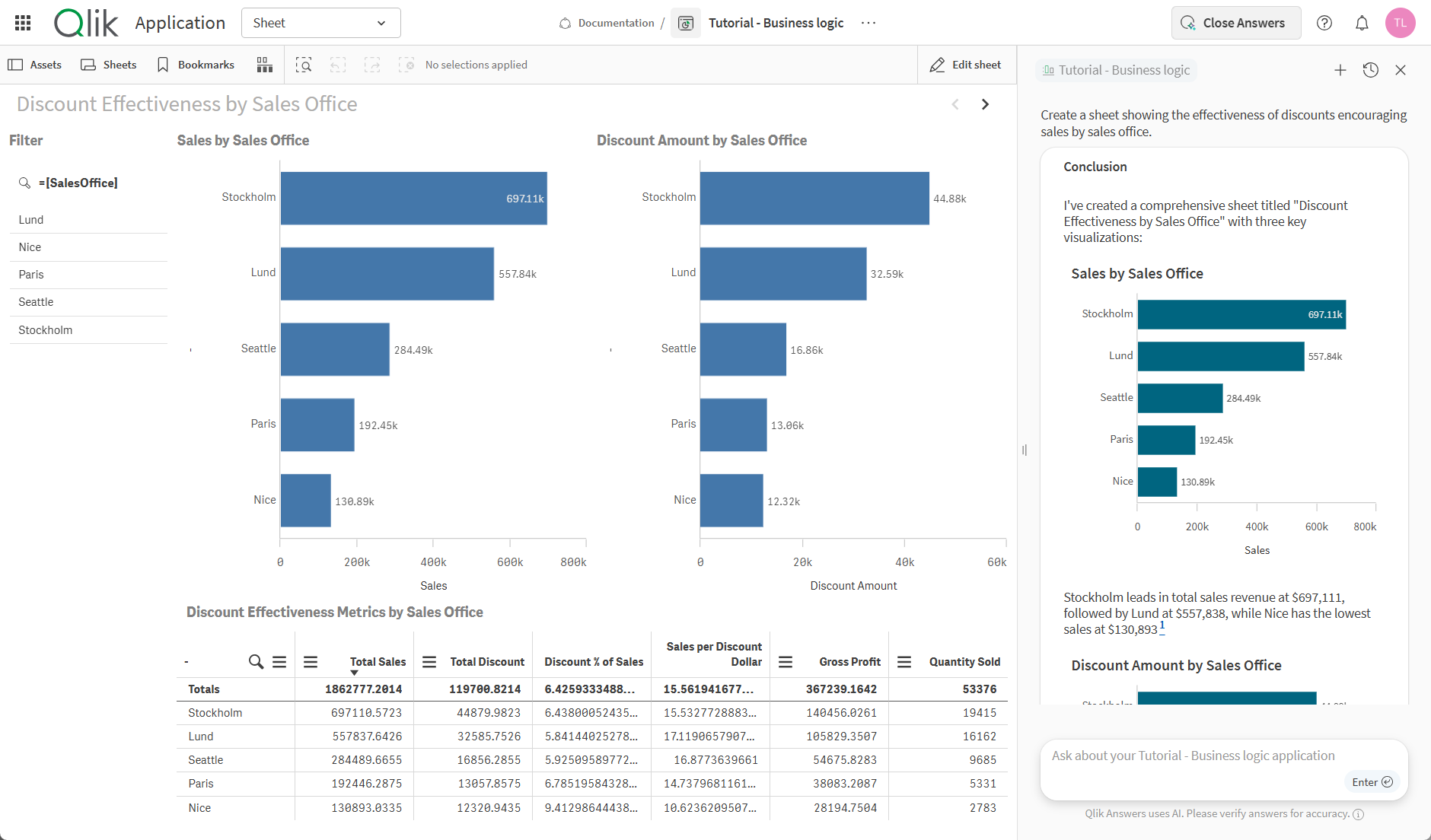
Fast mode handles direct questions and charts. Thinking mode can investigate a question in several steps, generate sheets and use configured automations. Adding a generated chart to a sheet happens inside the connected app and requires editing permissions; that control is unavailable when the assistant is opened outside the app.
The assistant does not inherit the dashboard’s current selections or bookmarks. A question therefore needs its own filter context, even when asked alongside a filtered chart. Certain master-measure expressions can also override a requested filter. Data-access restrictions remain a separate layer, rather than following the visible state of the dashboard.
Document search and free-text columns behave differently. Qlik Answers can return text from a table, but it does not semantically reason across that column as if it were a document collection. Knowledge bases provide that document-search capability, with their own indexing and permissions.
Access combines user roles, space permissions and access to the underlying app or knowledge base. Section Access still restricts the data a person can see. Agentic Qlik Answers requires cross-region inference, with regional processing profiles; enabling it also replaces Insight Advisor and Insight Advisor Chat across the tenant. English is supported, while other languages remain in preview.
Qlik Predict adds machine learning on eligible editions, including Premium. Analysts can train models from historical data, examine influential features and use predictions in Qlik Sense. Model deployment and real-time prediction access have subscription limits, so predictive analytics is a distinct capability alongside conversational reporting.
Pricing separates a user-based entry plan from capacity-based editions. Starter has fixed data capacity and can add users. Standard and Premium can add capacity without an extra user charge. Data for Analysis is assessed against the month’s highest recorded usage, using uncompressed data size; it is not a cumulative annual upload allowance. Reusing the same data across apps in one tenant does not automatically multiply that charge.
Best for
- Teams building interactive business dashboards
- Organizations exploring analytics and internal documents
- Analysts developing predictive models
Limitations
Qlik Answers works independently of dashboard filters and bookmarks. Its agentic features require cross-region inference to be enabled. Semantic document search, predictive models and available AI allowances depend on the subscription and configured access.
Qlik Cloud Analytics features
Associative dashboards
Explore related fields, possible values and exclusions within interactive analytics apps.
Conversational business answers
Ask questions about a connected analytics app and see charts and explanations.
Document knowledge bases
Search supported documents alongside app data, with source references in answers.
Fast and Thinking modes
Choose direct analytical answers or a multi-step investigation with sheet creation.
Charts inside the reporting app
Add generated charts to a sheet with the required app-editing permissions.
Governed data access
Combine roles, space permissions and Section Access restrictions for assistants and data.
Predictive analytics
Train and deploy predictive models through Qlik Predict on eligible subscriptions.
Authenticated assistant APIs
Integrate assistant management, conversation threads and prompts using Qlik’s REST API.
Qlik Cloud Analytics pricing
Qlik Cloud Analytics starts at $300 per month for Starter, $825 for Standard and $2,750 for Premium, billed annually. Starter includes 10 users and fixed 10 GB data capacity. Standard starts with 25 GB and Premium with 50 GB, with no charge for additional users. Enterprise uses custom pricing. Extra capacity and AI allowances depend on the subscription.
Example plans.
Starter: annual starting subscription
USD 3600 / year
Current documented product
Billed annually.
Plan details
USD 300/month billed annually (12 months = USD 3,600). Includes 10 users and fixed 10 GB data capacity; additional users can be purchased, but Starter cannot add data capacity. AI allowances and app limits apply.
Standard: annual starting subscription
USD 9900 / year
Current documented product
Billed annually.
Plan details
USD 825/month billed annually (12 months = USD 9,900). Starts with 25 GB Data for Analysis assessed against monthly peak usage. Additional users have no extra charge; additional capacity, overages and AI allowances have separate terms.
Premium: annual starting subscription
USD 33000 / year
Current documented product
Billed annually.
Plan details
USD 2,750/month billed annually (12 months = USD 33,000). Starts with 50 GB Data for Analysis assessed against monthly peak usage. Additional users have no extra charge; additional capacity, overages and AI allowances have separate terms.
Technical specifications
Data analysis
| Feature | Qlik Cloud Analytics |
|---|---|
| Data inputs and connections | One analytics app and configured knowledge bases with PDF, HTML, DOCX and TXT content.Eligible subscription and configured assistant |
| Analysis workflow | Fast mode handles direct questions and charts. Thinking mode adds multi-step analysis, sheet creation and configured automations.Enabled Qlik Answers modes and permissions |
| Charts and reproducible outputs | Answers, source references and charts; sheet generation in Thinking mode. Adding charts to sheets requires in-app editing permissions.Connected app and authorized authoring |
| Data permission controls | User roles, space permissions and underlying app or knowledge-base access apply. Section Access remains enforced.Configured assistant and data permissions |
| Data and compute limits | Dashboard selections and bookmarks do not scope answers. Certain measure expressions override requested filters; free-text table columns do not receive document-style semantic analysis.Qlik Answers current limitations |
| API access | SupportedAuthenticated REST assistant management, threads and prompts; action privileges required |
Qlik Cloud Analytics alternatives
ThoughtSpot focuses on conversational BI and Liveboards, Tableau combines visual analysis with AI assistance, and Power BI connects reporting with Microsoft’s data ecosystem.
ThoughtSpot
Conversational BI and interactive Liveboards across supported data platforms.
Power BI with Copilot
Microsoft reporting, semantic models and capacity-backed AI assistance.
Qlik Cloud Analytics FAQs
What is Qlik Cloud Analytics used for?
It provides interactive business dashboards, data exploration and Qlik Answers conversational analytics. Eligible subscriptions also offer Qlik Predict for machine learning and predictive analysis.
How much does Qlik Cloud Analytics cost?
Starter starts at $300 per month, Standard at $825 and Premium at $2,750, billed annually. Starter includes 10 users; Standard and Premium charge by data capacity without an additional-user fee. Enterprise has custom pricing.
What is Data for Analysis?
It is a data-capacity meter based on uncompressed data loaded into the analytics service. Usage is assessed against the highest recorded level in the month, rather than total uploads accumulated across a year. It differs from an individual app limit.
Does Qlik Answers use my dashboard filters?
No. Current dashboard selections and bookmarks do not automatically constrain an answer. The question needs its own filter context, while Section Access data restrictions continue to apply.
Can Qlik Answers create a sheet?
Thinking mode can generate sheets. Charts can be added to a sheet from inside the connected app when the user has editing permissions. Fast mode handles direct answers and charts without full sheet creation.
Can Qlik Answers search documents?
Yes. Configured knowledge bases support PDF, HTML, DOCX and text documents. This differs from semantically analyzing free-text columns in an app, which Qlik Answers does not support in the same way.
Does Qlik Answers require cross-region processing?
The agentic experience requires cross-region inference to be enabled. Regional profiles govern where requests can be processed. The legacy document-answering experience can remain in the tenant’s region when that setting is disabled.
What are the best Qlik Cloud Analytics alternatives?
ThoughtSpot offers conversational BI and Liveboards, Tableau offers visual analytics with AI assistance, and Power BI offers reporting in Microsoft’s data ecosystem. Their data connections, licensing and AI access differ.
Is this your product? Claim this page to update your listing.