

Napkin AI
Turn explanations into editable visuals
Turn a written explanation into a diagram you can refine and reuse in a document or presentation. Napkin focuses on communicating an idea visually.
Free plan availableAccount required
- Access
- Free and paid plans
- Available on
- Web
What is Napkin AI?
Napkin AI turns selected text into visual options such as flowcharts, mind maps and charts. Paste or import material, select a passage, then refine the wording, colours, icons and layout of the result.
Its Visuals surface suits an explanatory graphic inside a report or deck. Slides adds presentation work under the same subscription and is labelled beta on the main site. Both begin with content whose structure and facts still need review.
Refine the relationship, not just the appearance
Select the passage that explains the process or relationship you need to show. Compare layouts and check each label, connection and implied sequence before refining individual elements. AI actions consume credits; direct edits to text, colours and elements do not.
Choose an export for the next editing step
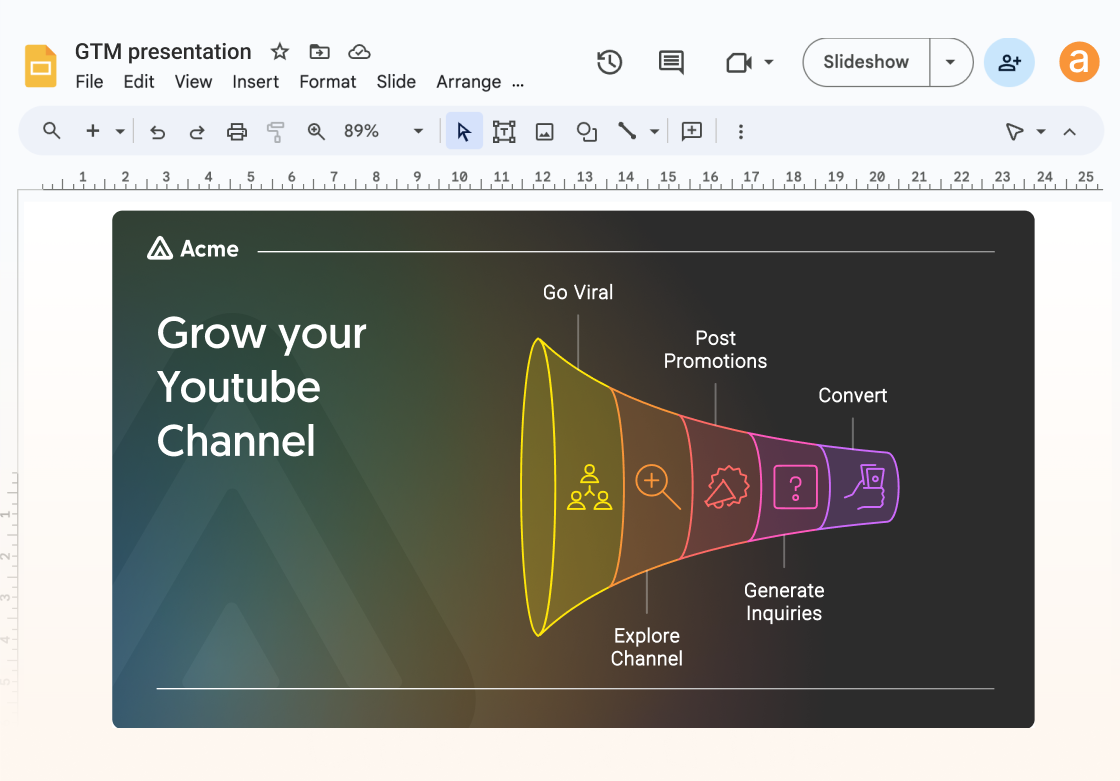
PNG is a fixed image; SVG supports a vector workflow. PowerPoint retains text and supported shapes, while images and styled-image Effects remain images. Google Slides export creates a file in Google Drive and uses the same allowance as PowerPoint. Check fonts and layout in the destination before presenting.
Check format allowances
Free PNG and PDF exports are unlimited. The help guide permits a limited number of free PowerPoint and SVG exports; Plus and Pro remove that limit. Check the remaining in-app allowance when editable output is essential to the handoff.
Best for
- Explaining processes and relationships with diagrams
- Adding editable visuals to presentations
- Refining generated elements without repeated generation
Limitations
Generated diagrams need factual and structural review before use. Free visuals carry Napkin branding. PPT/SVG export allowances differ by plan; direct editing and AI generation consume credits differently. Individual visual generation requires a computer. Mobile supports viewing work and creating/editing presentations.
Napkin AI features
Text-led visual generation
Generate explanatory visual options from a selected passage or imported material.
Editable diagrams
Refine wording, colours, fonts and individual elements after generation.
Document and slide exports
Export PNG/PDF, or use plan-specific SVG and PowerPoint allowances.
Shared Visuals and Slides access
The current help guide documents one subscription across both product surfaces.
Selective generation and direct refinement
Generate from a chosen text passage, compare visual options and edit the selected elements. Direct text, color and font edits do not consume AI credits.
Editable presentation handoff
PowerPoint/Google Slides retain supported shapes and text; images remain images. Google Slides exports count against the same PPT export allowance.
Napkin AI pricing
Free includes 500 AI credits weekly, Napkin branding and unlimited PNG/PDF exports. Plus includes 10,000 AI credits per paid seat monthly; Pro includes 30,000. Paid Teamspaces share their allowance. Both add branding controls and unlimited PPT/SVG exports. Compare the selected monthly or annual offer and its complete per-person charge before subscribing; a displayed monthly equivalent may have a yearly commitment. Included credits do not roll over. Purchased top-ups roll over and do not expire under the current help terms; export allowances are a separate limit.
Technical specifications
Graphic design
| Feature | Napkin AI |
|---|---|
| Design output types | Text-led diagrams, flowcharts, mind maps and explanatory visuals.Napkin Visuals |
| Editable layers and layout | Edit text, colours, fonts and visual elements directly without consuming AI-generation credits.Direct editing versus AI actions |
| Export formats | Unlimited free PNG/PDF exports; limited free PPT/SVG allowance; paid plans remove that export limit.Free versus Plus/Pro; current help guide |
Napkin AI alternatives
Choose the workflow that matches the material you want to create or capture.
Canva
Canva suits assembling a wider range of designed assets and slides around your content.
Piktochart
Piktochart suits a full infographic or visual report, including the layout surrounding the explanation.
Gamma
Gamma suits organising and building a complete presentation. Napkin Visuals can supply a particular explanatory graphic within a larger deck.
Napkin AI FAQs
What does Napkin AI create?
It creates explanatory visuals from text, including diagrams, flowcharts, mind maps and data charts, with editable visual elements.
Can Napkin export to PowerPoint?
Yes. The current help guide documents editable text and supported shapes in PPTX exports. Images and styled-image effects remain images. Free export allowances are limited; Plus and Pro include unlimited PPT exports.
Are Napkin AI exports free?
PNG and PDF exports are unlimited on Free. The current help guide also describes a limited free PPT/SVG allowance; paid plans remove that export limit.
Do credits roll over?
Included credits refresh weekly on Free and monthly on paid plans without rollover. Purchased top-up credits have separate rollover terms.
Can I generate Napkin visuals on a phone?
The current getting-started guide requires a computer for individual visual generation. On mobile you can view work and create or edit presentations; these are different surfaces.
Does changing a label or color use AI credits?
Direct edits to text, colors, fonts and elements do not use AI credits. Asking AI to generate or change content, generate images or apply Effects can use credits, with cost depending on the action.
Can I continue the presentation in Google Slides?
The presentation export offers Google Slides and creates the file in your Google Drive. Google Slides and PowerPoint exports share the PPT allowance. Check the destination layout and fonts; images do not become separately editable text or shapes.
What is the difference between included and top-up credits?
Included credits reset weekly on Free and monthly on paid plans without rollover. The current help guide says purchased top-up credits roll over and do not expire. That balance is separate from format-specific export allowances.
Explore related AI tools
Is this your product? Claim this page to update your listing.