

Kling AI
Kling AI review: video features, pricing and alternatives
Kling AI turns prompts and reference images into video with sound, multi-shot scenes and motion controls. Explore its features, pricing and alternatives.
Free plan availableAccount required
- Access
- Free and paid plans
- Example plan
- USD 8.8 / monthStandard — monthly renewal
- Available on
- Web, Desktop, API
Kling AI for generated scenes and reference-led video
Kling AI is a strong choice for creators making product shots, short stories and image animations. Its studio combines video and image generation with a Canvas workspace for scripts, storyboards and assets. A prompt sets the scene, while reference images and subjects give you a more direct way to carry a character or product into the result.
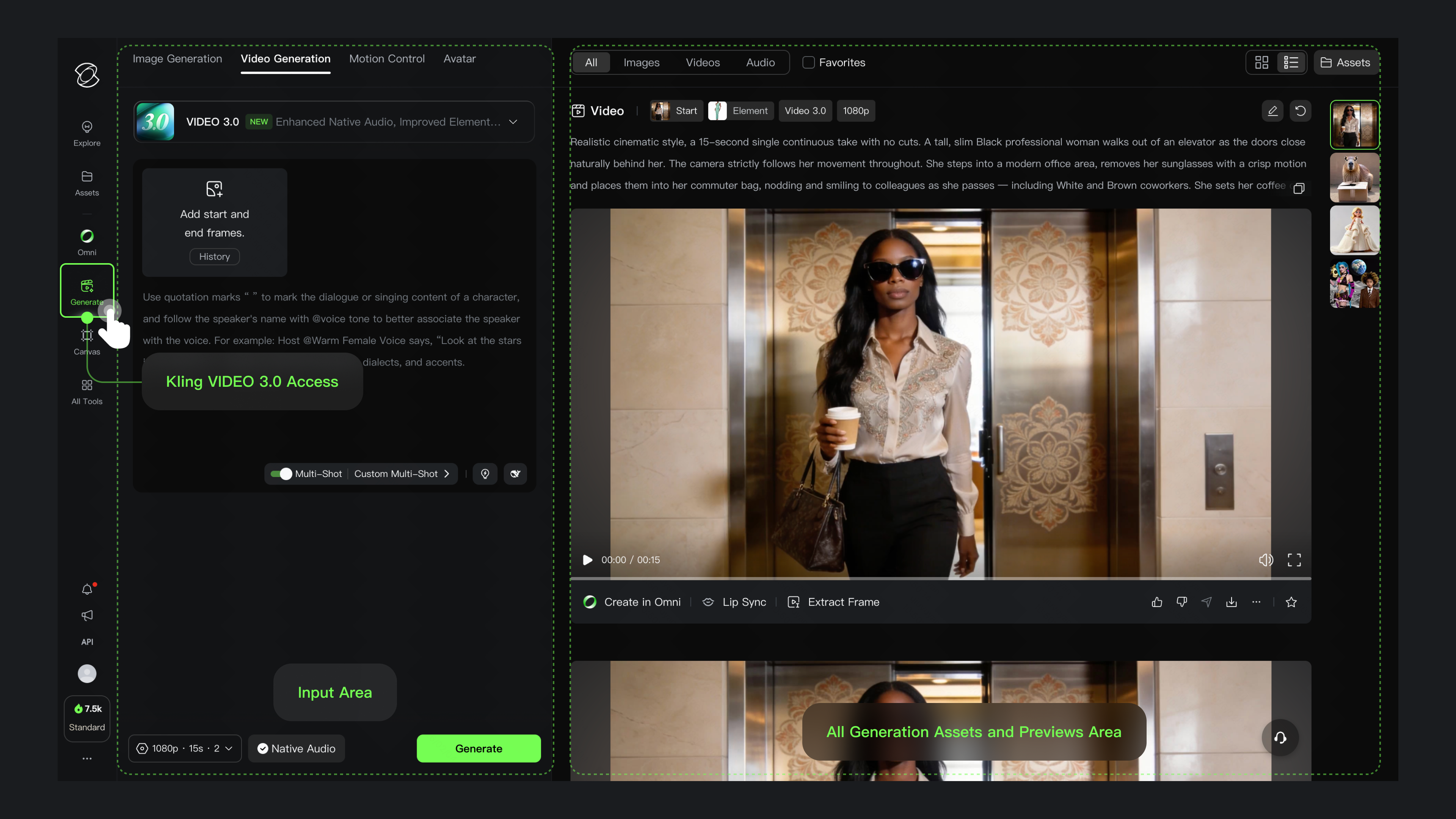
Video 3.0 supports three- to fifteen-second generations. Start and end frames guide the opening and closing images; Elements bind a subject and can include a voice. Multi-Shot generates scene changes automatically, while Custom Multi-Shot adds individual shot descriptions and durations. Native audio can include dialogue, ambience and sound effects, with Chinese, English, Japanese, Korean and Spanish dialogue support.
Motion Control uses an action video and a character image to guide a performance. Video 3.0 can also bind a facial element, but that reference covers the face rather than clothing, hair or props. Matching the character’s orientation to the action video matters for element binding. These controls are useful for dance, performance and character scenes that need a specific movement.
The Kling 3.0 series now includes native 4K generation alongside 720p and 1080p modes. Kling’s announced 4.0 upgrade adds up to thirty-second generations and ten keyframes. Its September rollout began with limited 4.0 Flash access, so those headline capabilities should not be assumed for every account. The full 4.0 guide describes richer image, video and subject references and targeted changes to existing footage; 10-bit HDR is still described as coming soon.
Kling AI pricing combines a subscription with generation credits. The published Standard offer renews at USD 8.80 per month with 660 credits, after a lower first-subscription price. Pro, Premier and Ultra provide larger monthly pools. A five-second Video 3.0 generation at 1080p uses 40 credits without native audio or 60 with it; voice control adds another 10. Native 4K has a published reference rate of 30 credits per second. Model choice and extra takes change how much finished footage a credit pool produces.
Best for
- Creators making short product videos and generated scenes
- Filmmakers using character, image and shot references
- Creators animating a character with an action-video reference
Limitations
Model access, generation settings and offers vary. Kling 4.0 Flash began with limited early access; the announced full 4.0 feature set is not a promise of access on every plan. Credits are spent per generation, with higher costs for some audio and resolution settings. Basic output is non-commercial; paid commercial use remains subject to Kling’s terms and rights in any supplied material.
Kling AI video and creative features
Text and image to video
Describe a scene or animate a starting image. Supported models also accept end frames and subject references.
Multi-shot storytelling
Generate automatic shot transitions or specify individual shots and timing with Video 3.0’s Custom Multi-Shot controls.
Characters and voice references
Create Elements from reference images or a character video. Character Elements can carry a voice tone into supported generations.
Sound and dialogue
Create speech, ambience and effects with native audio. Available languages and voice controls depend on the selected model.
Motion Control
Transfer a performance from an action video to a character image. Facial Element binding in Video 3.0 has its own reference requirements.
Native 4K generation
Generate 4K video in supported Kling 3.0 series modes. Its credit rate differs from the guide’s 720p and 1080p settings.
Image studio and Canvas
Generate images, develop scripts and storyboards with an agent, and arrange project material in a node-based workspace.
Kling 4.0 creative controls
The announced upgrade combines keyframes, richer references and targeted video editing. Access began with a limited Flash rollout.
Kling AI pricing
Kling offers a free Basic tier and paid Standard, Pro, Premier and Ultra subscriptions. Standard’s published renewal is USD 8.80 per month for 660 credits. Introductory discounts differ from renewals; higher plans add larger credit pools. Generation costs vary by model, length, resolution, audio and voice settings.
Example plans.
Standard — monthly renewal
USD 8.8 / month
Global creator subscription
Plan details
Published discounted renewal; first subscription USD 6.99. Includes 660 credits/month. Current offers may change.
Pro — monthly renewal
USD 32.56 / month
Global creator subscription
Plan details
Published discounted renewal; first month USD 25.99. Includes 3,000 credits/month.
Premier — monthly renewal
USD 80.96 / month
Global creator subscription
Plan details
Published discounted renewal; first month USD 64.99. Includes 8,000 credits/month.
Technical specifications
Video creation
| Feature | Kling AI |
|---|---|
| Generation or editing workflow | Create generated scenes with text, images, Elements and multi-shot controls. Canvas adds scripts, storyboards and a creative workspace.Features and access depend on selected model |
| Inputs and references | Video 3.0 uses text, start/end frames and subject Elements. Its character Elements can include a voice. Motion Control takes an action video and character image.Model-specific references |
| Duration and resolution | The Kling 3.0 series supports native 4K as well as 720p and 1080p generation. Resolution availability and credit costs depend on the selected mode.Native 4K is a separate generation mode |
| Editing and captions | Custom Multi-Shot gives shots their own instructions and durations. Reference-driven editing is available through 3.0 Omni; the announced 4.0 adds targeted changes to existing footage.Full 4.0 access is not assumed for every account |
| Watermarks and usage rights | Paid plans list commercial-use permission; Basic output is non-commercial. Kling’s terms and third-party input rights still apply.Commercial benefit is paid-plan scoped |
| Maximum clip duration (seconds) | 153–15-second Video 3.0 generation |
| Export height (pixels) | 2160Model-specific output, not every plan or mode |
| API access | SupportedSeparate API packages and model access; creator subscriptions are not API credits |
Kling AI alternatives
Runway, Google Flow and Luma offer other approaches to generated shots, creative editing and scene development.
Runway
Develop campaign assets with Agent and combine generated shots with Aleph editing and timeline assembly.
Google Flow
Create and develop scenes with Google’s video models and creative tools. Explore Flow for a different model library and scene-building experience.
Luma
Create Ray-generated footage and transfer motion, body performance or facial expressions from existing video.
Kling AI FAQs
Is Kling AI free?
Basic is free, but Kling’s published plan table lists no included monthly credits and marks Basic output as non-commercial. Free access is not unlimited generation; current claims and offers are shown in the account.
How much does Kling AI cost?
Published monthly renewals are USD 8.80 for Standard, 32.56 for Pro, 80.96 for Premier and 159.99 for Ultra. First-subscription discounts are lower. These offers can change; the linked pricing page shows current billing options.
How many credits does a Kling AI video use?
For Video 3.0 at 1080p, a five-second clip uses 40 credits without native audio or 60 with it. Voice control adds 10 more. Other models, resolutions and generation modes have different rates.
Does Kling AI generate native 4K video?
Yes. The Kling VIDEO 3.0 series includes a native 4K mode, with a published planning rate of 30 credits per second. It is separate from the older guide’s 720p and 1080p audio modes.
What is the difference between Kling 3.0 and 4.0?
Kling 3.0 generates three- to fifteen-second clips. The announced 4.0 upgrade extends this to thirty seconds and adds up to ten keyframes and richer references. Flash early access began with a limited rollout; availability depends on the account.
Can Kling AI animate a character using another video?
Motion Control takes an action video and a character image. Video 3.0 facial Element binding uses facial references only, and requires the character’s orientation to match the video. It does not bind clothing, hair or props.
Can Kling AI edit existing video?
Kling 3.0 Omni supports reference-driven video changes. The announced full 4.0 model adds targeted edits to subjects, backgrounds, movement and style. Those 4.0 controls depend on access to the relevant model.
Can I use Kling AI videos commercially?
Paid plans list commercial-use permission; Basic output is non-commercial. That permission remains subject to Kling’s service terms and does not clear rights in uploaded images, footage, voices or identities.
Is this your product? Claim this page to update your listing.