

Dataiku
Dataiku review: visual data pipelines, AutoML and AI assistants
Dataiku review: explore visual data pipelines, AutoML, Cobuild, SQL assistance, free and enterprise editions, cloud trial limits and alternatives.
Free plan availableAccount required
- Access
- Free and paid plans
- Available on
- Web, API
Data preparation, analytics and AI in one shared platform
Dataiku is an enterprise platform for preparing data, developing machine-learning models and building AI applications. Its visual Flow connects datasets, transformation recipes and outputs, with Python, R and SQL available alongside visual tools. Analysts and developers can contribute to the same project without choosing a single way of working.
The platform connects to existing data systems, including Snowflake, Databricks, Redshift and S3. Visual recipes handle preparation tasks such as cleaning and joining datasets. Model development, batch scoring, deployment and monitoring extend that preparation work into production applications, subject to the configured environment and license.
Cobuild adds a natural-language way to create data and AI projects. Generated projects remain visible and editable in the Flow. Its September 2026 expansion adds Cobuild Insights for questions about governed data and Dataiku Headless for working through coding tools. These are platform capabilities; access still depends on the organization’s setup.
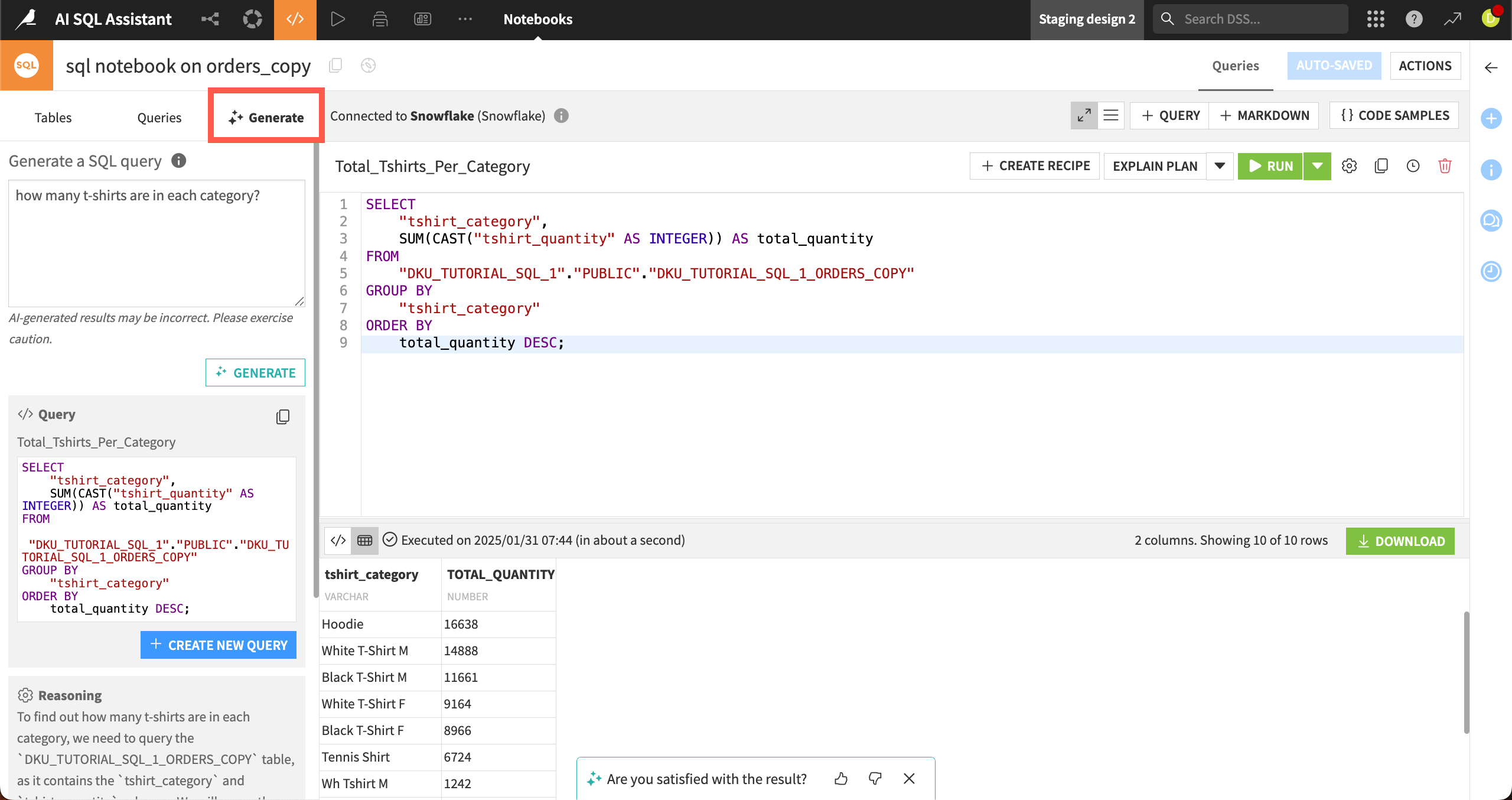
SQL Assistant serves a more focused purpose inside SQL notebooks: writing, refining, explaining and debugging queries. It uses the schema of tables added to its context, and requires write access to the project. SQL recipes use Cobuild instead. This distinction matters when moving from exploratory queries to a repeatable pipeline.
SQL notebooks run against a configured connection and show query results that can be explored, downloaded or charted. A notebook is an exploratory workspace, rather than a step represented in the Flow; queries can become SQL recipes for a pipeline. The chart engine can use in-database execution for a large result table instead of charting a sample.
Dashboards, interactive charts, Dataiku Apps and Stories turn analyses into material colleagues can use. Apps support exploration without requiring each reader to write code, while Stories combine analytical findings with presentations. These outputs sit alongside the platform’s modeling and agent tools, rather than limiting Dataiku to reporting.
AI Services can use Dataiku-operated models or an organization’s configured LLM connections. In bring-your-own-model mode, assistant input goes to the selected provider; both modes still need internet access. Stories AI does not support that mode. A self-hosted installation therefore does not, by itself, mean every AI feature processes data locally.
Sharing has specific boundaries. Cross-project datasets can be reused in recipes, charts and models, but exports require the relevant permission in the receiving project. External integrations use REST or Python APIs with scoped access. Personal API keys inherit the user’s permissions; project-level keys have their own project and dataset rights.
Dataiku suits teams that want reusable data preparation, analytical delivery and AI development in a common environment. The self-installed Free Edition provides a separate entry point from the managed cloud trial. Enterprise licensing, enabled capabilities and AI usage allowances are agreed with Dataiku.
Best for
- Data teams combining visual preparation with code
- Organizations building shared analytics and AI applications
- Teams managing reusable data pipelines and models
Limitations
Dataiku needs configured data connections and project permissions. AI Services require administrator setup and internet access, including in bring-your-own-model mode. Feature access and usage depend on licensing; the managed trial excludes Govern and advanced LLM Mesh.
Dataiku features
Visual and code recipes
Prepare connected data with visual transformations or Python, R and SQL in the same Flow.
Cobuild project creation
Use natural language to build inspectable data and AI projects, with editing and review in the Flow.
SQL notebook assistance
Draft, debug and explain SQL using selected table schemas and project write permissions.
AutoML and model operations
Develop and compare models, then support configured deployment, batch scoring and monitoring.
Dashboards and data apps
Publish interactive analytics and applications for colleagues, with Stories for presentations.
LLM Mesh integration
Use completion models, embeddings, agents and knowledge banks through the LLM Mesh API.
Cross-project data reuse
Reuse shared datasets in analytical projects while keeping export permissions separate.
REST and Python APIs
Integrate authorized projects and datasets with external systems using scoped API access.
Dataiku pricing
Dataiku has a self-installed Free Edition and a separate 14-day managed cloud trial with no credit card required. Enterprise pricing is available on request. AI Services use metered usage, with included usage and additional paid credits depending on the order. The cloud trial excludes Govern and advanced LLM Mesh.
Technical specifications
Data analysis
| Feature | Dataiku |
|---|---|
| Data inputs and connections | Connected datasets and visual or Python, R and SQL recipes in the Flow. Connections and execution engines depend on the environment.Configured data connections and execution environment |
| Analysis workflow | Cobuild creates inspectable data and AI projects. SQL Assistant drafts, refines and explains SQL in notebooks using selected table schemas.Enabled AI Services and project permissions |
| Charts and reproducible outputs | Interactive dashboards, charts, Dataiku Apps and Stories; delivery depends on project access and enabled capabilities.Configured analytics and application capabilities |
| Data permission controls | Shared datasets can be reused across projects. Exporting requires Export datasets data permission in the receiving project.Cross-project sharing and dataset export rights |
| Data and compute limits | AI Services use metered usage. Included allowances and additional paid credits vary by the applicable order.Organization-specific AI Services order |
| API access | SupportedAuthenticated REST/Python APIs; personal, project or global key permissions apply |
Dataiku alternatives
Hex offers collaborative notebooks and data apps, Databricks AI/BI brings analytics to a lakehouse, and DataRobot focuses on predictive modeling and production AI. They cover different parts of the work Dataiku brings into one platform.
Dataiku FAQs
What is Dataiku used for?
Dataiku supports data preparation, analytics, machine learning and AI applications. Visual recipes and code work together in a shared project, with dashboards, models and agents as possible outputs.
Is Dataiku free?
There is a self-installed Free Edition with its own license, separate from the managed cloud trial and enterprise offer. Free Edition access does not establish entitlement to every enterprise or AI feature.
How much does Dataiku cost?
Contact Dataiku for enterprise pricing. AI Services use metered usage; included allowances and additional paid credits depend on the order. The self-installed Free Edition and managed cloud trial are separate offers.
How long is the Dataiku cloud trial?
The managed trial linked here lasts 14 days and requires no credit card. Govern and advanced LLM Mesh are excluded. At the end, the trial instance is deactivated and access is lost unless an extension is agreed.
What is the difference between Cobuild and SQL Assistant?
Cobuild helps build data and AI projects. SQL Assistant works inside SQL notebooks, using selected table schemas to generate, refine or explain queries. For SQL recipes, Dataiku directs users to Cobuild.
Can Dataiku use my own language model?
Supported AI Services can use configured LLM connections. Input then goes to the selected provider, but internet access is still required. Stories AI is not available in this bring-your-own-model mode.
Can applications keep conversations in Dataiku?
Yes. The LLM Mesh API supports persisted conversations in a project. Project read access allows access to those conversations; filtering by an end-user identifier does not enforce authorization. Applications serving multiple users must apply their own access checks.
What are the best Dataiku alternatives?
Hex, Databricks AI/BI and DataRobot are relevant alternatives for different needs: shared notebooks and data apps, lakehouse analytics, or predictive modeling and production AI. Their scope differs from Dataiku’s combined platform.
Is this your product? Claim this page to update your listing.