

Auphonic
Balance speech and prepare delivery audio
Auphonic automates spoken-audio post-production with levelling, loudness targets, noise reduction and editable processing for podcasts, interviews and other recordings.
Free plan availableAccount required
- Access
- Free and paid plans
- Available on
- Web, API
What is Auphonic?
Auphonic processes recordings you already have, balancing speakers and speech/music segments with its leveler. Loudness settings, a true-peak limiter, filtering and noise or reverb reduction help prepare the delivery file.
Use singletrack for an already mixed mono or stereo recording. Multitrack accepts prepared parallel files, such as individual speakers and music, and adds ducking, gating and crosstalk handling before mixing them.
Prepare parallel tracks before processing
Align files to the same start time and keep speakers and music separate where possible. Stereo panorama is preserved from the inputs, so set it in the source editor first. Multitrack processing does not extract instruments from a finished song; complex arrangement changes belong in a timeline or music editor.
Review adjustments and reprocess
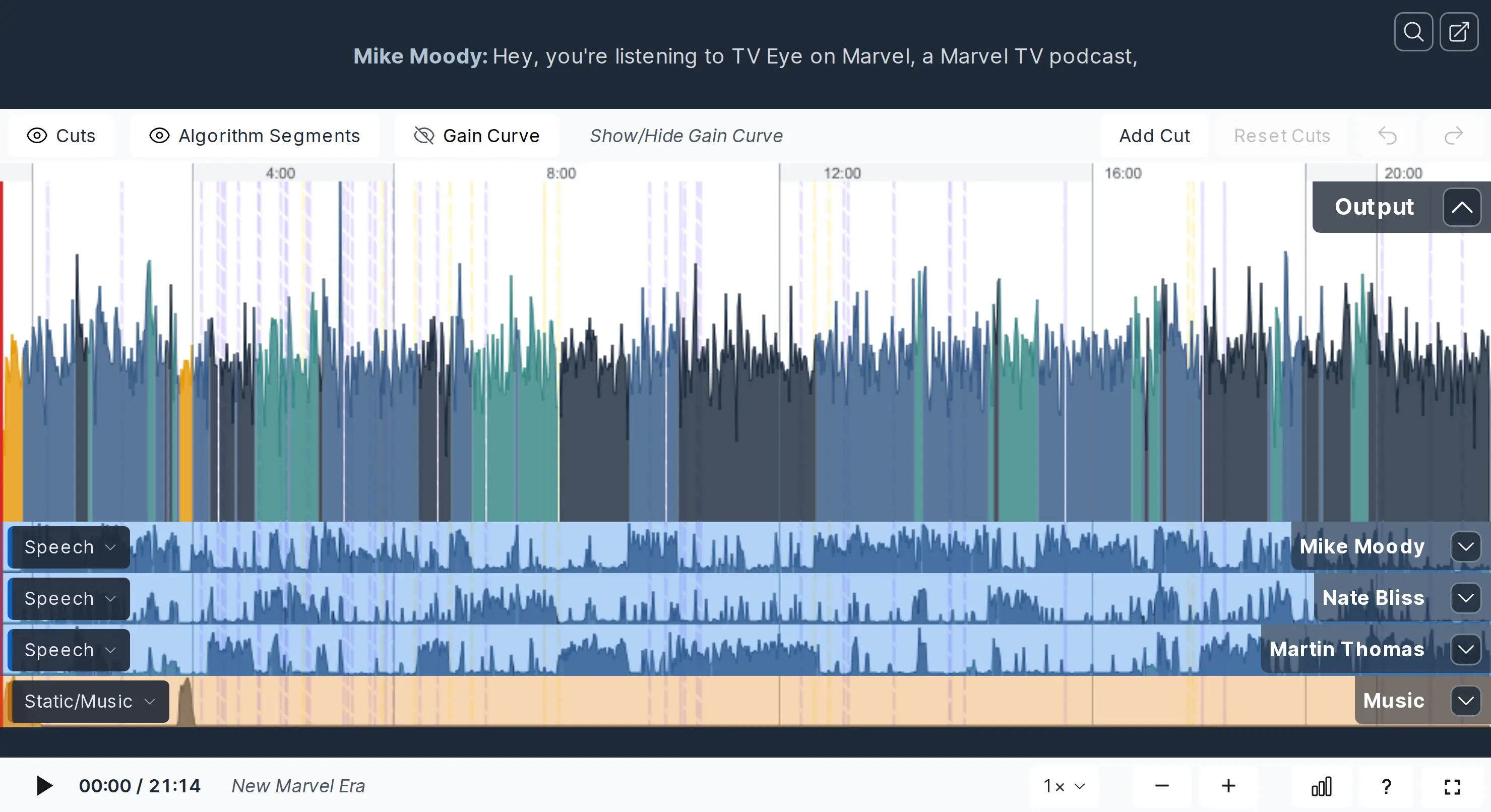
The result-page editor displays the waveform and processing adjustments. Review cuts, refine denoising segments or change the leveler gain curve, then reprocess to apply those edits. Reprocessing the same production with unchanged input files does not use additional credits under the guide; replacing inputs changes that scope.
Budget duration and retain the finished files
Processing time follows production duration: a twenty-minute recording plus a one-minute intro counts as twenty-one minutes, with a three-minute minimum for short productions. Additional output formats do not simply multiply that charge. Presets and API integration support repeatable publishing.
Free output includes an Auphonic jingle. The service is not storage or backup: production files are removed after the retention shown in the account, so download and keep the finished files.
Best for
- Podcast loudness and true-peak delivery
- Mixed recordings or aligned speaker and music tracks
- Repeatable processing with output review
Limitations
Free output includes an Auphonic jingle, and unused free credits do not accumulate. Multitrack needs appropriate separate inputs; it does not extract them from a mixed song. The service is not a permanent file archive. Free multitrack trials are limited to productions shorter than twenty minutes.
Auphonic features
Level balancing and loudness targets
Balance recorded speakers and music, then set output loudness and true-peak limits.
Singletrack and multitrack processing
Choose a mixed input or separate parallel speaker/music files according to the recording.
Reviewable processing edits
Refine cuts, denoise segments and leveler gain in the result editor, then reprocess.
Presets and API workflows
Reuse processing setups and integrate production into a broader workflow.
Prepared multitrack inputs
Align parallel tracks from the same start and separate speakers/music where possible. Input stereo placement is retained, so prepare it in the source editor.
Duration-based production accounting
Plan credits around the production duration and added intro/outro, not a count of exported formats. Short productions have a three-minute minimum charge.
Auphonic pricing
Free includes two processed hours monthly and an Auphonic jingle; unused free credits do not accumulate. Paid recurring credits reset monthly without rollover, while one-time credits do not expire and are used after recurring credits. Plans are purchased for processed audio duration; choose the currency, billing cadence and allowance on the pricing page. A production has a three-minute minimum charge. Reruns of the same production with unchanged inputs can avoid additional credits, while replacement inputs change that scope. Taxes may apply.
Auphonic alternatives
Choose according to the audio task and the workflow you need to finish.
Adobe Podcast
Adobe Podcast suits browser speech enhancement or recording. Compare the capture and editing steps you need.
Descript
Descript suits cutting and rearranging spoken content through a transcript and timeline before delivery processing.
LANDR
LANDR suits automated mastering for a finished music mix. Auphonic’s multitrack workflow centres on dialogue and speech-led programmes.
Auphonic FAQs
Is Auphonic free?
It includes two processed hours per month, but free output contains an Auphonic jingle and unused free credits do not stack up.
Does Auphonic separate instruments from a song?
Its multitrack workflow expects separate parallel input files. It mixes and processes those tracks; this is different from extracting stems from a finished mix.
Are edits charged again?
The pricing guide allows reprocessing the same production without extra credits while its inputs stay unchanged. Replacing an input or creating another production changes that scope.
Do Auphonic credits expire?
Recurring credits reset each month without rollover. One-time credits do not expire and are used after recurring credits.
Can I keep Auphonic as my audio archive?
No. The service says it is not a storage or backup system. Keep your originals and download finished files before the account’s displayed retention expires.
Can I use multitrack for free?
The pricing FAQ permits free multitrack trials for productions shorter than twenty minutes. Longer multitrack work requires paid recurring or one-time credits.
How should I prepare separate tracks?
The multitrack guide recommends aligned start times, one speaker per track and music separate from speech. Stereo placement is not changed automatically. This setup serves speech-led productions rather than music-only mixing.
Does exporting several formats multiply the credit charge?
The pricing FAQ bases the charge on processed duration, with a three-minute minimum per production. It says the number of output files does not change that processing time. Added intro/outro duration and changed input files can affect the relevant scope.
Is this your product? Claim this page to update your listing.