

Alpha3D
Alpha3D review: AI generation, asset refinement and pricing
Explore Alpha3D’s AI model generation, retopology, UVs, texturing and humanoid rigging, with paid plans, Alphred and shared API credits explained.
Paid plansAccount required
- Access
- Paid access
- Example plan
- EUR 5 / monthTester monthly
- Available on
- Web, API
Generate, refine and export a 3D asset in one toolset
Alpha3D is a web platform for generating and refining 3D assets. It starts from a text description, an image or multiple reference views, then offers retopology, UV unwrapping, materials, rigging and format conversion. Its appeal is keeping the steps around a single asset together, whether you are developing a game prop, a character prototype or a printable object.
Text-to-3D uses an intermediate reference image before generating the mesh. This lets you develop the visual idea before spending credits on the 3D result. Image and multi-view routes use supplied references directly. Multi-view reference allowances vary by plan: Creator Pro advertises up to eight views, while lower tiers have smaller allowances. The reference count available on your account depends on its current subscription.
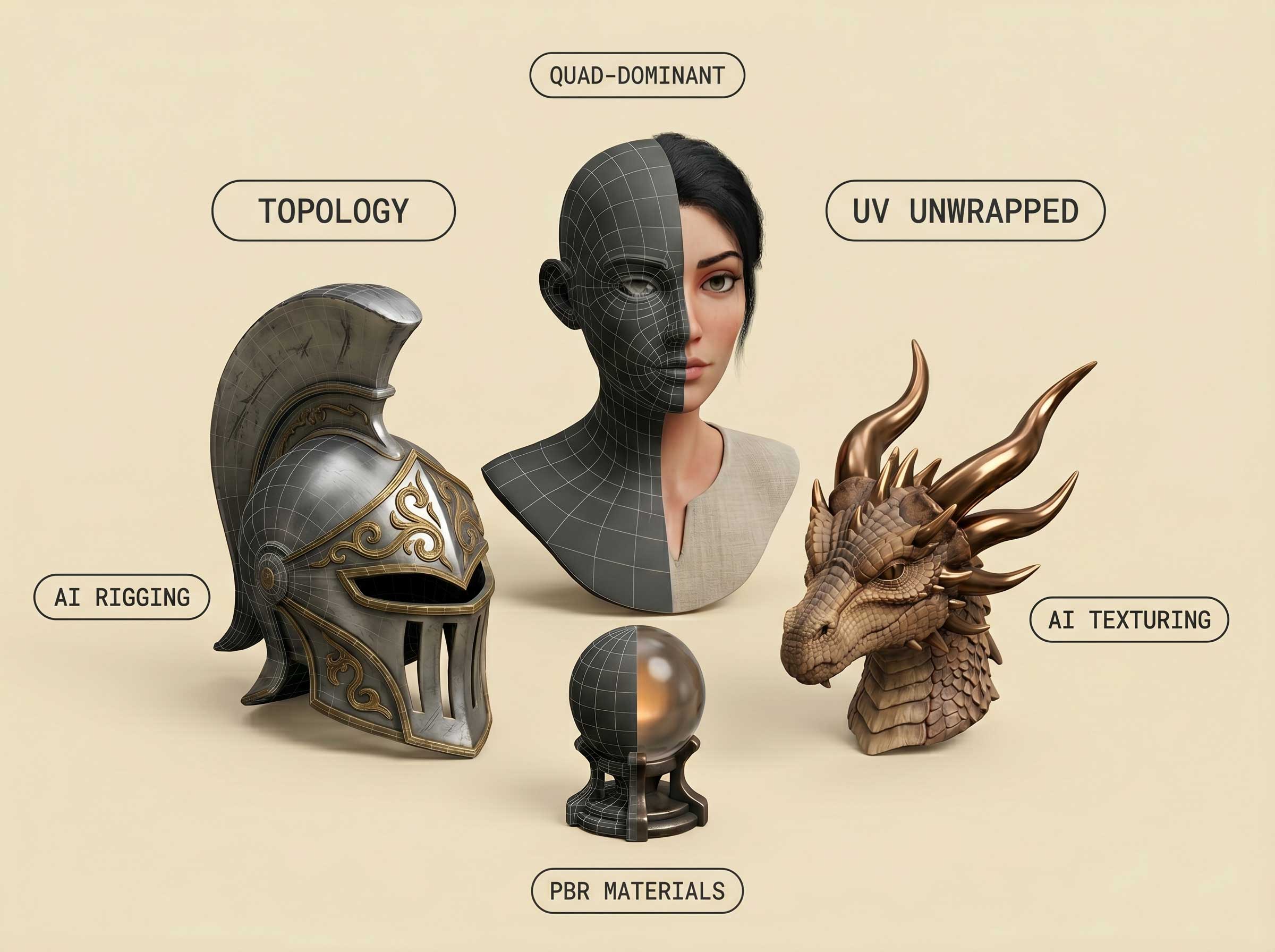
Generation quality and usable game geometry are different choices. The vendor describes Low Poly as 3,000–15,000 faces, High Res as 300,000–500,000 and Ultra High Res as 500,000–1.5 million. Smart Topology provides a separate refinement step with triangle or quad-dominant output and a target face count. Higher-detail source meshes may need a lighter version for real-time use; a dense result is not automatically a suitable game asset.
UV unwrapping prepares the model’s texture layout, while AI Texturing changes its appearance from a prompt or reference. High-resolution generation offers PBR materials; the described Low Poly mode does not use PBR. Format conversion is a separate operation, and texturing or rigging can add a conversion step when the input is GLB. Source format therefore affects the credits needed to finish an asset.
Segmentation splits a model into labelled parts. The rigging tool is narrower: it accepts supported humanoid meshes in a T-pose and returns an FBX with a skeleton and skin weights. It should not be treated as a universal animal, vehicle or animation-clip generator. The broader asset tools can be used on an existing mesh, so you do not have to start with a new AI generation for every job.
Alphred runs tools through conversation, with its own Token balance for messages and reasoning. Node-based Workflows connect asset operations into a reusable graph. Published templates cover Concept Canvas, Character Generator, 3D Printing and Roblox Assets; a blank canvas supports a custom sequence. Having access to the workflow canvas does not remove the individual tools’ plan limits or operation charges.
The REST API and MCP route use the same 3D pipeline and credit balance as the web app. Jobs run asynchronously, with polling or webhook updates and idempotency keys for duplicate-request handling. A Blender add-on provides another route into the toolset. These integrations help repeat a generation-and-refinement sequence, but they do not make cloud processing local or guarantee that every output fits an engine’s technical budget.
Paid monthly plans start at €5 for Tester, followed by Basic at €16, Creator at €50 and Creator Pro at €150, checked on 10 October 2026. They include separate 3D-credit and Token allowances; Enterprise is quoted. Alpha3D’s general terms assign generated content to the user subject to compliance, while also granting internal training rights over inputs and outputs. Commercial use and confidentiality are therefore separate considerations.
Best for
- Creators generating and refining game props
- Artists adding topology, UVs and textures to existing meshes
- Developers running a repeatable 3D asset pipeline
Limitations
Generation and refinement steps spend 3D credits; Alphred uses a separate Token allowance. Plan features and reference limits vary. Humanoid rigging requires a suitable T-pose mesh. General terms allow internal training on inputs and outputs, so ownership is separate from confidentiality.
Alpha3D features
Text, image and multi-view generation
Develop meshes from descriptions or reference images, with plan-specific view limits.
Smart Topology
Refine a dense asset with a target face count and triangle or quad-dominant output.
UV unwrapping
Prepare a model’s texture layout as a separate pipeline step.
AI materials and texturing
Use prompts or references to develop materials, with input-format-dependent costs.
Segmentation and humanoid rigs
Split assets into parts or rig supported T-pose characters with skeletons and skin weights.
Alphred and node Workflows
Run tools conversationally or connect them into a reusable asset graph.
GLB, OBJ, FBX and STL routes
Download supported models and use conversion or printing workflows for the required format.
REST API, MCP and Blender
Access the same toolset from integrations using a shared account balance.
Alpha3D pricing
Monthly EUR prices checked on 10 October 2026: Tester €5, Basic €16, Creator €50 and Creator Pro €150; Enterprise is quoted. Each tier includes separate 3D credits and Tokens. Refinement jobs and format conversions can add credit costs. Other displayed currencies can be converted estimates; annual billing and checkout totals may differ.
Example plans.
Tester monthly
EUR 5 / month
Current documented product
Plan details
90 monthly 3D credits and 1,000 Tokens; actual EUR monthly billing price. Each pipeline step uses credits; plan-specific features and reference limits apply.
Basic monthly
EUR 16 / month
Current documented product
Plan details
1,000 monthly 3D credits and 3,500 Tokens; actual EUR monthly billing price. Each pipeline step uses credits; plan-specific features and reference limits apply.
Creator monthly
EUR 50 / month
Current documented product
Plan details
3,200 monthly 3D credits and 10,000 Tokens; actual EUR monthly billing price. Each pipeline step uses credits; plan-specific features and reference limits apply.
Technical specifications
3D assets
| Feature | Alpha3D |
|---|---|
| Text and image inputs | Text, images and multi-view references. Creator Pro advertises up to eight reference views; lower tiers have smaller allowances and the selected plan determines account access.Selected subscription entitlement; reference allowances vary by tier |
| Mesh and topology workflow | Low Poly described as 3K–15K faces, High Res 300K–500K, Ultra High Res 500K–1.5M. Separate Smart Topology supports target face counts and triangle or quad-dominant output; segmentation and UV unwrapping have their own steps.Generation quality and available refinement tools vary by tier |
| Texture and material outputs | Prompt or reference-guided AI texturing and PBR materials. Low Poly mode is described without PBR. GLB input may need conversion before texture processing, with a different credit cost.Selected generation quality and input format |
| 3D export formats | GLB, OBJ and FBX downloads; STL through the conversion or geometry-first printing workflow. Conversion is separately metered; humanoid rigging returns FBX.Selected export/conversion/rigging route |
| Commercial-use rights | Paid plans advertise commercial use. Published general terms assign generated content to the user subject to compliance and grant Alpha3D rights for internal training on inputs and outputs.General terms; any separate studio agreement has its own scope |
| API access | SupportedEvery subscription tier; shared web/API credit balance, asynchronous jobs and MCP integration |
Alpha3D alternatives
Explore other AI 3D generators with geometry, material and character tools.
Alpha3D FAQs
What is Alpha3D?
Alpha3D is a web-based AI 3D creation platform. It combines text, image and multi-view generation with tools for retopology, UVs, texturing, segmentation, humanoid rigging and conversion. Alphred and Workflows provide conversational and node-based ways to run these steps.
How much does Alpha3D cost?
Monthly plans checked on 10 October 2026 are Tester €5, Basic €16, Creator €50 and Creator Pro €150. Enterprise is quoted. Prices are recorded in the EUR billing currency; other displayed currencies can be converted estimates. Annual billing, taxes and checkout totals may differ.
Is Alpha3D free?
Creating an account is free, but the published subscription plans are paid. Tester is the entry plan with 90 monthly 3D credits and 1,000 Tokens. Some image tools are described as free and rate-limited; that does not make model generation or the full refinement pipeline free.
What is the difference between 3D credits and Tokens?
3D credits pay for model-generation and asset-processing jobs. Tokens pay for Alphred’s conversation and reasoning. When Alphred submits a 3D job, that job still uses 3D credits. Monthly Token allowances reset without rollover; the vendor distinguishes bonus Tokens from the recurring allowance.
How many images can Alpha3D use?
Multi-view generation supports up to eight reference images on the advertised Creator Pro tier. Lower tiers have smaller allowances. The number of views available to your account depends on the selected plan and its current entitlement.
Can Alpha3D rig any model?
The described AI rigging route is for humanoid characters in a standard T-pose, using supported FBX, OBJ or GLB inputs. Its result is a rigged FBX with a skeleton and skin weights. This does not establish support for every body type or a library of completed animation clips.
Can I use Alpha3D assets commercially, and are they excluded from training?
Paid plans advertise commercial use. The general terms assign generated content to the user subject to compliance, and also grant Alpha3D rights to use inputs and outputs for internal model training and improvement. Ownership does not by itself establish a no-training arrangement; any separate studio agreement needs its own terms.
What are the best Alpha3D alternatives?
Meshy offers model generation, materials and character tools. Tripo combines AI generation with topology processing and rigging, while Rodin supports text, image and multiview creation with geometry and material settings. Our AI 3D model generator category covers these and other asset tools.
Is this your product? Claim this page to update your listing.