

StudyFetch
StudyFetch review: AI tutoring from your course material
StudyFetch turns course files and lectures into notes, flashcards and practice tests, with Sparky tutoring and exam-based study plans.
Free plan availableAccount required
- Access
- Free and paid plans
- Available on
- Web, Mobile
Your course notes, tutoring and revision in one place
StudyFetch brings your course material, revision activities and an AI tutor into one study workspace. Its Study Sets accept documents, slides, recordings and links, then turn that material into notes, flashcards and practice questions. It suits students who want to work through their own course content rather than search a library of unrelated study sets.
Study Plan organises a set into topics and units. Adding a syllabus and exam dates gives the plan a course schedule to work from, while Cram, Standard and Comprehensive modes change its depth. Topics can be ordered by material, exam or your own sequence, with progress and short assessments helping you keep track of completed work.
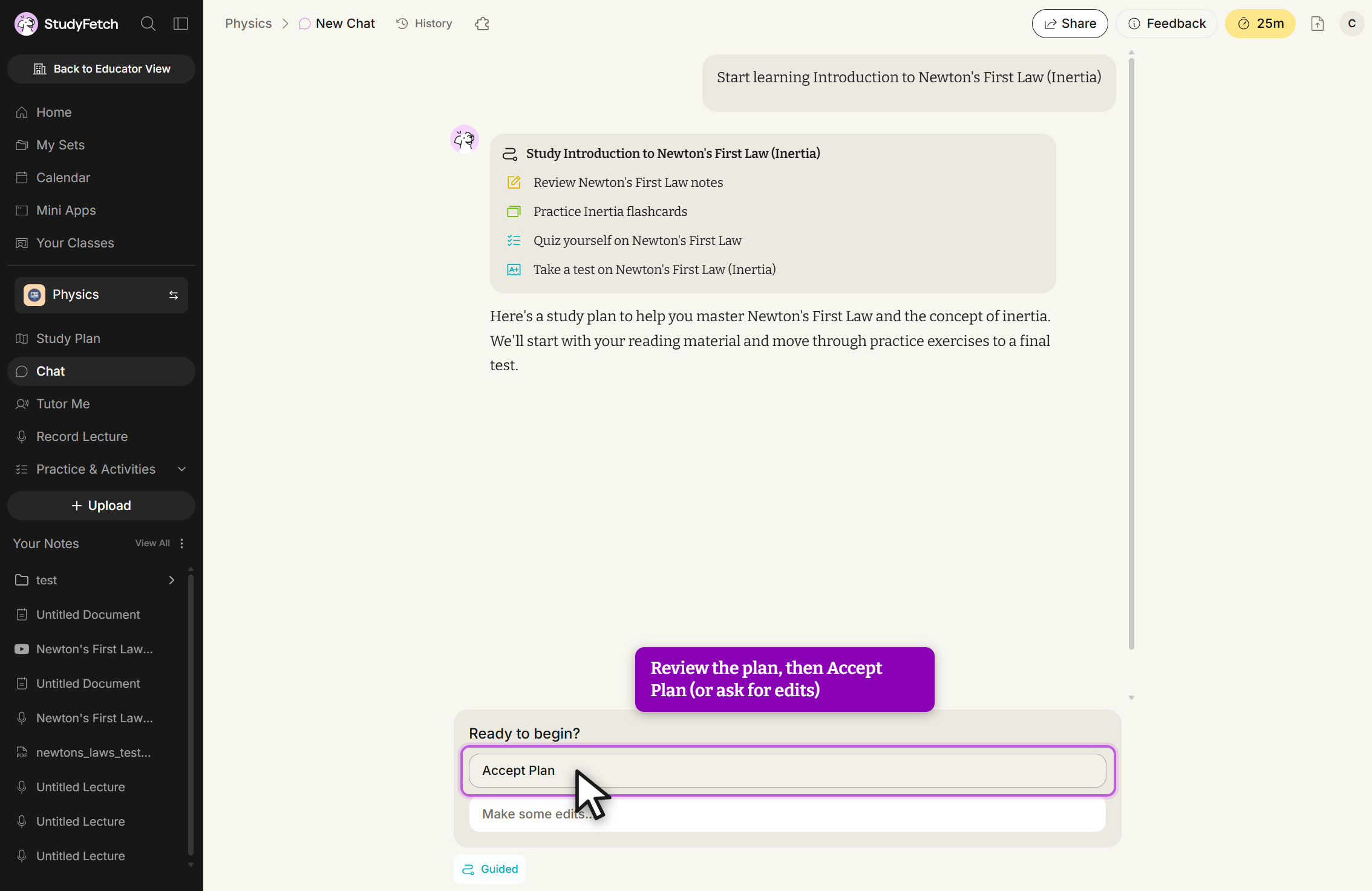
Sparky Chat answers questions about your material on the web and mobile apps. Guided Chat adds an editable sequence of study activities: accept or adjust a proposed plan, then move through notes, flashcards, quizzes or tests at your own pace. It follows the current activity and offers hints during questions rather than simply opening an empty conversation.
Tutor Me is a separate spoken tutoring session on the website. Sparky teaches through the material, using the current slide as context for questions and practice checks. It has its own chat alongside the lesson, but this session format is not available in the mobile app. That distinction matters if you expect to do most of your studying on a phone.
Live Lecture keeps recordings, transcripts and notes together. Enhanced notes can be summarised or expanded and edited after generation. Flashcards support term-and-definition, cloze, fill-in-the-blank, multiple-choice and image-occlusion formats. Practice Tests let you choose source files or cards, combine several question types and set a language; notes can also be printed or saved as a PDF through the browser.
StudyFetch works on the web, iOS and Android, with feature availability varying by platform. Institutional packages add sign-in, learning-platform integrations and usage administration. Canvas access has separate login and material-import connections that require administrator setup, so an individual subscription does not provide a ready-made connection to every course.
StudyFetch processes material in the cloud. Its consumer privacy policy allows uploaded content and service interactions to be used to train its own AI models, with an exception for data obtained through Google Workspace and Google Photos APIs. Institution-managed access uses separate agreements, which StudyFetch says prohibit training on enterprise data. Those arrangements differ from a student signing up independently.
Best for
- Students revising from their own course files
- Learners organizing study around a syllabus and exam dates
- Institutions arranging managed access to AI study resources
Limitations
AI notes and answers can contain mistakes. Tutor Me is web-only, and integrations need school setup. Consumer uploads may be used for model training; institutional agreements differ. Paid access and free allowances depend on the offer shown in your account.
StudyFetch features
Course files and recordings
Build Study Sets from PDFs, Word documents, slides, text, images, audio, video, YouTube and Google Docs.
Syllabus and exam planning
Arrange topics around course dates and choose Cram, Standard or Comprehensive study depth.
Guided Chat
Edit a proposed study sequence and work through notes, cards, quizzes and tests with Sparky.
Spoken Tutor Me sessions
Learn with slide-context questions and feedback on the website; this session format is separate from mobile chat.
Editable lecture notes
Review recordings and transcripts, generate enhanced notes and edit them after the lecture.
Flashcards and practice tests
Use several recall-card formats, including image occlusion, and build tests from chosen course material.
School-managed access
Institution packages add administration and integrations, with Canvas setup handled by an administrator.
StudyFetch pricing
StudyFetch is free to start, with paid Premium access for fuller use. The current offer and usage limits are shown in your account. Institutions receive a quote based on their size. Website subscriptions are managed through the Billing Portal in account settings. The NVIDIA-sponsored K-12 programme on Honen has separate access terms.
Technical specifications
Education and learning
| Feature | StudyFetch |
|---|---|
| Subjects and learner audience | Study from supplied course material with syllabus and exam-based topic planning.Study Sets and study-plan settings |
| Learning and feedback mode | Sparky Chat, Guided Chat, flashcards, tests and lecture notes; spoken Tutor Me is web-only.Main chat supports web and mobile; Tutor Me is a separate website session |
| Study material inputs | PDF, DOC/DOCX, PPT/PPTX, TXT, PNG/JPEG, MP3/MP4, YouTube and Google Docs.Supported material formats; account limits vary |
| Educator controls | Institutional sign-in, usage administration and LMS integration; Canvas login and material imports need administrator setup.Institution-managed access and integrations are separate from individual subscriptions |
| Accessibility and language support | Account interface-language settings and selectable practice-test language; main chat works on web and mobile.Interface and test languages are configurable; spoken Tutor Me remains website-only |
StudyFetch alternatives
Quizlet offers flashcards and practice activities. Gemini Notebook creates study aids from your sources. Khanmigo connects guided tutoring to Khan Academy.
StudyFetch FAQs
What is StudyFetch used for?
StudyFetch turns course files and lectures into study notes, flashcards, quizzes and practice tests, with Sparky tutoring and plans organised around topics and exams.
Is StudyFetch free?
You can start for free. Paid Premium access expands the study service, with prices and allowances shown in your account. Institutions receive custom quotes.
Does Tutor Me work on a phone?
Sparky Chat works on the website and mobile apps. The separate spoken Tutor Me sessions are website-only.
Can StudyFetch use my lecture recordings?
Yes. Audio and video are supported inputs, and Live Lecture can record a class. You can review the recording and transcript, generate enhanced notes and edit those notes.
Can I save StudyFetch notes as a PDF?
Yes. The Notes print option opens a print-ready view, where the browser’s Print dialog can save the notes as a PDF or send them to a printer.
Does StudyFetch train AI on my uploads?
For individual users, its privacy policy allows uploads and interactions to train its own models, except data obtained from Google Workspace or Google Photos APIs. Institution-managed access uses separate agreements with different protections.
What are the alternatives to StudyFetch?
Quizlet offers flashcards and practice activities, Gemini Notebook works from supplied sources, and Khanmigo provides guided tutoring within Khan Academy. Each takes a different approach to studying.
Is this your product? Claim this page to update your listing.