

Murf
Murf: AI voiceovers, pronunciation controls and speech API
Create AI voiceovers with Murf’s script editor, pronunciation controls and audio exports. Its speech API uses separate character-based billing.
Free plan availableAccount required
- Access
- Free and paid plans
- Example plan
- USD 29 / monthStudio Creator — monthly
- Available on
- Web, API
AI narration with script-level voice controls
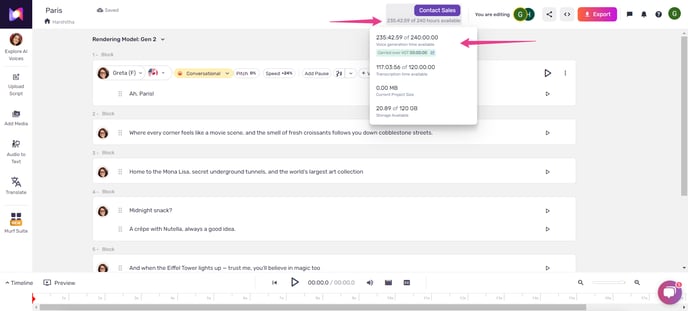
Murf Studio turns written scripts into narration for training videos, explainers and presentations. Script blocks let you arrange a project and adjust the voice, pronunciation, pauses, speed and pitch of individual lines. The browser editor keeps narration and a project timeline together. The mobile web app offers simpler controls and MP3 downloads on paid plans; more advanced editing is available on desktop.
Studio usage is measured in voice generation time, or VGT: the duration of the speech you generate. Changing text regenerates the affected sub-block and uses its duration again. Changing the voice or delivery settings for unchanged, already rendered text does not spend more VGT. Paid downloads are separate from this allowance, so unlimited downloads still come with a finite generation budget.
Unused generation time can carry into the next billing cycle when an active subscription renews. Monthly carry-forward lasts one following month; annual carry-forward lasts one following year. It does not accumulate indefinitely. Cancelling the subscription forfeits remaining VGT, while pausing it preserves the balance until the plan resumes.
Paid Studio audio exports include MP3, WAV, FLAC, OGG and telephony formats. The high-quality setting offers 48 kHz, 16-bit audio in mono or stereo. Voice and music export together as one file. The separately billed API uses characters rather than Studio hours: Falcon 2 supports streaming, while Gen2 remains available for non-streaming speech generation.
Custom voices have two Enterprise routes. Instant cloning is API-only and uses a recording of up to thirty seconds with Falcon 2. Professional cloning is a managed service for Studio and API, using longer recordings and typically one to four weeks of training. Both require access arranged through Murf. Only use recordings of your own voice or a speaker who has given permission.
Best for
- Individuals producing narrated videos and explainers
- Businesses making training and presentation voiceovers
- Developers integrating speech through a separately billed API
Limitations
Free Studio has no audio downloads or commercial rights. Studio hours and API characters are separate allowances. Commercial and broadcasting licences depend on the plan; voice cloning requires Enterprise access. Murf’s Enterprise no-training commitment should not be assumed for every subscription.
Murf voiceover features
Script-block narration
Build a voiceover from organised script blocks and adjust how each line is delivered.
Pronunciation and pacing
Control pronunciation, pauses, speed and pitch; advanced delivery controls depend on the Studio tier.
Same-text voice adjustments
Change the voice or settings for rendered text without consuming additional generation time.
Production audio exports
Export MP3, WAV, FLAC, OGG and telephony audio. High-quality Studio output is 48 kHz/16-bit; voice and music export as one combined file.
Enterprise voice cloning
Instant API cloning uses a short recording with Falcon 2. Managed professional cloning creates a custom voice for Studio and API from longer recordings.
Separately billed speech API
Build speech into an application with character-based billing. Falcon 2 supports streaming; Gen2 remains available for non-streaming generation.
Murf pricing
Free Studio includes 10 minutes of voice generation with no downloads. Paid Creator and Business subscriptions add downloads and plan-specific generation allowances; Enterprise is quoted separately. Studio prices recorded on 5 October 2026 were USD 29 and 99 a month, or USD 228 and 792 billed annually. API pay-as-you-go is separate: Falcon costs USD 0.01 per 1,000 characters and Gen2 costs USD 0.03, with a USD 10 minimum top-up.
Example plans.
Studio Creator — monthly
USD 29 / month
Murf Studio
Plan details
2 generation hours/month; Personal licence; paid audio downloads.
Studio Business — monthly
USD 99 / month
Murf Studio
Plan details
Business licence; plan-specific generation allowance. Price recorded 5 October 2026.
Technical specifications
Voice generation
| Feature | Murf |
|---|---|
| Speech languages | Studio lists 200+ voices across 30+ languages and accents. The separately billed API lists 150+ voices across 35 languages.Separate voice catalogues |
| Voice and pronunciation controls | Adjust voice, pronunciation, speed, pitch, pauses and volume. Advanced controls depend on the plan. Changing settings for unchanged rendered text does not consume more VGT.Control availability depends on plan |
| Voice cloning | Enterprise instant cloning: API-only, maximum thirty-second sample, Falcon 2. Professional cloning: managed Studio/API service, longer recordings and typically one to four weeks of training.Enterprise access; speaker permission required |
| Audio exports and streaming | MP3, WAV, FLAC, OGG, A-law and mu-law; high-quality Studio output is 48 kHz/16-bit mono or stereo. Voice and music export as one file. Falcon 2 streams; Gen2 remains non-streaming.Paid Studio downloads; separate API service |
| Commercial-use terms | Creator includes a Personal licence for individuals and small-scale commercial use; Business provides the organisation licence. Free lacks commercial rights. Full broadcasting rights are an Enterprise add-on.Plan-specific commercial licences |
| Output sample rate (Hz) | 48000High-quality audio export: 48 kHz, 16-bit |
| API access | SupportedSeparate character-based API billing |
Murf alternatives
Other voice tools offer different cloning options, production controls and billing models.
ElevenLabs
Multilingual speech, voice cloning and audio tools with shared-credit subscriptions.
Murf FAQs
Is Murf free?
Free Studio includes 10 minutes of voice generation. Audio downloads and commercial rights require a paid plan; the free allowance is for trying the voices and editor.
How much does Murf Studio cost?
Studio prices recorded on 5 October 2026 were USD 29/month for Creator and USD 99/month for Business, or USD 228 and 792 billed annually. Enterprise is quoted separately. Included generation time and commercial licences depend on the selected plan. API usage is billed separately.
Does changing a Murf voice use more minutes?
Changing the voice, pronunciation, speed, pitch or other delivery settings for unchanged rendered text does not consume additional voice generation time. New text and text edits use the duration of the regenerated sub-block.
Can Murf voiceovers be used commercially?
Paid Studio plans offer plan-specific commercial licences. Creator’s Personal licence covers individuals and small-scale commercial use; Business provides the organisation licence. Free has no commercial rights, and full broadcasting rights require an Enterprise add-on.
Does unused Murf generation time roll over?
Yes, when an active subscription renews. Unused monthly VGT carries into one following month; annual VGT carries into one following year. It does not accumulate indefinitely. Cancelling forfeits remaining time, while pausing preserves it until the subscription resumes.
Does Murf support voice cloning?
Yes, through Enterprise access. Instant Voice Cloning is API-only, uses a sample up to thirty seconds and works with Falcon 2. Professional cloning is a managed service for Studio and API, with longer recordings and typically one to four weeks of training. Recordings require the speaker’s permission.
Is Murf API usage included in Studio?
No. Studio uses generation-time allowances; API pay-as-you-go uses a separate balance. Falcon costs USD 0.01 per 1,000 characters and Gen2 costs USD 0.03 per 1,000 characters, with a USD 10 minimum purchase. Falcon 2 supports streaming; Gen2 streaming has been decommissioned, but its non-streaming generation remains available.
Which audio formats can Murf export?
Paid Studio supports MP3, WAV, FLAC, OGG, A-law and mu-law. High-quality exports are 48 kHz, 16-bit, in mono or stereo. Voice and music export together as one file. Mobile web downloads are MP3 only.
Is this your product? Claim this page to update your listing.